> ## Documentation Index
> Fetch the complete documentation index at: https://buttercms.com/docs/llms.txt
> Use this file to discover all available pages before exploring further.
# Authentication & API tokens
> ButterCMS uses Read and Write API tokens. Pass via auth_token query param or Authorization header. Keep Write tokens server-side only.
## Token types
ButterCMS provides two types of API tokens for different operations:
### Read API token
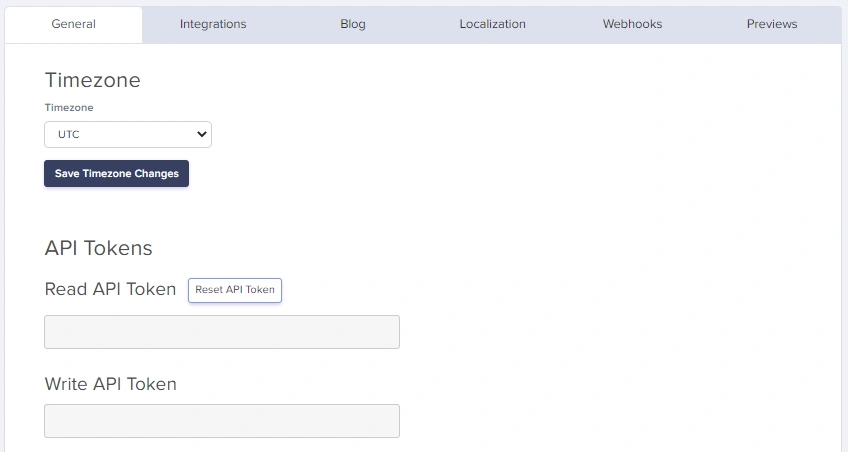
Used for fetching content from the API. This token is safe to use in client-side code and public applications.
{/* IMAGE_SOURCE: file_path="knowledge-base/how-to/managing-your-buttercms-account.md" */}
### Write API token
Used for creating, updating, and deleting content. This token must be kept secure and should never be exposed in client-side code.
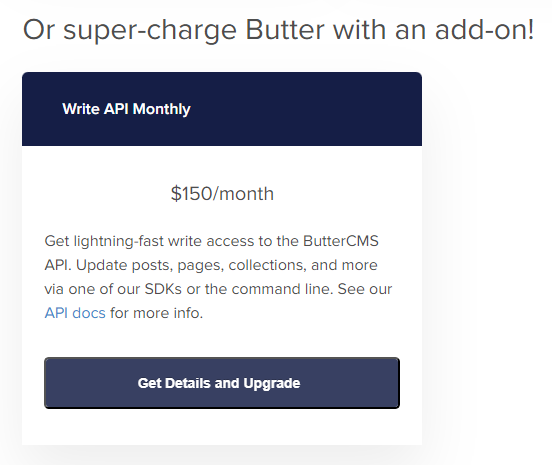
The API token you use for reading from the ButterCMS API will not allow you to create content. For write operations, you need a separate write-enabled token. Navigate to **Settings** > **Billing** to purchase the Write API add-on, or contact [support@buttercms.com](mailto:support@buttercms.com) for assistance.
## Where to find your tokens
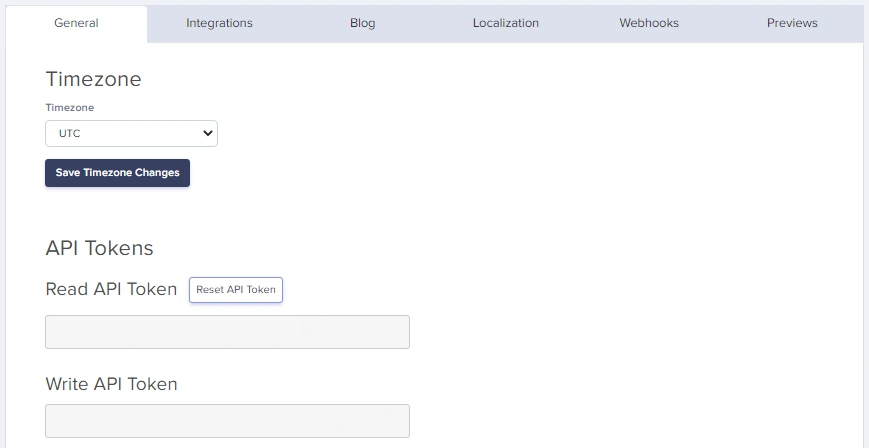
Navigate to the **Settings** page of your ButterCMS dashboard to view your tokens in the **API Tokens** tab.
## Authentication methods
### Method 1: query parameter (read operations only)
Pass your API token via the `auth_token` parameter on every request:
```bash theme={null}
curl "https://api.buttercms.com/v2/posts/?auth_token=your_read_api_token"
```
### Method 2: authorization header (read & write operations)
Set the `Authorization` header to `Token your_api_token`:
```bash theme={null}
curl -H "Authorization: Token your_api_token" \
"https://api.buttercms.com/v2/posts/"
```
The header value must include the `Token` prefix before your actual token.
## Authentication by operation type
| Operation | Query Parameter | Header Authentication |
| --------------------------------- | --------------- | --------------------- |
| **Read** (GET requests) | ✅ Supported | ✅ Supported |
| **Write** (POST/PUT/PATCH/DELETE) | ❌ Not Supported | ✅ Required |
## Code examples
```javascript JavaScript / Node.js theme={null}
// Using query parameter (Read operations)
const response = await fetch(
`https://api.buttercms.com/v2/posts/?auth_token=${process.env.BUTTER_READ_TOKEN}`
);
// Using header (Read or Write operations)
const response = await fetch('https://api.buttercms.com/v2/pages/', {
method: 'POST',
headers: {
'Authorization': `Token ${process.env.BUTTER_WRITE_TOKEN}`,
'Content-Type': 'application/json'
},
body: JSON.stringify(pageData)
});
```
```python Python theme={null}
import requests
import os
# Using query parameter (Read operations)
response = requests.get(
'https://api.buttercms.com/v2/posts/',
params={'auth_token': os.environ['BUTTER_READ_TOKEN']}
)
# Using header (Read or Write operations)
response = requests.post(
'https://api.buttercms.com/v2/pages/',
headers={'Authorization': f"Token {os.environ['BUTTER_WRITE_TOKEN']}"},
json=page_data
)
```
```bash cURL theme={null}
# Read operation with query parameter
curl "https://api.buttercms.com/v2/posts/?auth_token=your_read_token"
# Write operation with header
curl -X POST \
-H "Authorization: Token your_write_token" \
-H "Content-Type: application/json" \
-d '{"title": "My Page", "slug": "my-page"}' \
"https://api.buttercms.com/v2/pages/"
```
```php PHP theme={null}
// Using Guzzle HTTP client
use GuzzleHttp\Client;
$client = new Client();
// Read operation
$response = $client->get('https://api.buttercms.com/v2/posts/', [
'query' => ['auth_token' => $_ENV['BUTTER_READ_TOKEN']]
]);
// Write operation
$response = $client->post('https://api.buttercms.com/v2/pages/', [
'headers' => [
'Authorization' => 'Token ' . $_ENV['BUTTER_WRITE_TOKEN'],
'Content-Type' => 'application/json'
],
'json' => $pageData
]);
```
## Authentication errors
### 401 Unauthorized
Returned when the API token is missing, invalid, or insufficient for the operation.
**Missing token:**
```json theme={null}
{
"detail": "Authentication credentials were not provided"
}
```
**Invalid token:**
```json theme={null}
{
"detail": "Invalid token."
}
```
**Common causes:**
* Missing `auth_token` parameter or `Authorization` header
* Invalid or expired API token
* Using a Read token for Write operations
## Security best practices
Your write-enabled token should never be used anywhere it would be exposed, such as in client-side JavaScript.
### Do's
* ✅ Store tokens in environment variables
* ✅ Use the Read token for public-facing applications
* ✅ Keep Write tokens on secure backend servers only
* ✅ Use HTTPS for all API requests
* ✅ Rotate tokens periodically if you suspect compromise
### Don'ts
* ❌ Never commit tokens to version control (GitHub, GitLab, etc.)
* ❌ Never expose Write tokens in client-side code
* ❌ Never share tokens in public forums or documentation
* ❌ Never log tokens in application logs
## Environment configuration
```bash Node.js (.env file) theme={null}
# .env
BUTTER_READ_TOKEN=your_read_api_token_here
BUTTER_WRITE_TOKEN=your_write_api_token_here
```
```bash Python theme={null}
# .env or shell export
export BUTTER_READ_TOKEN=your_read_api_token_here
export BUTTER_WRITE_TOKEN=your_write_api_token_here
```
```dockerfile Docker theme={null}
ENV BUTTER_READ_TOKEN=your_read_api_token_here
ENV BUTTER_WRITE_TOKEN=your_write_api_token_here
```
## Requesting a write token
Write API is available as a paid add-on. To enable it:
1. Navigate to **Settings** > **Billing** in your ButterCMS dashboard
2. Click on **Get Details and Upgrade** under the add-ons section
3. Select the Write API add-on to purchase
## Next steps
Explore available API endpoints
Understand JSON data structures
Handle authentication errors