> ## Documentation Index
> Fetch the complete documentation index at: https://buttercms.com/docs/llms.txt
> Use this file to discover all available pages before exploring further.
# Import data using the Write API
> Learn how to programmatically import content into ButterCMS using the Write API, from single-item imports to bulk migrations of thousands of pages.
You can import your content from another CMS programmatically via the Write API.
Before importing, configure your Page Types and Collections to match your content structure. (You can create [Pages](../../create-content/creating-editing-content/add-pages-collections-posts/creating-pages) of existing Page Types or
[items for existing Collections](../../create-content/creating-editing-content/add-pages-collections-posts/creating-collections) with the Write API, but you will need to set up the schema first in the dashboard.)
Note that if you're setting up a blog, we have a pre-built Blog Engine that may serve your needs.
## Write API import
For programmatic imports, use the ButterCMS Write API. This allows you to automate content creation without manual data entry.
**Note:** Contact ButterCMS support at [support@buttercms.com](mailto:support@buttercms.com) to enable Write API access on your account.
### Getting your Write API token
1. Navigate to **Settings** in your ButterCMS dashboard
2. Go to the **API Tokens** tab
3. Copy your **Write API Token**
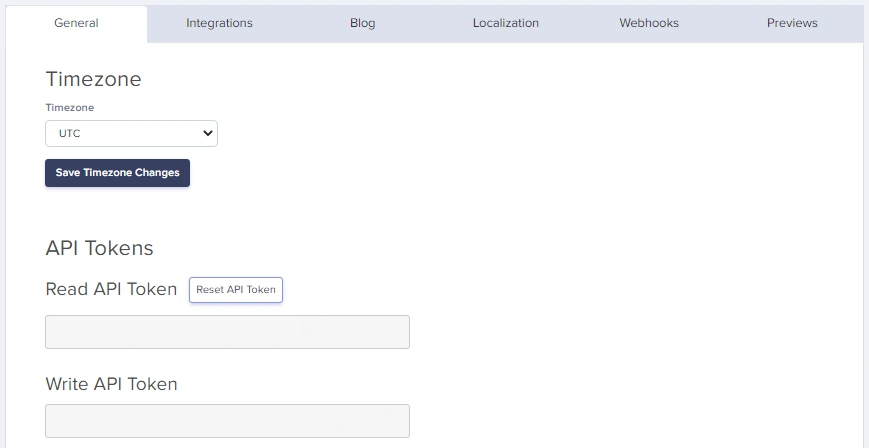
Keep your Write API Token secure. It allows creating and modifying content in your account.
### Creating content via Write API
For full parameter details and code examples, see:
## Supported SDKs
Click on any SDK to see examples of how to write Pages, Collection Items, and Blog Posts.
| Language | Package | Doc |
| ---------- | ------------------------- | ------------------------------------------------------ |
| JavaScript | `buttercms` | [JavaScript SDK](../../frameworks/sdks/javascript-sdk) |
| Python | `buttercms-python` | [Python SDK](../../frameworks/sdks/python-sdk) |
| Ruby | `buttercms-ruby` | [Ruby SDK](../../frameworks/sdks/ruby-sdk) |
| PHP | `buttercms/buttercms-php` | [PHP SDK](../../frameworks/sdks/php-sdk) |
| Java | `buttercms-java` | [Java SDK](../../frameworks/sdks/java-sdk) |
| .NET | `ButterCMS` | [.NET SDK](../../frameworks/sdks/dotnet-sdk) |
| Go | `buttercms-go` | [Go SDK](../../frameworks/sdks/go-sdk) |
| Dart | `buttercms_dart` | [Dart SDK](../../frameworks/sdks/dart-sdk) |
| Swift | `buttercms-swift` | [Swift SDK](../../frameworks/sdks/swift-sdk) |
| Kotlin | `buttercms-kotlin` | [Kotlin SDK](../../frameworks/sdks/kotlin-sdk) |
## Write API tips
### Working with references
To reference Collection items or other Pages, use their slugs or meta IDs:
```javascript theme={null}
// First, create collection items and note their slugs
const categorySlug = 'technology';
const authorSlug = 'john-doe';
// Then reference them in your page
const pageWithReferences = {
"page-type": "blog_page",
status: "published",
title: "Tech Article",
slug: "tech-article",
fields: {
title: "Understanding APIs",
body: "Article content...
",
categories: [categorySlug], // Array of slugs for One-to-Many
author: authorSlug // Single slug for One-to-One
}
};
```
### Working with media
ButterCMS can handle media in several ways:
**Option 1: External URLs**
```javascript theme={null}
fields: {
hero_image: "https://example.com/image.jpg"
}
```
**Option 2: ButterCMS CDN URLs**
```javascript theme={null}
fields: {
hero_image: "https://cdn.buttercms.com/abc123xyz"
}
```
ButterCMS will automatically download images from external URLs and serve them from the ButterCMS CDN.
### Handling localized content
For multilingual content, include locale-specific fields:
```javascript theme={null}
const localizedPage = {
"page-type": "product_page",
status: "published",
title: "Product Name",
slug: "product-name",
fields: {
en: {
title: "Amazing Product",
description: "English description of the product.",
price: "$99.99"
},
de: {
title: "Erstaunliches Produkt",
description: "German description of the product.",
price: "EUR 89.99"
}
}
};
await createPage(localizedPage);
```
### Working with Component Pickers
For pages with Component Pickers, pass an array of component objects:
```javascript theme={null}
const pageWithComponents = {
"page-type": "landing_page",
status: "published",
title: "Dynamic Landing Page",
slug: "dynamic-landing",
fields: {
title: "Welcome",
body: [
{
hero_block: {
headline: "Build Amazing Websites",
subheadline: "With ButterCMS",
background_image: "https://cdn.buttercms.com/hero.jpg"
}
},
{
content_block: {
text: "Your content here...
"
}
},
{
cta_block: {
caption: "Get Started Today",
link: "/signup"
}
}
]
}
};
```
Each object in the array represents a component instance. The key is the component's API name (lowercase, underscores).
## Import from CSV/spreadsheet
For content in spreadsheets, parse and import programmatically:
```javascript theme={null}
const csv = require('csv-parse/sync');
const fs = require('fs');
// Read CSV file
const fileContent = fs.readFileSync('content.csv');
const records = csv.parse(fileContent, {
columns: true,
skip_empty_lines: true
});
// Import each row as a page
for (const record of records) {
const page = {
"page-type": "team_member",
status: "published",
title: record.name,
slug: record.name.toLowerCase().replace(/ /g, '-'),
fields: {
name: record.name,
title: record.job_title,
bio: record.bio,
email: record.email,
photo: record.photo_url
}
};
await createPage(page);
console.log(`Imported: ${record.name}`);
}
```
**CSV format example:**
```csv theme={null}
name,job_title,bio,email,photo_url
John Doe,CEO,"Founder and CEO of the company.",john@example.com,https://example.com/john.jpg
Jane Smith,CTO,"Technical leader with 15 years experience.",jane@example.com,https://example.com/jane.jpg
```
## Bulk upload
Bulk upload is ideal for:
* Migrating hundreds or thousands of pages
* Importing product catalogs from e-commerce systems
* Loading content from databases or external APIs
* Populating Collections with reference data
* Automated content pipelines
### Prerequisites
Before bulk uploading:
1. **Write API access enabled** - Contact [support@buttercms.com](mailto:support@buttercms.com)
2. **Content types created** - Page Types and Collections must exist
3. **Data source prepared** - JSON, CSV, database, or API ready
4. **Field mapping documented** - Know how source fields map to ButterCMS
### Architecture
```mermaid theme={null}
flowchart LR
A["Data Source
(CSV/JSON/DB)"] --> B["Transform Script"]
B --> C["ButterCMS API"]
B --> D["Error Handling
& Logging"]
```
### Complete bulk upload script
Here's a complete Python script for bulk content migration:
```python theme={null}
# bulk_migration.py
import json
import os
import time
from requests import request, exceptions
from dotenv import dotenv_values
# Configuration
config = dotenv_values(".env")
BUTTERCMS_BASE_URL = "https://api.buttercms.com/v2"
BUTTERCMS_WRITE_API_KEY = config.get('BUTTERCMS_WRITE_API_KEY')
# Rate limiting settings
REQUESTS_PER_SECOND = 5
DELAY_BETWEEN_REQUESTS = 1 / REQUESTS_PER_SECOND
class BulkMigrator:
def __init__(self, data_file_path, verbose=True):
self.verbose = verbose
self.success_count = 0
self.error_count = 0
self.errors = []
# Load data from file
with open(data_file_path, 'r') as f:
self.data = json.load(f)
if self.verbose:
print(f"Loaded {len(self.data.get('pages', []))} pages")
print(f"Loaded {len(self.data.get('collections', []))} collections")
def api_request(self, route, data, method="POST"):
"""Make an API request with error handling."""
try:
response = request(
url=f"{BUTTERCMS_BASE_URL}/{route}",
json=data,
method=method,
headers={
"Authorization": f"Token {BUTTERCMS_WRITE_API_KEY}",
"Content-Type": "application/json"
}
)
if response.status_code in [200, 201, 202]:
self.success_count += 1
return response.json()
else:
self.error_count += 1
error_msg = f"Status {response.status_code}: {response.text}"
self.errors.append({
'route': route,
'data': data,
'error': error_msg
})
if self.verbose:
print(f"Error: {error_msg}")
return None
except exceptions.RequestException as e:
self.error_count += 1
self.errors.append({
'route': route,
'data': data,
'error': str(e)
})
return None
def create_pages(self, status="draft"):
"""Bulk create pages."""
pages = self.data.get('pages', [])
for i, page in enumerate(pages):
page['status'] = status
if self.verbose:
print(f"Creating page {i+1}/{len(pages)}: {page.get('title', 'Untitled')}")
result = self.api_request('pages/', page)
if result and self.verbose:
print(f" ✓ Created: {page.get('slug')}")
# Rate limiting
time.sleep(DELAY_BETWEEN_REQUESTS)
return self.success_count
def create_collection_items(self, collection_key, items, status="published"):
"""Bulk create collection items."""
for i, item in enumerate(items):
# Note: 'fields' takes an array even for single items
payload = {
'key': collection_key,
'status': status,
'fields': [item]
}
if self.verbose:
print(f"Creating collection item {i+1}/{len(items)}")
result = self.api_request('content/', payload)
if result and self.verbose:
print(f" ✓ Created collection item")
time.sleep(DELAY_BETWEEN_REQUESTS)
return self.success_count
def get_summary(self):
"""Return migration summary."""
return {
'success': self.success_count,
'errors': self.error_count,
'error_details': self.errors
}
# Usage
if __name__ == "__main__":
migrator = BulkMigrator('content_data.json', verbose=True)
# Create all pages as drafts first
migrator.create_pages(status="draft")
# Get summary
summary = migrator.get_summary()
print(f"\n=== Migration Complete ===")
print(f"Success: {summary['success']}")
print(f"Errors: {summary['errors']}")
# Save errors for review
if summary['errors'] > 0:
with open('migration_errors.json', 'w') as f:
json.dump(summary['error_details'], f, indent=2)
print("Error details saved to migration_errors.json")
```
### JavaScript/Node.js implementation
```javascript theme={null}
// bulk-migration.js
const fs = require('fs');
require('dotenv').config();
const BUTTERCMS_API_URL = 'https://api.buttercms.com/v2';
const BUTTERCMS_WRITE_TOKEN = process.env.BUTTERCMS_WRITE_TOKEN;
class BulkMigrator {
constructor(options = {}) {
this.verbose = options.verbose ?? true;
this.delayMs = options.delayMs ?? 200; // 5 requests per second
this.successCount = 0;
this.errorCount = 0;
this.errors = [];
}
async delay(ms) {
return new Promise(resolve => setTimeout(resolve, ms));
}
log(message) {
if (this.verbose) console.log(message);
}
async apiRequest(endpoint, data, method = 'POST') {
try {
const response = await fetch(`${BUTTERCMS_API_URL}/${endpoint}`, {
method,
headers: {
'Content-Type': 'application/json',
'Authorization': `Token ${BUTTERCMS_WRITE_TOKEN}`
},
body: JSON.stringify(data)
});
if (response.ok) {
this.successCount++;
return await response.json();
} else {
const errorText = await response.text();
this.errorCount++;
this.errors.push({
endpoint,
data,
status: response.status,
error: errorText
});
this.log(`Error: ${response.status} - ${errorText}`);
return null;
}
} catch (error) {
this.errorCount++;
this.errors.push({
endpoint,
data,
error: error.message
});
return null;
}
}
async createPages(pages, status = 'draft') {
this.log(`Starting bulk page creation: ${pages.length} pages`);
for (let i = 0; i < pages.length; i++) {
const page = { ...pages[i], status };
this.log(`[${i + 1}/${pages.length}] Creating: ${page.title}`);
const result = await this.apiRequest('pages/', page);
if (result) {
this.log(` ✓ Created: ${page.slug}`);
}
await this.delay(this.delayMs);
}
return this.successCount;
}
async createCollectionItems(collectionKey, items, status = 'published') {
this.log(`Creating ${items.length} items in collection: ${collectionKey}`);
for (let i = 0; i < items.length; i++) {
const payload = {
key: collectionKey,
status,
fields: [items[i]]
};
this.log(`[${i + 1}/${items.length}] Creating collection item`);
await this.apiRequest('content/', payload);
await this.delay(this.delayMs);
}
return this.successCount;
}
getSummary() {
return {
success: this.successCount,
errors: this.errorCount,
errorDetails: this.errors
};
}
}
// Usage
async function main() {
// Load data
const data = JSON.parse(fs.readFileSync('content_data.json', 'utf8'));
const migrator = new BulkMigrator({ verbose: true });
// Create pages
await migrator.createPages(data.pages, 'draft');
// Create collection items
if (data.collections) {
for (const [key, items] of Object.entries(data.collections)) {
await migrator.createCollectionItems(key, items);
}
}
// Summary
const summary = migrator.getSummary();
console.log('\n=== Migration Complete ===');
console.log(`Success: ${summary.success}`);
console.log(`Errors: ${summary.errors}`);
if (summary.errors > 0) {
fs.writeFileSync('errors.json', JSON.stringify(summary.errorDetails, null, 2));
console.log('Error details saved to errors.json');
}
}
main().catch(console.error);
```
### Data file format
Structure your data file for bulk upload:
```json theme={null}
{
"pages": [
{
"page-type": "blog_post",
"title": "First Article",
"slug": "first-article",
"fields": {
"title": "First Article",
"body": "Content here...
",
"summary": "Article summary",
"publish_date": "2024-01-15T10:00:00Z",
"author": "john-doe",
"categories": ["technology", "tutorials"]
}
}
],
"collections": {
"blog_authors": [
{
"en": {
"name": "John Doe",
"slug": "john-doe",
"bio": "Technical writer"
}
}
]
}
}
```
### Handling large datasets
#### Batch processing
For very large datasets, process in batches:
```javascript theme={null}
async function processBatches(items, batchSize = 50) {
const batches = [];
for (let i = 0; i < items.length; i += batchSize) {
batches.push(items.slice(i, i + batchSize));
}
console.log(`Processing ${batches.length} batches of ${batchSize} items`);
for (let i = 0; i < batches.length; i++) {
console.log(`\nBatch ${i + 1}/${batches.length}`);
await migrator.createPages(batches[i], 'draft');
// Longer pause between batches
if (i < batches.length - 1) {
console.log('Pausing between batches...');
await delay(2000);
}
}
}
```
#### Progress tracking
```javascript theme={null}
class ProgressTracker {
constructor(total) {
this.total = total;
this.current = 0;
this.startTime = Date.now();
}
increment() {
this.current++;
}
getProgress() {
const percent = Math.round((this.current / this.total) * 100);
const elapsed = (Date.now() - this.startTime) / 1000;
const rate = this.current / elapsed;
const remaining = (this.total - this.current) / rate;
return {
current: this.current,
total: this.total,
percent,
elapsed: Math.round(elapsed),
remaining: Math.round(remaining),
rate: rate.toFixed(2)
};
}
log() {
const p = this.getProgress();
console.log(
`Progress: ${p.current}/${p.total} (${p.percent}%) ` +
`| Rate: ${p.rate}/s | ETA: ${p.remaining}s`
);
}
}
// Usage
const tracker = new ProgressTracker(pages.length);
for (const page of pages) {
await createPage(page);
tracker.increment();
tracker.log();
}
```
#### Checkpoint/resume support
For very long migrations, implement checkpoint support:
```javascript theme={null}
const fs = require('fs');
class CheckpointMigrator {
constructor(checkpointFile = 'migration_checkpoint.json') {
this.checkpointFile = checkpointFile;
this.checkpoint = this.loadCheckpoint();
}
loadCheckpoint() {
try {
if (fs.existsSync(this.checkpointFile)) {
return JSON.parse(fs.readFileSync(this.checkpointFile, 'utf8'));
}
} catch (e) {
console.log('No checkpoint found, starting fresh');
}
return { lastIndex: -1, completed: [] };
}
saveCheckpoint() {
fs.writeFileSync(
this.checkpointFile,
JSON.stringify(this.checkpoint, null, 2)
);
}
async migrateWithCheckpoint(pages) {
const startIndex = this.checkpoint.lastIndex + 1;
console.log(`Resuming from index ${startIndex}`);
for (let i = startIndex; i < pages.length; i++) {
const page = pages[i];
try {
await createPage(page);
this.checkpoint.lastIndex = i;
this.checkpoint.completed.push(page.slug);
// Save checkpoint every 10 items
if (i % 10 === 0) {
this.saveCheckpoint();
}
} catch (error) {
console.error(`Failed at index ${i}:`, error);
this.saveCheckpoint();
throw error;
}
}
// Clear checkpoint on completion
fs.unlinkSync(this.checkpointFile);
console.log('Migration complete, checkpoint cleared');
}
}
```
## Request pacing
| Request Volume | Recommended Delay | Requests/Second |
| -------------- | ----------------- | --------------- |
| \< 100 items | 200ms | 5/s |
| 100-500 items | 250ms | 4/s |
| 500-1000 items | 300ms | 3/s |
| 1000+ items | 500ms | 2/s |
These delays help keep bulk migrations stable and reduce the chance of hitting monthly API call limits. Free and Trial plans have a 50,000 API calls per month limit.
### Handling 429 responses
```javascript theme={null}
async function requestWithRetry(fn, maxRetries = 3) {
for (let attempt = 1; attempt <= maxRetries; attempt++) {
try {
const response = await fn();
if (response.status === 429) {
// Monthly API call limit reached (Free/Trial). Respect Retry-After and pause.
const retryAfter = Number(response.headers.get('Retry-After') || 0);
console.log(`API limit reached. Retry after ${retryAfter}s...`);
await delay(retryAfter * 1000);
continue;
}
return response;
} catch (error) {
if (attempt === maxRetries) throw error;
await delay(1000 * attempt);
}
}
}
```
## Validation before upload
Always validate data before uploading:
```javascript theme={null}
function validatePage(page, schema) {
const errors = [];
// Check required fields
if (!page['page-type']) {
errors.push('Missing page-type');
}
if (!page.title) {
errors.push('Missing title');
}
if (!page.slug) {
errors.push('Missing slug');
}
// Recommended slug format (lowercase alphanumeric with hyphens)
// API allows up to 200 characters
if (page.slug && !/^[a-z0-9-]+$/.test(page.slug)) {
errors.push('Slug contains characters outside recommended format (a-z, 0-9, hyphens)');
}
if (page.slug && page.slug.length > 200) {
errors.push('Slug exceeds maximum length of 200 characters');
}
// Check fields against schema
if (schema && page.fields) {
for (const [key, config] of Object.entries(schema)) {
if (config.required && !page.fields[key]) {
errors.push(`Missing required field: ${key}`);
}
}
}
return errors;
}
// Validate all before uploading
const validationErrors = [];
for (const page of pages) {
const errors = validatePage(page, schema);
if (errors.length > 0) {
validationErrors.push({ page: page.title, errors });
}
}
if (validationErrors.length > 0) {
console.error('Validation failed:', validationErrors);
process.exit(1);
}
```
## Error handling
Handle common errors gracefully:
```javascript theme={null}
async function safeCreatePage(pageData) {
try {
const response = await fetch(`${BUTTERCMS_API_URL}/pages/`, {
method: 'POST',
headers: {
'Content-Type': 'application/json',
'Authorization': `Token ${BUTTERCMS_WRITE_TOKEN}`
},
body: JSON.stringify(pageData)
});
if (response.status === 409) {
// Page with this slug already exists
console.log(`Page ${pageData.slug} exists, updating...`);
return updatePage(pageData['page-type'], pageData.slug, pageData);
}
if (!response.ok) {
const error = await response.json();
throw new Error(`API Error: ${JSON.stringify(error)}`);
}
return response.json();
} catch (error) {
console.error(`Failed to create ${pageData.title}:`, error.message);
return null;
}
}
```
### Common error codes
| Status Code | Meaning | Solution |
| ----------- | ------------------------------ | ------------------------------------------------------------------------------------------------ |
| 400 | Bad Request | Check field names and data types |
| 401 | Unauthorized | Verify your Write API token |
| 403 | Forbidden | Write API is not enabled—contact [support@buttercms.com](mailto:support@buttercms.com) to enable |
| 409 | Conflict | Page/item with slug already exists |
| 422 | Validation Error | Check required fields and formats |
| 429 | API Limit Reached (Free/Trial) | Reduce calls and wait for the monthly reset |
This list covers common errors. For complete API error documentation, see [API Reference](../../api).
## Best practices
1. **Test with draft status first** - Create as drafts, review, then publish
2. **Batch your imports** - Import in small batches to identify issues early
3. **Log everything** - Keep detailed logs of what was imported
4. **Validate before import** - Check data quality before sending to API
5. **Monitor monthly limits** - Use pacing and caching to stay within limits
6. **Use idempotent operations** - Check if content exists before creating