> ## Documentation Index
> Fetch the complete documentation index at: https://buttercms.com/docs/llms.txt
> Use this file to discover all available pages before exploring further.
# SEO Components to Pages
> Build reusable ButterCMS SEO Components with meta tags, Open Graph, Twitter cards, and structured data. Next.js and React examples.
# SEO & Social Components
SEO is must-have for any content, so creating a reusable SEO component is one of the first things you should do when setting up your ButterCMS project. This component can be reused across all your Page Types for consistent search optimization.
## Why create SEO Components?
Same SEO fields across all Page Types
Ensure no SEO field is forgotten
Update SEO schema once, apply everywhere
Built-in validation for SEO guidelines
## Building an SEO Component
An SEO component can be quite simple:
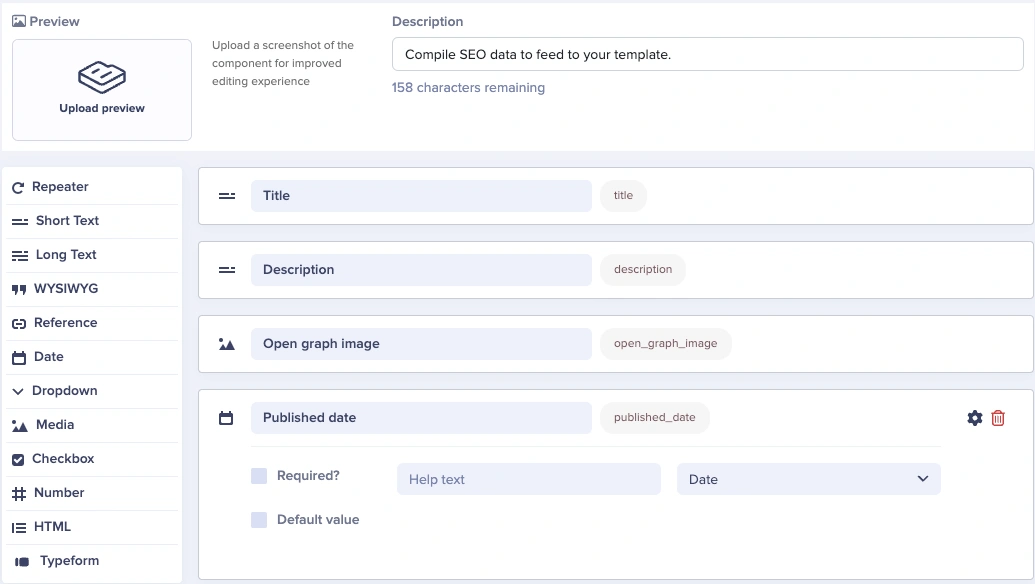
Our fields will be:
* A **Short Text** field for our meta title
* A **Short Text** field for our meta description
* You can set a max of 150-160 characters for SEO best practices by clicking on the Gear (⚙️) icon
* A **Media** field for our open graph image when sharing the blog post via social media and messaging platforms
* A **Date** field to set our original published date for SEO and JSON-LD
## Essential SEO fields
### Core meta tags
| Field Name | Field Type | Validation | Purpose |
| -------------------- | ---------- | ------------------------------ | ------------------------------ |
| **Meta Title** | Short Text | Max 60 chars | Browser tab and search results |
| **Meta Description** | Short Text | Max 160 chars | Search result snippet |
| **Canonical URL** | Short Text | URL pattern | Prevent duplicate content |
| **Robots** | Dropdown | index/noindex, follow/nofollow | Search engine directives |
### Open Graph tags (social sharing)
| Field Name | Field Type | Validation | Purpose |
| ------------------ | ---------- | ------------------------- | --------------------- |
| **OG Title** | Short Text | Max 60 chars | Social share headline |
| **OG Description** | Short Text | Max 200 chars | Social share summary |
| **OG Image** | Media | 1200x630px recommended | Social share image |
| **OG Type** | Dropdown | website, article, product | Content type |
### Twitter card tags
| Field Name | Field Type | Options | Purpose |
| ----------------------- | ---------- | ------------------------------ | ------------------- |
| **Twitter Card Type** | Dropdown | summary, summary\_large\_image | Card display format |
| **Twitter Title** | Short Text | Max 70 chars | Tweet headline |
| **Twitter Description** | Short Text | Max 200 chars | Tweet summary |
| **Twitter Image** | Media | 1200x600px for large | Tweet image |
## Complete SEO Component schema
Here's a comprehensive SEO component that covers all essential metadata:
```
SEO & Social Component
├── Core SEO
│ ├── meta_title (Short Text, max 60, required)
│ ├── meta_description (Short Text, max 160, required)
│ ├── canonical_url (Short Text, optional)
│ ├── robots (Dropdown: index/follow, index/nofollow, noindex/follow, noindex/nofollow)
│ └── published_date (Date)
│
├── Open Graph
│ ├── og_title (Short Text, max 60, defaults to meta_title)
│ ├── og_description (Short Text, max 200, defaults to meta_description)
│ ├── og_image (Media, required)
│ └── og_type (Dropdown: website, article, product, profile)
│
├── Twitter
│ ├── twitter_card (Dropdown: summary, summary_large_image)
│ ├── twitter_title (Short Text, defaults to og_title)
│ ├── twitter_description (Short Text, defaults to og_description)
│ └── twitter_image (Media, defaults to og_image)
│
└── Advanced (Optional)
├── keywords (Short Text, comma-separated)
├── author (Reference → Authors Collection)
└── schema_type (Dropdown: Article, BlogPosting, Product, WebPage)
```
## Rendering SEO tags
Using React Helmet to generate the head HTML tags:
```jsx theme={null}
```
### Next.js example
```jsx theme={null}
// components/seo.js
import Head from 'next/head'
function SEO({ seo }) {
return (
{seo.meta_title}
{/* Open Graph */}
{/* Twitter */}
{/* Canonical */}
{seo.canonical_url && }
)
}
export default SEO
```
## Social sharing preview Component
For pages where social sharing is critical, create a dedicated social preview Component:
```
Social Preview Component
├── facebook_title (Short Text, max 60)
├── facebook_description (Short Text, max 200)
├── facebook_image (Media, 1200x630px)
├── twitter_title (Short Text, max 70)
├── twitter_description (Short Text, max 200)
├── twitter_image (Media, 1200x600px)
├── twitter_handle (Short Text, e.g., @yourbrand)
├── linkedin_title (Short Text)
├── linkedin_description (Short Text, max 256)
└── pinterest_description (Short Text, max 500)
```
This allows content editors to customize messaging per platform while maintaining SEO as a separate concern.
## Image requirements
### Open Graph (Facebook, LinkedIn)
| Specification | Recommendation |
| ---------------- | ------------------------------- |
| **Dimensions** | 1200 x 630 pixels |
| **Aspect Ratio** | 1.91:1 |
| **File Size** | Under 8MB |
| **Format** | PNG, JPEG |
| **Text** | Keep important content centered |
### Twitter cards
| Card Type | Image Dimensions |
| ----------------------- | ----------------------------------------- |
| **Summary** | 144 x 144 pixels (min), 4096 x 4096 (max) |
| **Summary Large Image** | 300 x 157 pixels (min), 4096 x 4096 (max) |
| **Recommended** | 1200 x 600 pixels for best display |
### Pinterest
| Specification | Recommendation |
| ---------------- | ------------------ |
| **Dimensions** | 1000 x 1500 pixels |
| **Aspect Ratio** | 2:3 |
| **Format** | PNG, JPEG |
## Structured data Component
For enhanced search results, create a structured data Component:
```
Structured Data Component
├── schema_type (Dropdown: Article, BlogPosting, Product, FAQPage, etc.)
├── headline (Short Text)
├── author_name (Short Text)
├── author_url (Short Text)
├── date_published (Date)
├── date_modified (Date)
├── publisher_name (Short Text)
├── publisher_logo (Media)
└── main_image (Media)
```
### Rendering JSON-LD
```jsx theme={null}
function StructuredData({ data }) {
const jsonLd = {
"@context": "https://schema.org",
"@type": data.schema_type,
"headline": data.headline,
"author": {
"@type": "Person",
"name": data.author_name,
"url": data.author_url
},
"datePublished": data.date_published,
"dateModified": data.date_modified,
"publisher": {
"@type": "Organization",
"name": data.publisher_name,
"logo": {
"@type": "ImageObject",
"url": data.publisher_logo
}
},
"image": data.main_image
};
return (
);
}
```
## Best practices
Set meta title, meta description, and OG image as required fields to ensure content is never published without essential SEO metadata.
Configure max character limits based on platform guidelines: 60 for titles, 160 for descriptions.
Set default robots to "index, follow" and default OG type to "website" so editors don't need to set them for standard pages.
Include guidance in field help text, like "Keep under 60 characters for best display in search results."
In your frontend, let Twitter fields fall back to OG fields, and OG fields fall back to meta fields when empty.
Use help text to remind editors of recommended image dimensions for each platform.
## SEO Component variations
Consider creating specialized SEO Components for different content types:
### Article SEO Component
Enhanced for blog posts and articles:
* Article-specific schema type
* Author reference
* Reading time
* Article section/category
* Publication and modification dates
### Product SEO Component
Enhanced for e-commerce:
* Product schema type
* Price
* Availability
* Brand
* SKU
* Reviews/ratings
### Event SEO Component
Enhanced for events:
* Event schema type
* Start/end dates
* Location
* Performer/organizer
* Ticket availability
## Testing your SEO setup
After implementing your SEO Components, validate them with these tools:
| Tool | Purpose | URL |
| ----------------------------- | ---------------------- | ----------------------------------- |
| **Facebook Sharing Debugger** | Test Open Graph tags | developers.facebook.com/tools/debug |
| **Twitter Card Validator** | Test Twitter cards | cards-dev.twitter.com/validator |
| **LinkedIn Post Inspector** | Test LinkedIn previews | linkedin.com/post-inspector |
| **Google Rich Results Test** | Test structured data | search.google.com/test/rich-results |
| **Schema.org Validator** | Validate JSON-LD | validator.schema.org |