> ## Documentation Index
> Fetch the complete documentation index at: https://buttercms.com/docs/llms.txt
> Use this file to discover all available pages before exploring further.
# Caching strategies
> Caching strategies for ButterCMS. Browser, object, CDN levels, plus app implementations with node-cache, Redis, Next.js ISR, and SWR.
{/* /SOURCE */}

## What is caching?
Caching means to store resources or data once retrieved as cache. Once stored, the browser or API client can get the data from the cache. This means the server will not have to process or retrieve the data repeatedly, resulting in reduced load on the server.
Caching is a simple concept - store the data and retrieve it from the cache when needed again. However, it requires careful implementation. Caching strategies should be understood and applied carefully.
## Types of caching strategies
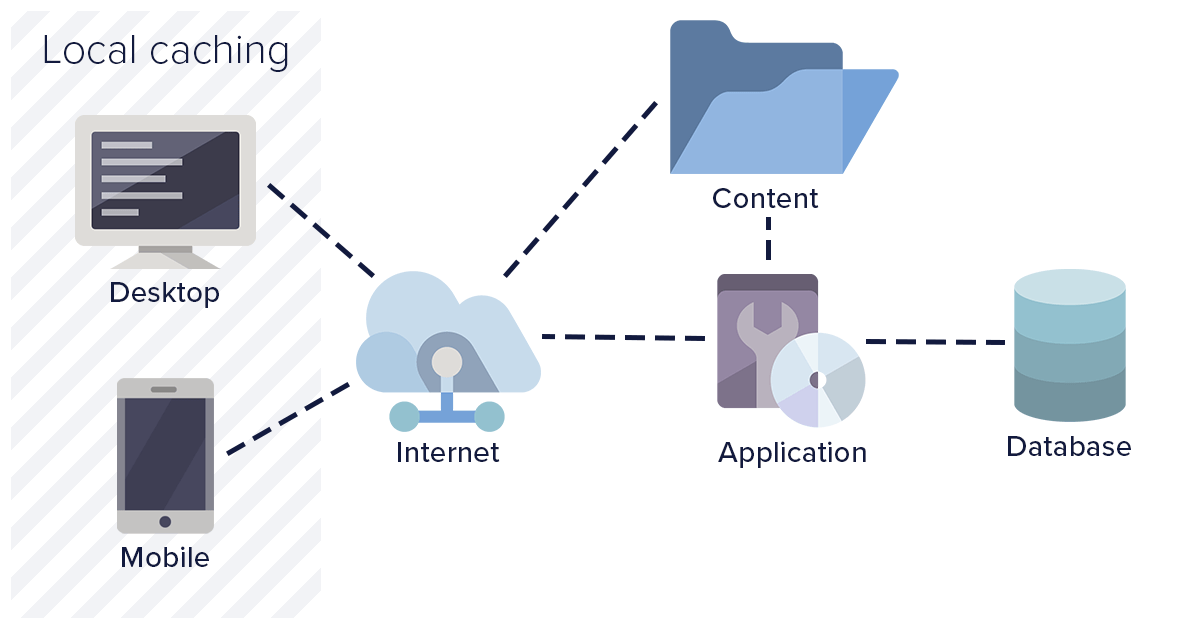
### 1. Browser level / local caching
Browser level caching means storing resources and API responses at the user level. This enables the web application to load considerably faster compared to a fresh load. Browser level caching utilizes the browser's local data store and disk space to save resources.
{/* IMAGE_SOURCE: file_path="blog-posts/gsd/caching-strategies-everything-you-need-to-know.md" */}
**Benefits:**
* Browser level cache consumes space only on a user's system
* Helps in avoiding a full round trip to the server
* Results in quick loading of the web page
* Reduced API calls consequently reduce server traffic
**Drawbacks:**
* If expiry time is configured too long, it could load stale files
* Heavy resources may consume significant client disk space
* Limited control over the cache
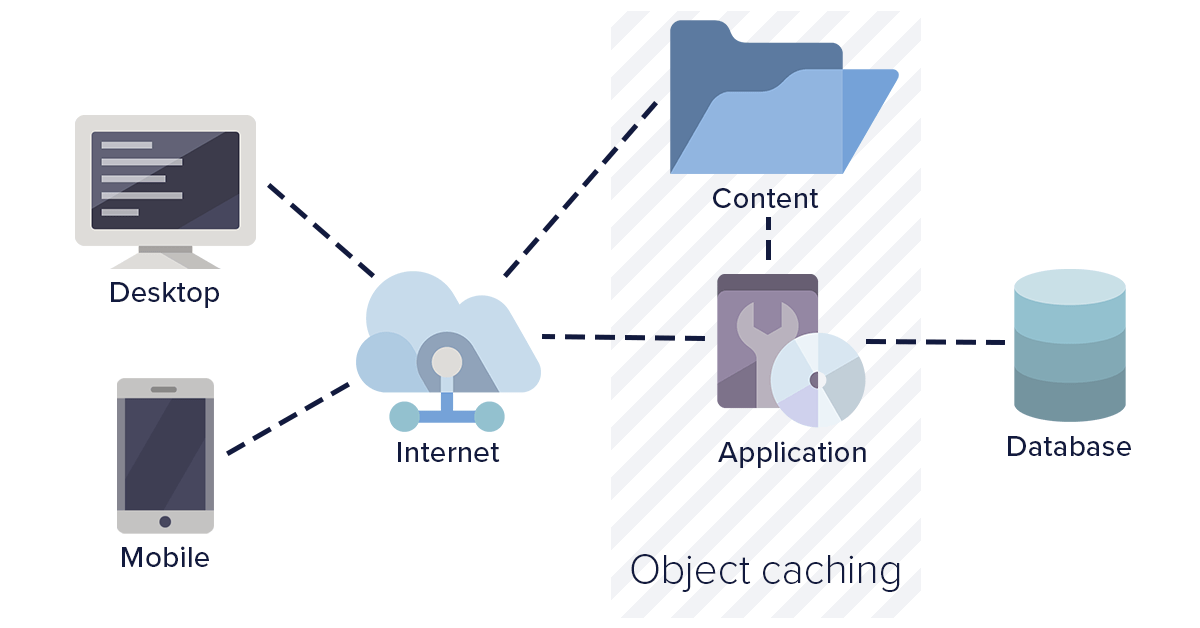
### 2. Object level caching
Object level caching involves caching pre-processed pages at the server level along with the data. This helps in preventing frequent database calls as well as page processing calls. Object level caching is beneficial when the web application expects many new users on a regular basis.
{/* IMAGE_SOURCE: file_path="blog-posts/gsd/caching-strategies-everything-you-need-to-know.md" */}
**Benefits:**
* Common cache for all users ensures consistent content delivery
* Cache expiry is controlled by the server
* Optimizes database calls
**Drawbacks:**
* Occupies server disk space
* Requires shared disk or cache duplication for load-balanced servers
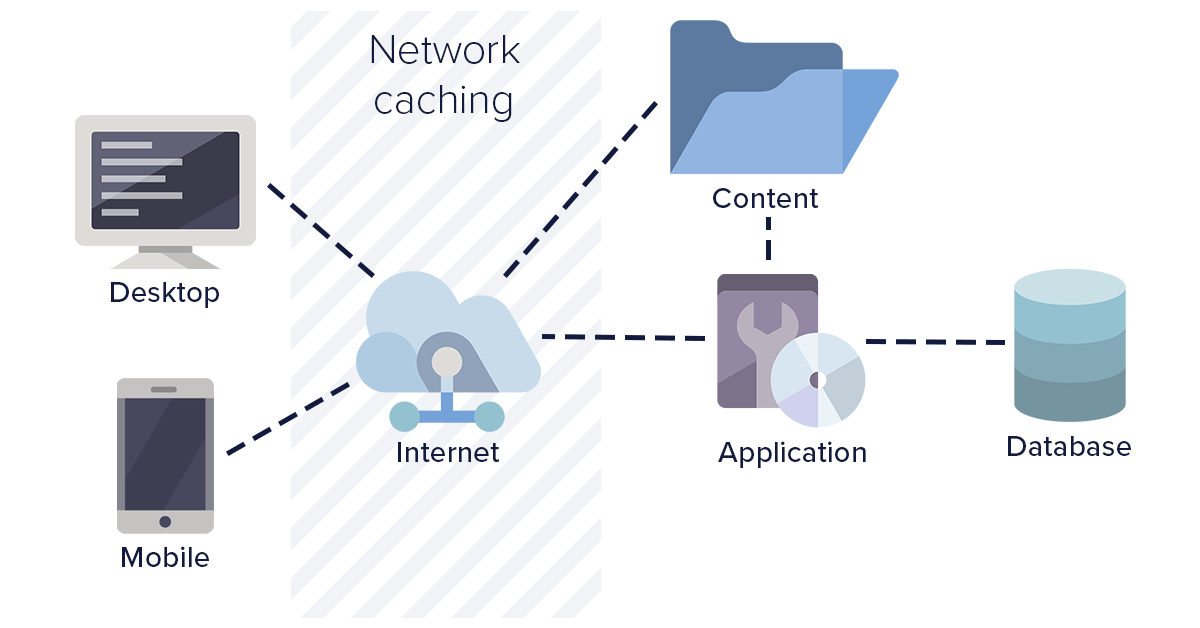
### 3. Network level caching
Network level caching is where your intermediate HTTP web server and routers are configured to cache API calls and resources. This type of caching works strictly based on URL. The network layer can be configured to use or ignore query parameters as needed.
Network layer caching improves overall performance by completely avoiding calls for a response. In regional setups, users hit a network layer closer to their location, improving response time considerably.
{/* IMAGE_SOURCE: file_path="blog-posts/gsd/caching-strategies-everything-you-need-to-know.md" */}
**Benefits:**
* Common cache irrespective of servers
* Reduced hits on application servers
* Faster response times in regional setups
**Drawbacks:**
* Requires durable network layer with sufficient disk space
* Increased traffic and bandwidth at network layers
### 4. Third-party caching (CDN)
This is the best caching method in use today. Third-party caching involves routing resource-intensive calls through third-party cache providers. These providers handle, manage, and clean the cache as needed.
With third-party caching, you can ensure that the same cache is served around the world irrespective of country or region. They also improve website performance by cascading data to locations closer to the user.
**Benefits:**
* Complete cache responsibility handled by the third party
* Full control over cache with global replication
* Reduces hits on web application servers
* Faster performance due to high-speed caching servers
ButterCMS uses this approach - content is delivered through a global CDN with 150+ edge locations, providing sub-100ms response times for cached content worldwide.
## Caching for ButterCMS content
ButterCMS handles CDN-level caching automatically — see [CDN & Global Delivery](./cdn-global-delivery) for how edge caching and cache invalidation work. The strategies below focus on application-level caching you implement in your own stack.
## Implementing application-level caching
While ButterCMS handles CDN caching automatically, implementing application-level caching provides additional benefits:
### Node.js with node-cache
```javascript theme={null}
import NodeCache from 'node-cache';
import Butter from 'buttercms';
const cache = new NodeCache({
stdTTL: 300, // 5 minutes default TTL
checkperiod: 60 // Check for expired keys every 60 seconds
});
const butter = Butter(process.env.BUTTER_API_TOKEN);
async function getPage(slug) {
const cacheKey = `page-${slug}`;
// Check cache first
let page = cache.get(cacheKey);
if (page === undefined) {
// Cache miss - fetch from API
const response = await butter.page.retrieve('*', slug, { levels: 2 });
page = response.data.data;
// Store in cache
cache.set(cacheKey, page);
}
return page;
}
// Invalidate cache when content updates (webhook handler)
function invalidatePageCache(slug) {
cache.del(`page-${slug}`);
}
```
### Next.js with ISR (incremental static regeneration)
```javascript theme={null}
// pages/blog/[slug].js
export async function getStaticProps({ params }) {
const butter = Butter(process.env.BUTTER_API_TOKEN);
try {
const response = await butter.post.retrieve(params.slug);
return {
props: { post: response.data.data },
// Revalidate every 60 seconds
revalidate: 60
};
} catch (error) {
return { notFound: true };
}
}
export async function getStaticPaths() {
const butter = Butter(process.env.BUTTER_API_TOKEN);
const response = await butter.post.list({ page_size: 100 });
const paths = response.data.data.map(post => ({
params: { slug: post.slug }
}));
return {
paths,
fallback: 'blocking' // Generate new pages on-demand
};
}
```
### Redis caching (production scale)
```javascript theme={null}
import Redis from 'ioredis';
import Butter from 'buttercms';
const redis = new Redis(process.env.REDIS_URL);
const butter = Butter(process.env.BUTTER_API_TOKEN);
async function getCachedPage(slug) {
const cacheKey = `buttercms:page:${slug}`;
// Try cache first
const cached = await redis.get(cacheKey);
if (cached) {
return JSON.parse(cached);
}
// Fetch from ButterCMS
const response = await butter.page.retrieve('*', slug, { levels: 2 });
const page = response.data.data;
// Cache for 5 minutes
await redis.setex(cacheKey, 300, JSON.stringify(page));
return page;
}
// Webhook handler for cache invalidation
async function handleWebhook(payload) {
const { slug, page_type } = payload;
// Invalidate specific page
await redis.del(`buttercms:page:${slug}`);
// Optionally invalidate related list caches
await redis.del(`buttercms:list:${page_type}`);
}
```
### SWR (React) for client-side caching
```jsx theme={null}
import useSWR from 'swr';
const fetcher = (url) => fetch(url).then(res => res.json());
function BlogPost({ slug }) {
const { data, error, isLoading } = useSWR(
`/api/posts/${slug}`,
fetcher,
{
revalidateOnFocus: false,
revalidateOnReconnect: false,
dedupingInterval: 60000, // Dedupe requests within 60s
refreshInterval: 0 // Don't auto-refresh
}
);
if (isLoading) return Loading...
;
if (error) return Error loading post
;
return (
{data.title}
);
}
```
## Cache expiry best practices
Cache expiry is the time before which the cache is considered valid. When analyzing different caching strategies, ensure there is an option for configuring custom cache expiry.
### Recommended TTL values
| Content Type | Recommended TTL | Reason |
| ----------------------------- | --------------- | ----------------------------------- |
| Static pages (About, Contact) | 24 hours | Rarely changes |
| Blog post listings | 5-15 minutes | Balances freshness with performance |
| Individual blog posts | 1-24 hours | Content stable once published |
| Navigation/menus | 1-6 hours | Structure changes infrequently |
| Homepage | 5-30 minutes | Often includes dynamic elements |
| Product pages | 15-60 minutes | May have inventory/pricing updates |
### Cache invalidation strategies
Use ButterCMS webhooks to invalidate cache when content changes:
```javascript theme={null}
// Webhook endpoint handler
app.post('/api/webhooks/buttercms', async (req, res) => {
const { webhook_type, data } = req.body;
switch (webhook_type) {
case 'page.published':
case 'page.updated':
await invalidatePageCache(data.slug);
break;
case 'post.published':
case 'post.updated':
await invalidatePostCache(data.slug);
await invalidateListCache('posts');
break;
}
res.status(200).json({ received: true });
});
```
Set appropriate TTL values based on content volatility:
```javascript theme={null}
const TTL_CONFIG = {
page: 3600, // 1 hour
post: 1800, // 30 minutes
collection: 3600, // 1 hour
list: 300 // 5 minutes
};
```
Serve stale content while fetching fresh data in background:
```javascript theme={null}
// SWR configuration
const { data } = useSWR(key, fetcher, {
revalidateOnFocus: true,
refreshInterval: 60000, // Refresh every minute in background
fallbackData: staleData
});
```
## Avoiding common caching mistakes
**Extreme Caching Pitfalls**: Caching every file with high expiration times can result in improper web application performance. Stale JavaScript, CSS, or API data could cause unexpected behavior. Carefully cache resources and refresh the cache when updates are made.
### What to cache vs. not cache
| Should Cache | Should Not Cache |
| --------------------------- | ----------------------- |
| Published page content | Preview/draft content |
| Static assets (images, CSS) | User-specific data |
| Navigation menus | Shopping cart data |
| Blog post listings | Authentication tokens |
| Collection reference data | Real-time notifications |