> ## Documentation Index
> Fetch the complete documentation index at: https://buttercms.com/docs/llms.txt
> Use this file to discover all available pages before exploring further.
# Automating with no-code tools
> Use Pipedream, Zapier, Make, or n8n to trigger automated actions when ButterCMS content is published.
You'll need a configured ButterCMS webhook before connecting to any automation platform. See [Configuring Webhooks in the Dashboard](./configuring-and-receiving-webhooks).
## Tutorial: automated email campaigns with Mailchimp
This tutorial shows how to automatically send email campaigns when you publish new blog posts, using Pipedream as the middleware.
### Prerequisites
* ButterCMS account
* Mailchimp account
* Pipedream account
* Basic knowledge of Node.js
### Step 1: create a Pipedream workflow
1. Create a free Pipedream account at [pipedream.com](https://pipedream.com/)
2. Navigate to Workflows and click **New**
3. Select **HTTP/Webhook** as the trigger
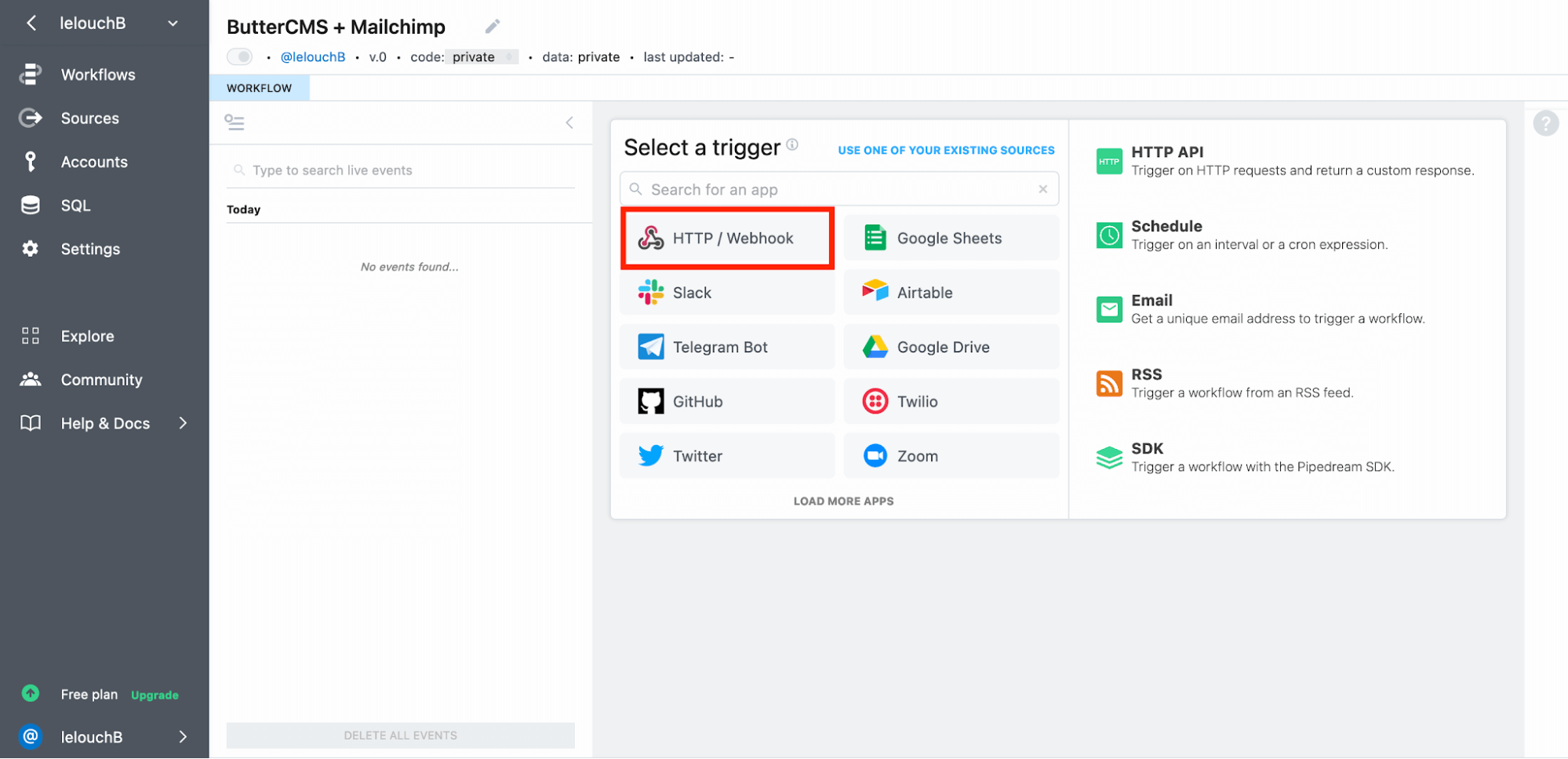
4. Choose **New Requests (Payload Only)**
5. Name your source (e.g., "ButterCMS - Blog Published")
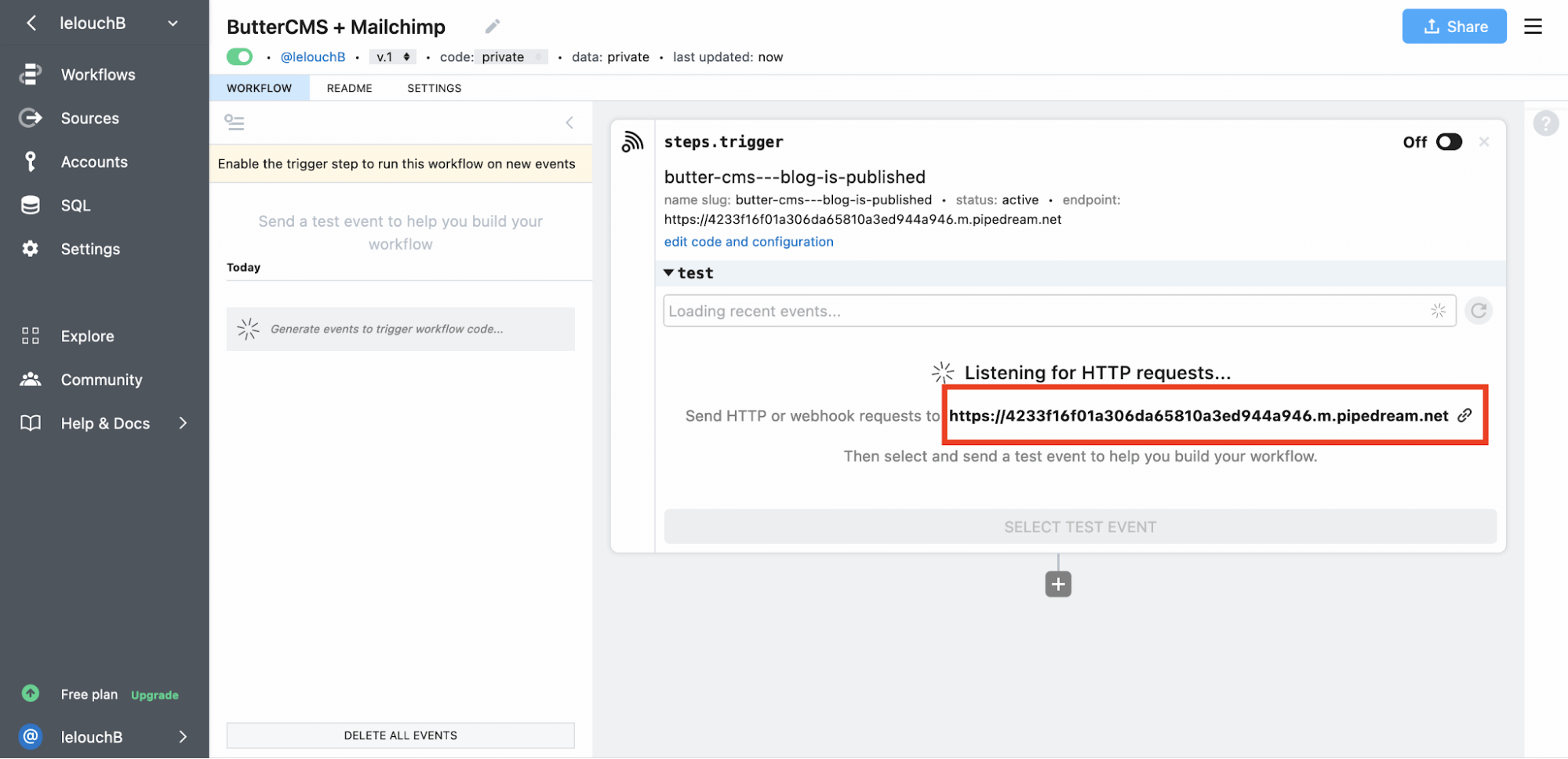
6. Copy the generated webhook URL
### Step 2: configure ButterCMS webhook
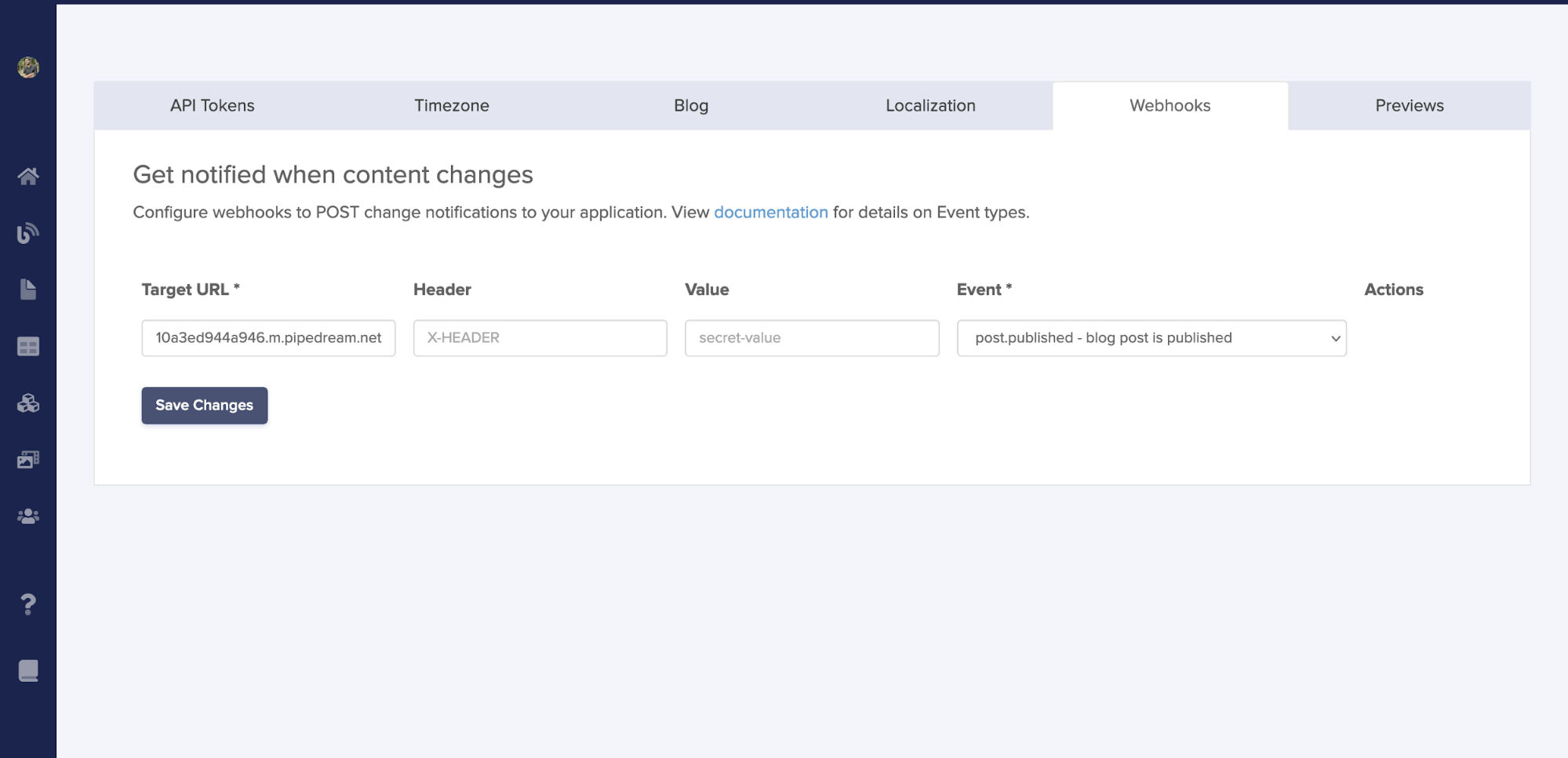
1. Go to **Settings > Webhooks** in ButterCMS
2. Paste your Pipedream URL
3. Select the `post.published` event
4. Save your webhook
Now, whenever you publish a blog post in ButterCMS, Pipedream receives the webhook payload and can trigger downstream actions — such as creating a Mailchimp campaign with the new post content.
### Step 3: fetch post data in Pipedream
Add a Node.js code step to fetch the full blog post:
```javascript theme={null}
const axios = require("axios");
const response = await axios.get(
'https://api.buttercms.com/v2/posts/' +
event.body.data.id +
'/?auth_token=YOUR_API_KEY'
);
const postData = response.data;
return postData;
```
### Step 4: send Mailchimp campaign
Add the Mailchimp integration code:
```javascript theme={null}
const axios = require("axios");
const client = require("@mailchimp/mailchimp_marketing");
client.setConfig({
apiKey: "YOUR_MAILCHIMP_API_KEY",
server: "YOUR_SERVER_PREFIX", // e.g., "us20"
});
// Fetch the blog post data
const response = await axios.get(
'https://api.buttercms.com/v2/posts/' +
event.body.data.id +
'/?auth_token=YOUR_BUTTERCMS_API_KEY'
);
const postData = response.data;
// Replicate your draft campaign template
const replicateCampaign = await client.campaigns.replicate("YOUR_CAMPAIGN_ID");
// Update with new post information
const updateCampaign = await client.campaigns.update(replicateCampaign.id, {
settings: {
subject_line: 'New Blog Published - ' + postData.data.title,
title: 'New Blog Published: ' + postData.data.title
}
});
// Send the campaign
const sendCampaign = await client.campaigns.send(replicateCampaign.id);
return sendCampaign;
```

***
## Other automation platforms
### Zapier
Zapier connects ButterCMS to 5,000+ apps without coding:
1. Create a Zap with **Webhooks by Zapier** as the trigger
2. Configure it to receive the ButterCMS webhook payload
3. Add actions for any Zapier-connected app
**Common Zapier workflows:**
* Post to Slack when content is published
* Add new blog posts to a Google Sheet
* Create Trello cards for content review
* Update social media automatically
### Make (formerly Integromat)
Make offers visual workflow building with advanced logic:
* Conditional routing based on content type
* Data transformation and formatting
* Error handling and retry logic
* Scheduled content aggregation
### n8n (Self-Hosted)
For privacy-focused or complex workflows, n8n provides:
* Self-hosted deployment options
* Advanced data transformation
* Custom code execution
* No vendor lock-in
***
## Common automation scenarios
**Content distribution:**
* Automatically post to social media channels
* Sync content to email marketing platforms
* Push updates to mobile apps
**Translation workflows:**
* Trigger DeepL translations when content is published
* Notify translation teams via Lokalise or Crowdin
* Automate multilingual content publishing
**Development workflows:**
* Trigger static site rebuilds on content changes
* Invalidate CDN caches automatically
* Sync content across environments
***
## Related
Set up webhooks in the ButterCMS dashboard
All available webhook events
Automate cache management
Sync content to search indexes and databases