> ## Documentation Index
> Fetch the complete documentation index at: https://buttercms.com/docs/llms.txt
> Use this file to discover all available pages before exploring further.
# Configuring and Receiving Webhooks
> Set up webhook URLs and event subscriptions in ButterCMS so your system can receive content change notifications.
## Prerequisites
Before configuring webhooks, ensure you have:
* **Admin access** to your ButterCMS account
* **A publicly accessible endpoint** URL to receive webhook requests
* **HTTPS support** on your endpoint (required for production environments)
## Step 1: access webhook settings
Navigate to your webhook settings in ButterCMS:
1. Log into your [ButterCMS dashboard](https://buttercms.com/)
2. Click on **Settings** in the left sidebar
3. Select **Webhooks** from the settings menu
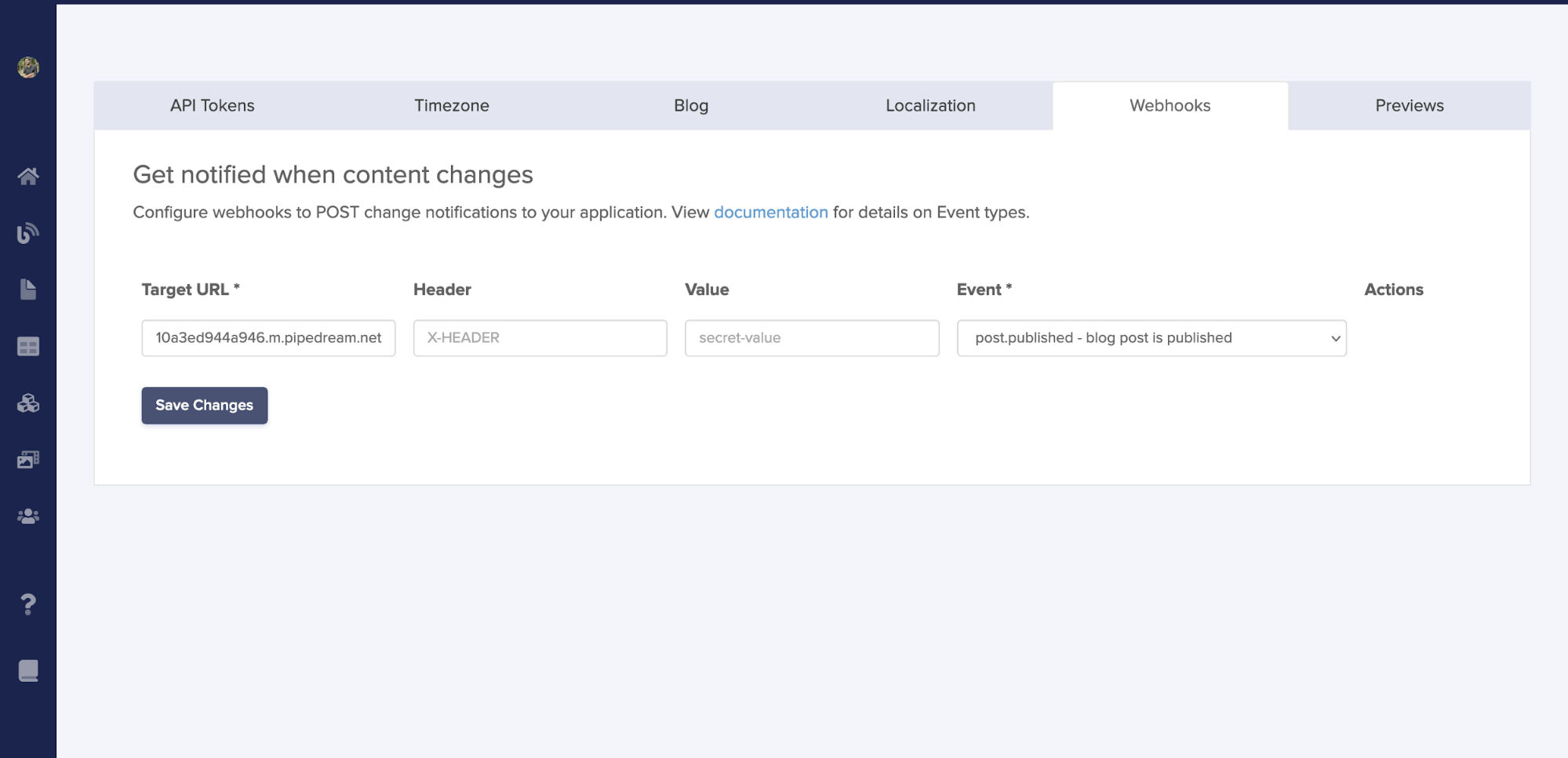
## Step 2: configure your webhook URL
Enter your webhook endpoint URL in the configuration screen. This is where ButterCMS will send HTTP POST requests when content events occur.
### URL requirements
| Requirement | Description |
| ----------------- | --------------------------------------------------------- |
| **Protocol** | HTTPS strongly recommended (HTTP allowed for development) |
| **Accessibility** | Must be publicly accessible from the internet |
| **Response Time** | Must respond within 5 seconds |
| **Response Code** | Return 2xx status code to acknowledge receipt |
### Example URLs
```
Production: https://api.yourapp.com/webhooks/buttercms
Staging: https://staging-api.yourapp.com/webhooks/butter
Development: https://your-ngrok-url.ngrok.io/webhooks
```
For local development, use a tunneling service like [ngrok](https://ngrok.com/) or [Cloudflare Tunnel](https://developers.cloudflare.com/cloudflare-one/connections/connect-apps/) to expose your local endpoint.
## Step 3: select event types
Choose which content events should trigger webhooks. You can select specific events or use the `.all` event to receive all notifications for a content type. See [Event Types Reference](./webhook-event-types) for the complete list.
Using `.all` events will send a webhook for every action on that content type. For high-traffic sites, consider selecting only the specific events you need to avoid overwhelming your endpoint.
## Step 4: save and test
After configuring your webhook:
1. Click **Save Changes** to activate the webhook
2. Test by making a content change in ButterCMS
3. Verify your endpoint received the webhook payload
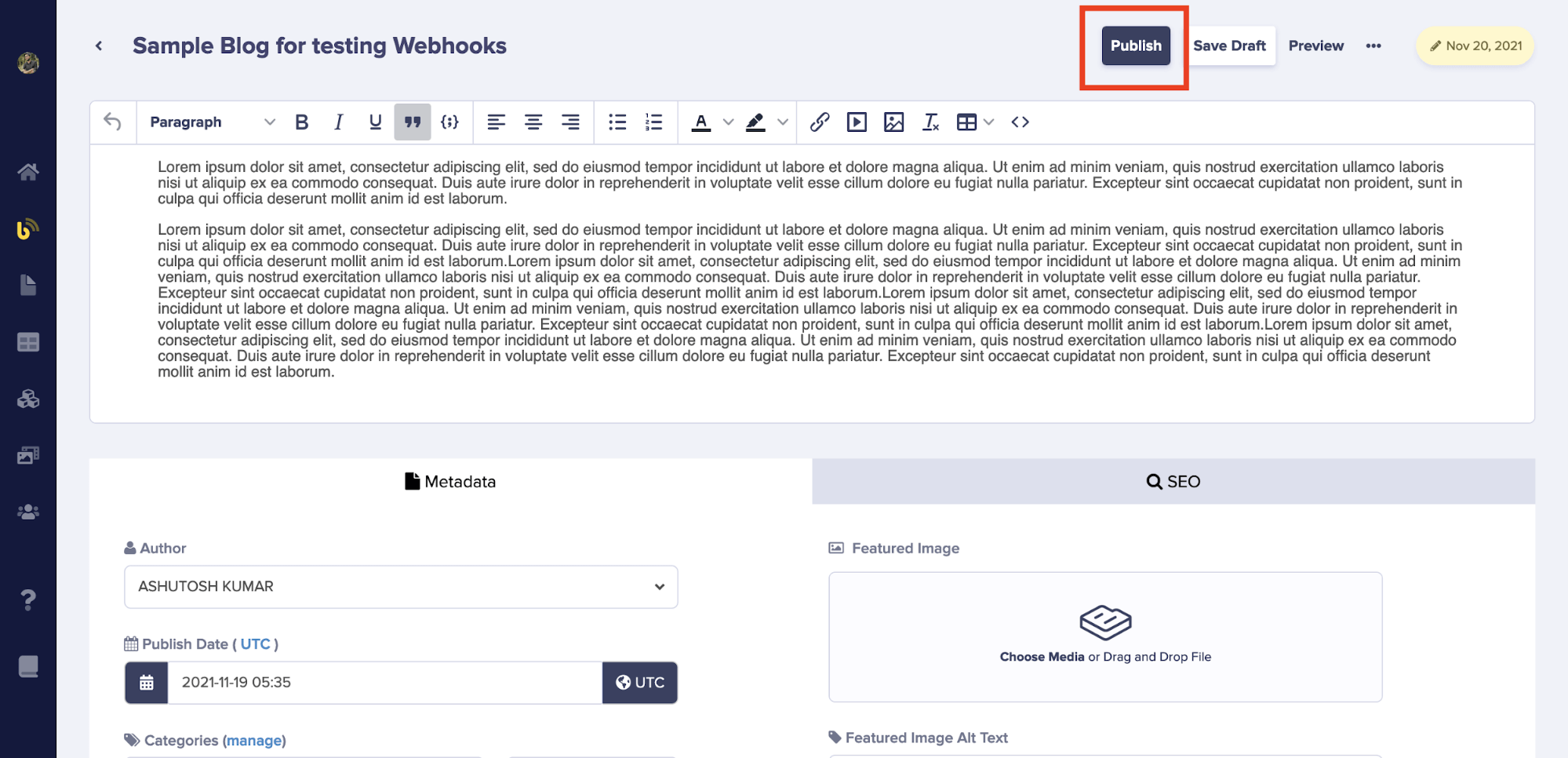
To test this, create a new demo blog post in your ButterCMS account and publish it. Your configured endpoint should receive the webhook request with the event information.
{/* IMAGE_SOURCE: file_path="blog-posts/gsd/automate-content-workflows.md" */}
## Implementing your endpoint
Your webhook endpoint must accept `POST` requests with JSON payloads, respond within 5 seconds, and return a `2xx` status code to acknowledge receipt.
### Node.js / Express
```javascript theme={null}
const express = require('express');
const app = express();
app.use(express.json());
app.post('/webhooks/buttercms', (req, res) => {
const { data, webhook } = req.body;
console.log('Received webhook event:', webhook.event);
console.log('Content data:', data);
// Process the webhook based on event type
switch (webhook.event) {
case 'page.published':
handlePagePublished(data);
break;
case 'post.published':
handlePostPublished(data);
break;
// Add more event handlers as needed
}
// Always return 200 to acknowledge receipt
res.status(200).json({ received: true });
});
app.listen(3000, () => {
console.log('Webhook server listening on port 3000');
});
```
### Python / Flask
```python theme={null}
from flask import Flask, request, jsonify
app = Flask(__name__)
@app.route('/webhooks/buttercms', methods=['POST'])
def handle_webhook():
payload = request.get_json()
event = payload['webhook']['event']
data = payload['data']
print(f"Received webhook event: {event}")
print(f"Content data: {data}")
# Process based on event type
if event == 'page.published':
handle_page_published(data)
elif event == 'post.published':
handle_post_published(data)
# Return 200 to acknowledge receipt
return jsonify({'received': True}), 200
if __name__ == '__main__':
app.run(port=3000)
```
### PHP / Laravel
```php theme={null}
all();
$event = $payload['webhook']['event'];
$data = $payload['data'];
\Log::info('Received webhook event: ' . $event);
// Process based on event type
if ($event === 'page.published') {
$this->handlePagePublished($data);
}
return response()->json(['received' => true], 200);
}
}
```
For security, validate webhook signatures and add idempotency handling. See [Securing Webhooks](./securing-webhooks) and [Retry Logic & Error Handling](./retry-logic-error-handling).
## Multiple webhooks
You can configure multiple webhooks to send events to different endpoints:
* **Separate by environment**: Different endpoints for production vs staging
* **Separate by purpose**: One endpoint for cache invalidation, another for email notifications
* **Separate by content type**: Route page events to one service, blog events to another
### Best practices for multiple webhooks
1. **Keep endpoints focused** - Each endpoint should handle a specific task
2. **Use descriptive names** - Label webhooks clearly for easy management
3. **Monitor independently** - Track success/failure rates for each webhook
4. **Consider failover** - Set up backup endpoints for critical integrations
## Troubleshooting
### Common issues
* Verify the webhook is enabled in settings
* Check that you selected the correct event types
* Ensure the content change matches a selected event (e.g., publishing, not just saving)
* Confirm your endpoint URL is publicly accessible
* Test the URL directly with a tool like curl or Postman
* Check firewall rules aren't blocking ButterCMS IP addresses
* For local development, ensure your tunnel (ngrok) is running
* Verify your endpoint returns a 2xx status code
* Check that your endpoint responds within 5 seconds
* Review server logs for errors in your webhook handler