> ## Documentation Index
> Fetch the complete documentation index at: https://buttercms.com/docs/llms.txt
> Use this file to discover all available pages before exploring further.
# Date field
> Detailed explanation of the Date field in ButterCMS, including input, output, configuration options, use cases, formatting options, and calendar picker
The **Date** field provides you with a calendar selector that enables content editors to easily pick dates and times, which will be returned by the API in ISO 8601 formatted strings.
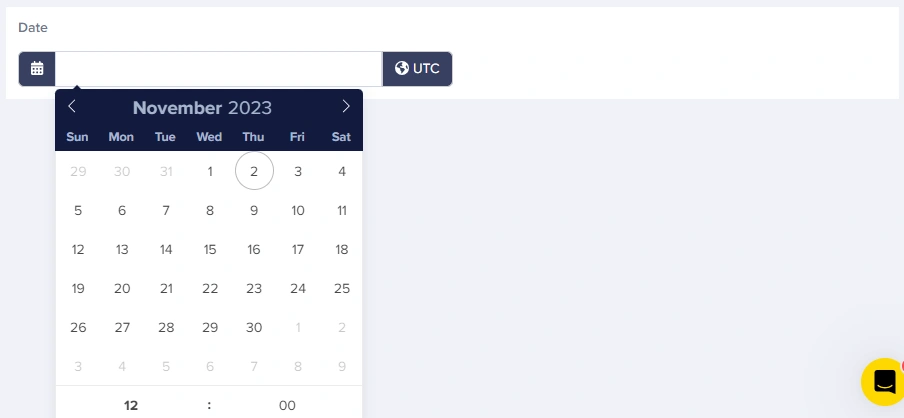
You can update your timezone in settings, but this doesn't add timezone support to datetime fields. Instead, it changes the `updated` and `published` fields on your Content Type objects from the default of UTC to whatever timezone you choose.
## Field at a glance
### Input and output
Calendar picker with optional time input
`string` (ISO 8601, no timezone)
### API response example
#### Date only
If a time isn't selected when the field is saved, the API will return the time as `00:00`.
```json theme={null}
"publish_date": "2024-03-15T00:00:00"
```
#### Date with time
```json theme={null}
"event_start": "2024-03-15T14:30:00"
```
### Field configuration options
| `Option Name` | `Type` | `Function` |
| ------------- | ------- | -------------------------------------------- |
| Required? | boolean | Make field required to save page |
| Help text | string | Add help text to describe usage to your team |
| Default value | string | Set a default value for the field |
## Common use cases
* Article publish dates
* Content expiration dates
* Scheduled release dates
* Review dates
* Event start/end times
* Registration deadlines
* Session schedules
* Webinar times
* Sale start/end dates
* Product launch dates
* Warranty expiration
* Subscription renewal dates
* Historical dates (founding dates, milestones)
* Document effective dates
* Last updated timestamps
## Best practices
1. **Use clear help text**: Specify if editors should think in UTC or local time
2. **Handle timezone display**: Convert to the user's local timezone for display
3. **Validate future/past dates**: Use your application logic to enforce date ranges
4. **Consider date libraries**: Use libraries like date-fns or moment.js for complex formatting
5. **Store event timezones separately**: For events with specific timezones, add a dropdown field for timezone selection
## Working with dates in your application
Dates in ButterCMS Date fields are stored and returned without time zones. You'll need to handle time zone conversion in your application for proper display.
```javascript theme={null}
const butter = require('buttercms')('your-api-key');
const response = await butter.page.retrieve('*', 'event-page');
const event = response.data.data.fields;
// Parse the ISO date string
const eventDate = new Date(event.event_date);
// Format for display
const formattedDate = eventDate.toLocaleDateString('en-US', {
weekday: 'long',
year: 'numeric',
month: 'long',
day: 'numeric'
});
// "Friday, March 15, 2024"
const formattedTime = eventDate.toLocaleTimeString('en-US', {
hour: '2-digit',
minute: '2-digit'
});
// "2:30 PM"
// Using date-fns library
import { format, parseISO } from 'date-fns';
const formatted = format(parseISO(event.event_date), 'MMMM d, yyyy h:mm a');
// "March 15, 2024 2:30 PM"
```
```python theme={null}
from datetime import datetime
from butter_cms import ButterCMS
client = ButterCMS('your-api-key')
response = client.pages.get('*', 'event-page')
event = response['data']['fields']
# Parse the ISO date string
event_date = datetime.fromisoformat(event['event_date'].replace('Z', '+00:00'))
# Format for display
formatted_date = event_date.strftime('%B %d, %Y') # "March 15, 2024"
formatted_time = event_date.strftime('%I:%M %p') # "02:30 PM"
formatted_full = event_date.strftime('%A, %B %d, %Y at %I:%M %p')
# "Friday, March 15, 2024 at 02:30 PM"
```
```ruby theme={null}
require 'buttercms-ruby'
ButterCMS::api_token = 'your-api-key'
response = ButterCMS::Page.get('*', 'event-page')
event = response.data.fields
# Parse the ISO date string
event_date = DateTime.parse(event.event_date)
# Format for display
formatted_date = event_date.strftime('%B %d, %Y') # "March 15, 2024"
formatted_time = event_date.strftime('%l:%M %p') # " 2:30 PM"
```
```php theme={null}
$butter = new ButterCMS\ButterCMS('your-api-key');
$response = $butter->fetchPage('*', 'event-page');
$event = $response->data->fields;
// Parse the ISO date string
$eventDate = new DateTime($event->event_date);
// Format for display
$formattedDate = $eventDate->format('F j, Y'); // "March 15, 2024"
$formattedTime = $eventDate->format('g:i A'); // "2:30 PM"
$formattedFull = $eventDate->format('l, F j, Y \a\t g:i A');
// "Friday, March 15, 2024 at 2:30 PM"
```
## Date display patterns
| Use case | Format example | Code (JavaScript) |
| --------- | ------------------------ | ------------------------------------------------------------------------------------------ |
| Blog post | "March 15, 2024" | `toLocaleDateString('en-US', { year: 'numeric', month: 'long', day: 'numeric' })` |
| Event | "Fri, Mar 15 at 2:30 PM" | `toLocaleDateString('en-US', { weekday: 'short', month: 'short', day: 'numeric' })` + time |
| Calendar | "03/15/2024" | `toLocaleDateString('en-US')` |
| Relative | "in 3 days" | Use date-fns `formatDistanceToNow()` |
| ISO | "2024-03-15" | `toISOString().split('T')[0]` |