> ## Documentation Index
> Fetch the complete documentation index at: https://buttercms.com/docs/llms.txt
> Use this file to discover all available pages before exploring further.
# Long Text field
> Detailed explanation of the Long Text field in ButterCMS, including input, output, configuration options, and use cases
The **Long Text** field can be used to enter multi-line alphanumeric content, such as a meta-description, article summary, or Markdown snippet.
If your content includes multiple paragraphs, they'll appear as `\n` characters in the API Response.
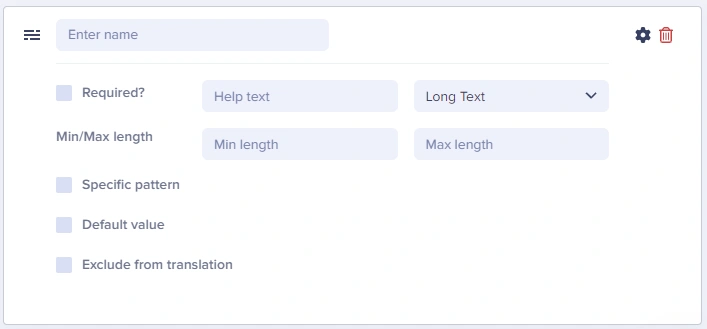
## Long Text at a glance
### Input and output
Multi-line text area
`string` (preserves line breaks with `\n`)
### API response example
```json theme={null}
"article_summary": "A comprehensive guide.\nWe'll cover all aspects of content modeling in ButterCMS.\nWe'll explore Pages, Collections, and Components.",
```
### Field configuration options
Set reasonable limits via min/max length. For example, meta descriptions should use a max length of \~160 characters.
| `Option Name` | `Type` | `Function` |
| ------------------------ | -------- | --------------------------------------------------------------------------------------------------------------------------------------------------- |
| Required? | boolean | Make field required to save page |
| Help text | string | Add help text to describe usage to your team |
| Min length | number | Set a minimum length in characters |
| Max length | number | Set a maximum length in characters |
| Default value | string | Set a default value for the field |
| Exclude from translation | boolean | Exclude the field from translation function |
| Specific pattern | Dropdown | Validates field data against your choice of: - Email
- URL
- US Phone Number
- US Zip Code
- Custom (Regex)
|
## Common use cases
* Meta descriptions for SEO
* Article summaries and excerpts
* Product descriptions
* Author bios
* Plain text instructions
* Markdown content (when you'll parse it on the frontend)
* JSON data (advanced use)
## Using Long Text as a Markdown editor
Many developers use the Long Text field to store Markdown content, which is then parsed and rendered on the frontend. This approach is popular for:
* Technical documentation
* Developer blogs
* Content where authors are comfortable with Markdown syntax
### Example workflow
1. Create a Long Text field named `content_markdown`
2. Authors write content using Markdown syntax
3. Frontend application parses the Markdown using a library (e.g., `marked`, `remark`, or `markdown-it`)
```javascript theme={null}
// Example: Parsing Markdown in JavaScript
import { marked } from 'marked';
const markdownContent = page.fields.content_markdown;
const htmlContent = marked.parse(markdownContent);
```
### API response with Markdown
````json theme={null}
{
"content_markdown": "## Getting Started\n\nFollow these steps:\n\n1. Install the SDK\n2. Configure your API key\n3. Fetch your first page\n\n```javascript\nconst butter = require('buttercms')('your-key');\n```"
}
````
## Best practices
1. **Consider WYSIWYG instead** - If editors need formatting, use the WYSIWYG field
2. **Document Markdown expectations** - If using for Markdown, provide help text explaining the format
3. **Set reasonable limits** - For meta descriptions, use max length of \~160 characters
4. **Use for SEO fields** - Meta descriptions work great with Long Text
## Field validation examples
### Example: meta description (Long Text)
```text theme={null}
Field Name: meta_description
Max Length: 160
Help Text: "Enter a brief description for search results (max 160 characters)"
Required: No
```
### Example: article excerpt (Long Text)
```text theme={null}
Field Name: excerpt
Min Length: 50
Max Length: 300
Help Text: "Summarize the article in 1-2 sentences"
Required: Yes
```