> ## Documentation Index
> Fetch the complete documentation index at: https://buttercms.com/docs/llms.txt
> Use this file to discover all available pages before exploring further.
# Short Text field
> Detailed explanation of the Short Text field in ButterCMS, including input, output, configuration options, and use cases
The **Short Text** field is best used for short, single-line, alpha-numeric content, like a page title or button label.
The Short Text field does not support line breaks, which makes it a poor fit for content like Markdown. Use the Long Text field, WYSIWYG field (with code editor), or the HTML field for that kind of content.
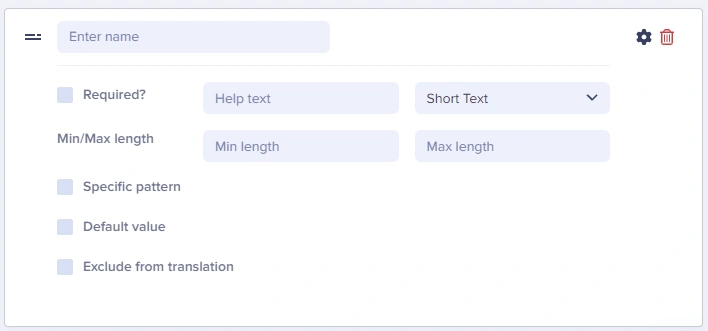
## Field at a glance
### Input and output
Single line text
`string`
### API response example
```json theme={null}
"headline": "Welcome to Our Site"
```
### Field configuration options
Use max length validation to ensure headlines don't exceed what your design can accommodate. A typical recommendation is 60-70 characters for page titles to optimize for SEO.
| `Option Name` | `Type` | `Function` |
| ------------------------ | -------- | --------------------------------------------------------------------------------------------------------------------------------------------------- |
| Required? | boolean | Make field required to save page |
| Help text | string | Add help text to describe usage to your team |
| Min length | number | Set a minimum length in characters |
| Max length | number | Set a maximum length in characters |
| Default value | string | Set a default value for the field |
| Exclude from translation | boolean | Exclude the field from translation function |
| Specific pattern | Dropdown | Validates field data against your choice of: - Email
- URL
- US Phone Number
- US Zip Code
- Custom (Regex)
|
## Common use cases
Some of the common use cases for the Short Text field include:
* Page titles and headlines
* Button labels and CTA text
* Meta titles for SEO
* URL slugs
* Author names
* Product names
* Navigation menu items
* Headlines, titles, button text, URLs
## Best practices
1. **Set appropriate max lengths**: Match your design constraints
2. **Use help text**: Guide editors on expected content (e.g., "Enter a headline under 60 characters")
3. **Make required when needed**: Titles and slugs should typically be required
4. **Use for structured short data**: Phone numbers, social media handles, short URLs