> ## Documentation Index
> Fetch the complete documentation index at: https://buttercms.com/docs/llms.txt
> Use this file to discover all available pages before exploring further.
# Media Library overview
> Store and manage images and files in the ButterCMS Media Library — an easy-to-use interface with multiple ways to organize your media assets.
{/* IMAGE_SOURCE: file_path="knowledge-base/how-to/media-library.md" */}
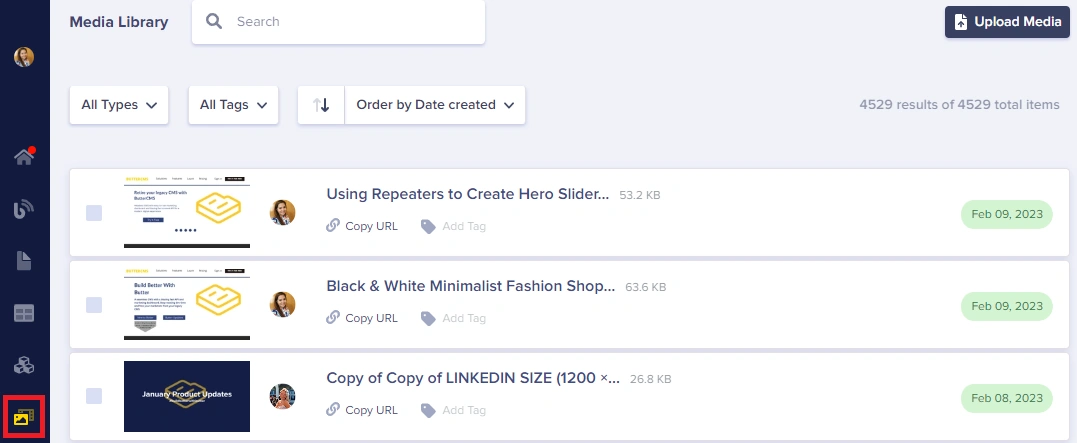
## Navigating the interface
The media library allows you to store your images and files in Butter with an easy-to-use interface with several ways to help organize and manage everything.
{/* IMAGE_SOURCE: file_path="knowledge-base/how-to/media-library.md" */}
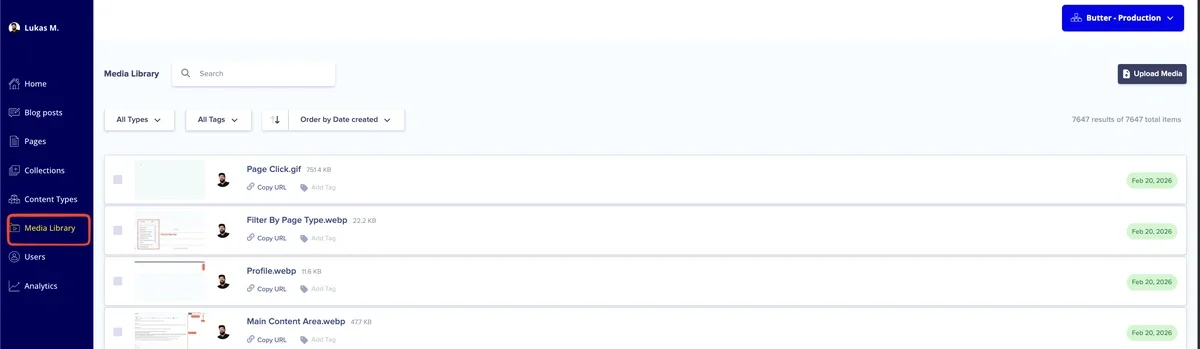
It features a clean, intuitive interface with several key areas:
Located at the top of the interface for adding new files
Find files by name, type, or tags
Organize your view by date, name, editor, or file size
Select multiple files for deletion
## Supported file types
The ButterCMS Media Library accepts all modern file types including MS Word Docs, Excel Files, Presentations, PDFs, Audio Files, Zip Files, and Video Files (available on Enterprise and by add-on for other plans). All files are hosted on our CDN for fast delivery to your users.
| Category | Supported Formats |
| --------------------- | ---------------------------------------------------------------------------------------------- |
| **Images** | JPEG, GIF, PNG, SVG, WebP |
| **Videos** | MP4, AVI, WebM, OGG (video/ogg), QuickTime |
| **Audio** | MP3, MPEG, WAV, OGG, M4A, application/octet-stream |
| **Documents & Other** | PDF and most `application/*`, `text/*`, and `model/*` files (e.g., DOCX, XLSX, PPTX, TXT, ZIP) |
Video file uploads are available on Enterprise and can be enabled for other plans as an add-on. Contact ButterCMS support to check availability for your account.
## In this section
Upload images, videos, and documents to your Media Library
Insert media into blog posts and content fields
Tag and organize your media files
Search, filter, and sort your media files
Delete multiple files at once
Replace a file while keeping the same URL
Edit and transform images in the dashboard
How ButterCMS optimizes your images automatically
Add alt text to images for accessibility and SEO
Connect to external DAM systems like Cloudinary or Bynder