> ## Documentation Index
> Fetch the complete documentation index at: https://buttercms.com/docs/llms.txt
> Use this file to discover all available pages before exploring further.
# Multisite overview
> Understand how ButterCMS organizes multiple sites and environments in the dashboard.
ButterCMS multi-site and multi-environment features are only available on specific plans. If you don't have access to these features, and would like to, please [contact support](../../support/contact-status/contact-support) or upgrade your plan.
Under a traditional CMS structure, you need separate installations, databases, and admin panels for each site. With ButterCMS, you can take advantage of multi-site and multi-environment setup, allowing you to take a centralized approach the reduces costs and simplifies maintenance and scalability.
The below diagram illustrates this concept. As you can see, a single ButterCMS account can manage multiple sites, and each site can have multiple environments to allow for testing, staging, and deploying content. For global sites that have content in many languages, the multi-site and multi-environment features can be combined with our locales feature, which allows you to create localized versions of all of your content.
```mermaid theme={null}
graph TD
A[ButterCMS Account] --> B[Single country site]
A --> C[Global site]
B --> B1[Staging]
B --> B2[Production]
C --> C1[Staging]
C --> C2[Production]
C1 --> C1a[Locale 1]
C1 --> C1b[Locale 2]
C2 --> C2a[Locale 1]
C2 --> C2b[Locale 2]
```
## Key benefits
A single login gives users access to all permitted sites and environments from one account.
Define and maintain a shared content structure across all your sites and environments.
Each site has its own content, schema, API keys, and locales — fully isolated even while managed from a single account.
Environments run as separate instances. Safely test schema before migrating content between environments.
## Site-level settings
Each site in ButterCMS has independent settings:
All of the settings below are set at the environment-level, unless marked with (\*), in which case they affect all environments in a single site.
***Content configuration***
* **Page Types** - Define unique content structures per site
* **Collections** - Create site-specific data tables
* **Components** - Build reusable content blocks for each site
* **Locales** - Configure languages specific to each site's audience
***Access control***
* **Users**(\*) - Assign users to specific sites
* **Roles**(\*) - Set permissions (Admin, Publisher, Author) per site
* **Locale Permissions** - Control language access per user
***API configuration***
* **Read API Token** - For fetching published content
* **Write API Token** - For programmatic content creation (requires account-level enablement)
* **Preview parameter** - Use `preview=1` with the Read API token to access draft content
## Use cases
Organizations with multiple brands often struggle to maintain consistent branding and messaging across different websites. A multi-site CMS helps simplify this process and ensure a cohesive brand experience.
As a global business, you must localize content for different languages and cultures. A multisite CMS not only offers built-in localization but also allows you to easily replicate a website for new regions without starting from scratch.
If you are planning to add new websites, brands, or regions to your digital ecosystem, a multisite CMS helps avoid scalability challenges and the heavy costs associated with managing separate website infrastructures.
Frequent acquisitions, mergers, or partnerships can lead to a complex digital landscape. With a multisite CMS, content management for all sites is centralized, making integration easier.
{/* SOURCE: file_path="blog-posts/butter-updates/manage-multiple-environments-and-client-websites-our-multisite-dashboard.md" section="Great for Agencies Managing Multiple Clients" */}
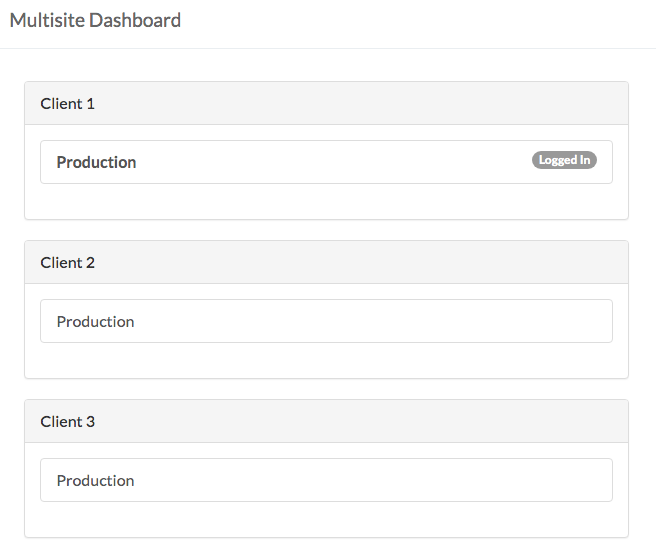
Multisite also works well for agencies that need to manage multiple client websites. As an agency, you can switch between client websites to provide them with the support they need, all from one place.
{/* /SOURCE */}
{/* IMAGE_SOURCE: file_path="blog-posts/butter-updates/manage-multiple-environments-and-client-websites-our-multisite-dashboard.md" */}
## Best practices
### Recommended environment structure
For most teams, we recommend a three-environment setup:
```mermaid theme={null}
graph TD
A[Your ButterCMS Account] --> B[Development]
A --> C[Staging]
A --> D[Production]
B --> B1[For testing new content models]
C --> C1[For previewing content before publish]
D --> D1[For live, published content]
```
See [migrating content](migrating-content) for information on how to keep your content current across environments.
#### Development environment
Use your Development environment for:
* Creating and testing new Page Types
* Experimenting with field configurations
* Testing new Components before rolling out
* Developer experimentation without risk
#### Staging environment
Use your Staging environment for:
* Content preview before publishing
* QA testing of content changes
* Client reviews and approvals
* Testing the full publish workflow
#### Production environment
Production environment best practices:
* Only publish reviewed and approved content
* Limit Admin access to essential team members
* Use the Migrations tool to move tested schemas from Staging
* Never experiment with schema changes in Production
### Implementation best practices
Before implementation, establish a clear strategy that outlines your goals and needs. Articulate what you want to achieve with your multisite CMS—whether it's improved website performance, streamlined content management, enhanced customer experience, or all of the above.
Set up a clear system for user roles and permissions to control access across all your sites. Use the CMS's built-in user roles features to maintain accountability, streamline management, and prevent unauthorized access to sensitive data.
A well-defined content strategy can make multisite management easier. This strategy should align with your business objectives and govern workflows related to content creation, approval, and publication.
* Use similar Page Type structures across sites when possible
* Create a shared component library for brand consistency
* Document naming conventions for your organization
* Review user access quarterly
* Audit content across sites for consistency
* Check for unused or orphaned content