> ## Documentation Index
> Fetch the complete documentation index at: https://buttercms.com/docs/llms.txt
> Use this file to discover all available pages before exploring further.
# SEO in Blog Posts
> Best practices for optimizing ButterCMS Blog Posts for search engine visibility, including built-in SEO features and content optimization tips.
# SEO in Blog Posts
The ButterCMS blog engine is designed from the ground up for creating SEO-friendly blog posts. This guide covers the built-in SEO features and best practices for maximizing your blog's search visibility.
## Built-in SEO features
The blog engine is designed for creating SEO-friendly blog posts. Key SEO variables such as page title, meta description, URL slug, and image ALT tags are built into the default post template which can be optimized to improve search engine rankings.
{/* SOURCE: file_path="api-documentation/openapi/info/tags/blogs-key-concepts.yaml" section="SEO Integration" */}
Blog Posts include built-in SEO optimization features such as automatic XML sitemap generation, RSS feed creation, and structured data markup that enhance search engine discoverability without additional configuration.
## Blog Post SEO fields
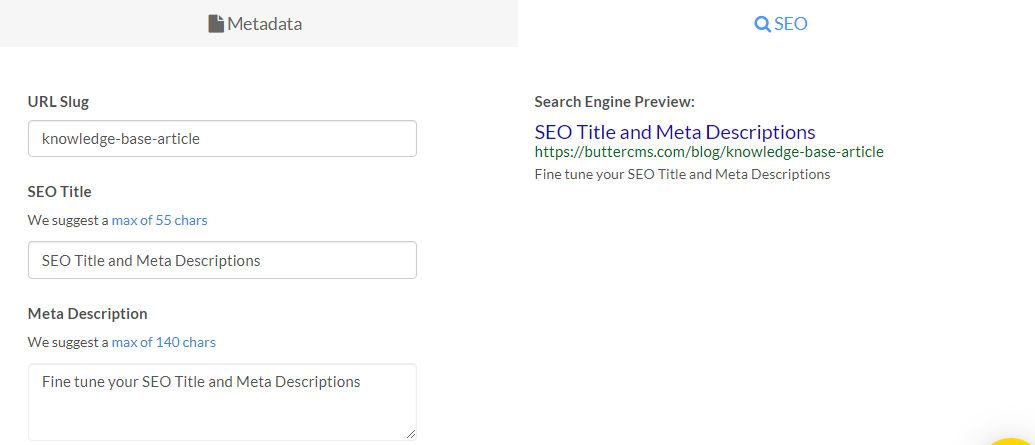
Great SEO is a major focus and benefit of ButterCMS. To customize the SEO Title and Meta Descriptions for your blog posts, click on the **SEO** tab at the bottom of your blog engine.
{/* IMAGE_SOURCE: file_path="knowledge-base/how-to/how-to-create-modify-and-delete-blog-posts.md" */}
### Available SEO fields
| Field | Description | API Key |
| ------------------ | ------------------------------------- | -------------------- |
| SEO Title | Title optimized for search results | `seo_title` |
| Meta Description | Description shown in search snippets | `meta_description` |
| URL Slug | SEO-friendly URL identifier | `slug` |
| Featured Image | Image for social sharing and previews | `featured_image` |
| Featured Image Alt | Accessibility and SEO alt text | `featured_image_alt` |
## Auto-generated SEO fields
If you save a draft of the blog post before providing any content for the URL Slug, SEO Title, Meta Description, or Summary fields, they will automatically populate for you:
* The **URL Slug** and **SEO Title** are automatically generated to match the post's **Title**
* The **Meta Description** and **Summary** fields will contain the first 140 characters from the body of the post
These can all be manually changed to optimize for your target keywords.
## Search engine preview
Alongside these SEO fields, ButterCMS provides a real-time preview of what your blog post will look like in search engine results.
ButterCMS includes character limits on both the SEO title and meta description to ensure they show up in full in Google search results, following SEO best practices.
## URL slug optimization
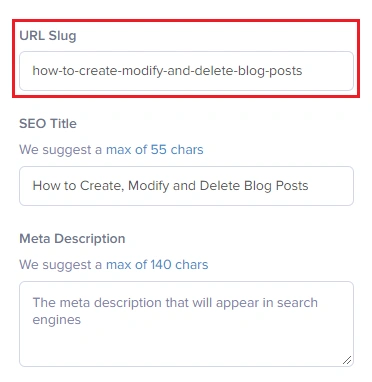
The initial default slug will be a slugified version of your post title. To update or change the slug of your post, click on the **SEO** tab at the bottom of your blog engine.
{/* IMAGE_SOURCE: file_path="knowledge-base/how-to/how-to-create-modify-and-delete-blog-posts.md" */}
### URL slug best practices
| Do | Don't |
| ----------------------------- | ---------------------------- |
| Use hyphens to separate words | Use underscores or spaces |
| Keep it short and descriptive | Include dates or numbers |
| Include primary keywords | Use stop words (a, the, and) |
| Use lowercase letters only | Change URLs after publishing |
**Examples:**
* Good: `seo-best-practices-guide`
* Bad: `2024_01_15_seo_best_practices_guide_for_beginners`
## Categories and tags for SEO
You can choose the Categories and Tags for multi-level filtering of each post. To create a new category or tag for blog posts, just type it inside their corresponding boxes.
{/* IMAGE_SOURCE: file_path="knowledge-base/how-to/how-to-create-modify-and-delete-blog-posts.md" */}
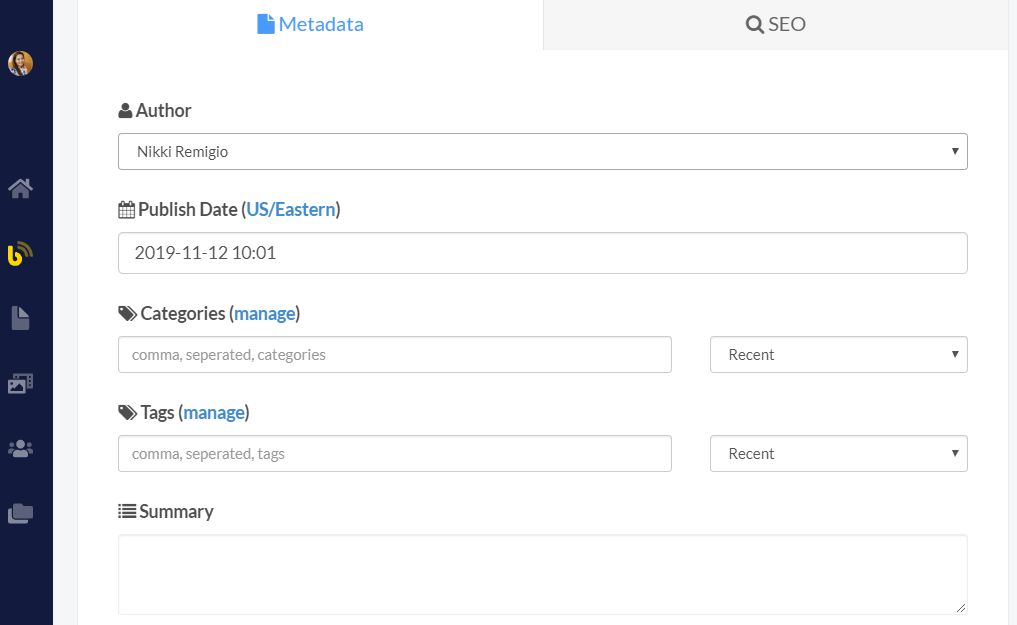
Use categories for broad content themes and permanent organizational structure, while using tags for specific topics, campaigns, or temporal content connections that may evolve over time.
## Featured images
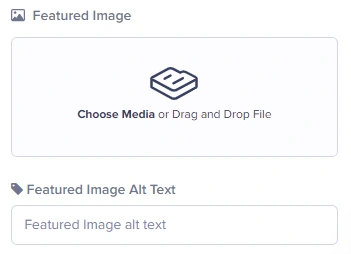
To add a Featured Image, just click on **Insert Media** and upload a new image or choose one from your Media Library. You can also drag & drop an image.
{/* IMAGE_SOURCE: file_path="knowledge-base/how-to/how-to-create-modify-and-delete-blog-posts.md" */}
### Featured image SEO tips
See [image requirements](./seo-and-buttercms#image-requirements) for platform-specific size recommendations (Facebook, Twitter, LinkedIn, Pinterest).
Always add descriptive alt text that includes relevant keywords. This improves accessibility and helps search engines understand your images.
Before uploading, rename image files with descriptive names like `seo-best-practices-guide.jpg` instead of `IMG_12345.jpg`.
Use WebP for best compression, JPEG for photos, or PNG for graphics with transparency. ButterCMS CDN automatically optimizes images.
## Open Graph and social meta tags
ButterCMS blog posts map directly to Open Graph fields for social sharing. For the full tag reference, image size requirements, and Twitter Card types, see [SEO and ButterCMS](./seo-and-buttercms#open-graph--social-meta-tags).
Your blog post fields map to OG tags as follows:
| Blog Post Field | Open Graph Tag |
| -------------------------------- | -------------------------------------- |
| `post.seo_title` or `post.title` | `og:title` |
| `post.meta_description` | `og:description` |
| `post.featured_image` | `og:image` |
| `post.slug` | `og:url` (combined with your base URL) |
## Authors for E-E-A-T
Blog Posts include comprehensive metadata and built-in features that provide professional blogging capabilities:
* **Author Profiles**: Dedicated author entities with names, biographies, profile images, and social links
* **Author Management**: Centralized author management for multi-author blogs
### Why authors matter for SEO
Google's E-E-A-T guidelines (Experience, Expertise, Authoritativeness, Trustworthiness) emphasize the importance of author credentials:
| E-E-A-T Factor | How to Address |
| --------------------- | ---------------------------------------------------------- |
| **Experience** | Include author's real-world experience in their bio |
| **Expertise** | Highlight credentials, certifications, and specializations |
| **Authoritativeness** | Link to author's professional profiles and publications |
| **Trustworthiness** | Use real names and photos, not anonymous bylines |
## Implementing Blog Post SEO in templates
For framework-specific code (React/Next.js, Angular, Vue/Nuxt.js, Jekyll), see [Rendering SEO Data](../../build-your-app/seo/rendering-seo-data). The examples there use the same `post.seo_title`, `post.meta_description`, and `post.featured_image` fields available in blog posts.
### Article schema markup
For Article schema implementation, see [Structured Data & Schema Markup](../../build-your-app/seo/structured-data-schema#blog-post-article-schema).
## Blog Post SEO checklist
* Research target keywords
* Check search intent for your topic
* Analyze competing content
* Plan content structure with headings
* Include primary keyword in title and first paragraph
* Use H2s and H3s with related keywords
* Write naturally—avoid keyword stuffing
* Include internal links to related posts
* Add external links to authoritative sources
* Write compelling SEO title (50-60 characters)
* Create unique meta description (150-160 characters)
* Optimize URL slug (short, descriptive)
* Add featured image with alt text
* Select relevant categories and tags
* Review in search engine preview
* Share on social media
* Submit URL to Google Search Console
* Build internal links from other content
* Monitor performance in analytics
* Update content periodically
## Built-in feeds for SEO
ButterCMS Blog Posts include:
* **RSS Feeds**: Automatic RSS 2.0 and Atom feed generation for content syndication
* **XML Sitemaps**: Search engine sitemap integration for improved discoverability
* **Previous/Next Navigation**: Automatic post navigation for chronological content browsing
* **Related Posts**: Built-in content relationship suggestions based on categories and tags
See [sitemap generation](../../build-your-app/seo/sitemap-generation) for a deep dive into this topic.