> ## Documentation Index
> Fetch the complete documentation index at: https://buttercms.com/docs/llms.txt
> Use this file to discover all available pages before exploring further.
# Managing your subscription
> Learn how to upgrade, downgrade, or cancel your ButterCMS subscription, and manage your billing preferences.
## Accessing subscription settings
To access information about your current plan, the credit card linked to your account, and your Invoice Receipts, click on **Billing** in your account settings.
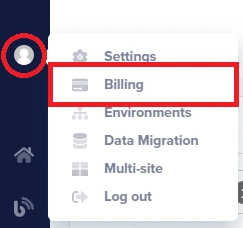
**To access your subscription settings:**
1. Log in to your ButterCMS dashboard
2. Click on **Settings** in the main navigation
3. Select **Billing** from the settings menu
4. You'll see your current plan, usage, and subscription options
## Upgrading your plan
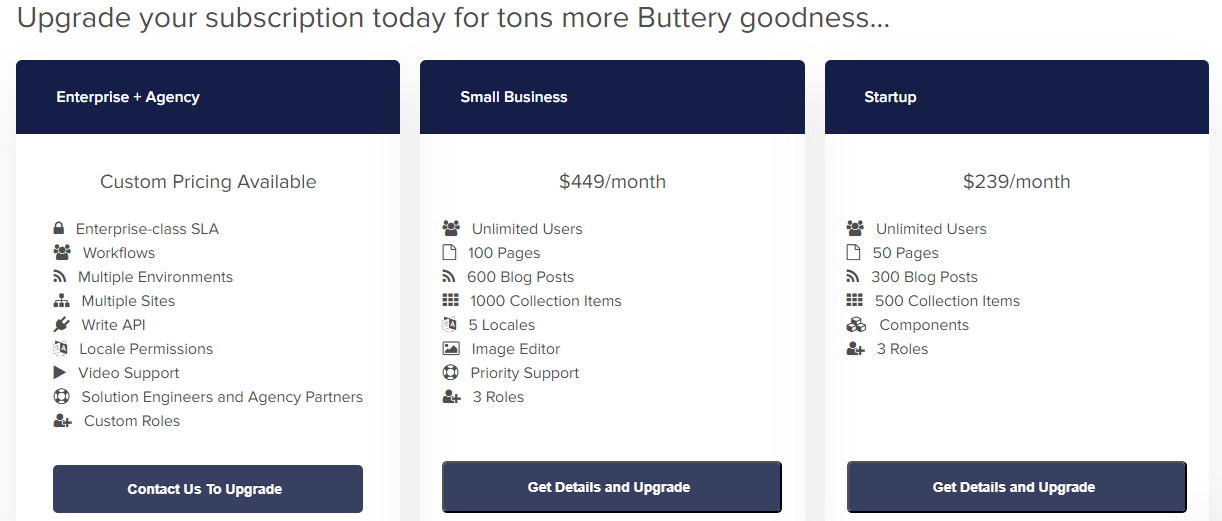
You can upgrade your subscription anytime by clicking on the **Get Details and Upgrade** button for the plan you wish to switch to.
{/* SOURCE: file_path="blog-posts/gsd/buttercms-vs-hygraph.md" section="ButterCMS pricing" */}
ButterCMS has a unique pricing feature that allows you to instantly upgrade or downgrade your subscription at any time. There are no contracts, no minimums, and no hidden fees. You can also change your account type from monthly to annual or vice versa without penalty.
### How to upgrade
1. Navigate to **Settings > Billing**
2. Review your current plan and usage
3. Click **Get Details and Upgrade** on the plan you want
4. Review the new plan features and pricing
5. Confirm your upgrade
**Upgrade takes effect immediately.** Your new features and limits are available right away. You'll be charged the prorated difference for the remainder of your billing cycle.
### When to upgrade
Consider upgrading when you:
* Are approaching your plan's content limits (pages, blog posts, collection items)
* Need additional features like Workflows or Write API (available by request)
* Require more locales for international expansion
* Need priority support for your growing team
* Are experiencing API call or bandwidth overages regularly
## Downgrading your plan
To downgrade your plan or switch between monthly and annual billing, [contact support](../contact-status/contact-support).
## Adding the Write API add-on
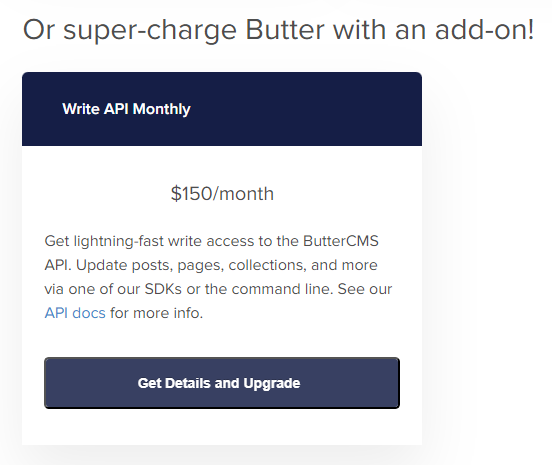
You can also enable the Write API feature on your account by clicking on the **Get Details and Upgrade** button under the add-ons section.
### What is the Write API?
The Write API allows you to programmatically create and update content in ButterCMS. It's useful for:
* Automated content imports and migrations
* Integration with external systems (e-commerce, CRM)
* Building custom admin interfaces
* Content synchronization workflows
The Write API add-on is only available to certain plan levels. [Contact support](../contact-status/contact-support) if you don't see it available.
## Canceling your subscription
If you need to cancel your paid subscription, [contact support](../contact-status/contact-support), and we can downgrade you to the free developer plan.
If your content exceeds Free plan limits after cancellation, you won't be able to add new content but existing content remains accessible.
## Updating payment methods
### Changing your credit card
1. Navigate to **Settings > Billing**
2. Find the payment method section
3. Click to update your card details
4. Enter your new card information
5. Save changes
For Enterprise plans, additional payment options including invoicing may be available. Contact sales for details.
## Frequently asked questions
No, your content is preserved when you downgrade. However, if your content exceeds the new plan's limits, you won't be able to add new content until you reduce it or upgrade again.
Yes, you can upgrade at any time. You'll be charged the prorated difference for the remainder of your current billing cycle, and your new features are available immediately.
Your content remains in ButterCMS and your account reverts to the Free plan. You can still access and view your content, though some features may be limited.
ButterCMS generally does not offer prorated refunds for unused time. Contact [support@buttercms.com](mailto:support@buttercms.com) if you have specific circumstances to discuss.
Please email [support@buttercms.com](mailto:support@buttercms.com) or use live chat to process account ownership transfers. This requires verification and is handled by the ButterCMS support team.
## Getting Help
ButterCMS extends technical support to all customers through live chat and email channels. Enterprise and agency clients can receive additional support via user training and a dedicated success manager.
Email [support@buttercms.com](mailto:support@buttercms.com) for billing questions
Use the chat widget on buttercms.com for immediate help