Quick references
Overview: ButterCMS content types
Check out our core concepts article on Pages, Collections, and the Blog Engine to understand the differences
between these content types and when to use each one.
Collections deep dive
Take a deep dive into the Collections content type, including features, supported fields, and more.
Create a Collection
Before you can add items to a Collection, you need to create it.You must have adequate permissions to create a new Collection.
1
Create the Collection
There are two ways to create a new Collection.You can either click Content Types in the left sidebar, then New Content Type, then Collection, or you can click on the Collections icon in the left sidebar, then New item, then Create new collection.
2
Add fields
Click on a field type in the menu pane that appears to add it to your Collection schema. Give the field a name, slug, and add any necessary configuration options.
3
Click the Create Collection button
Click the Create Collection button in the upper-right corner to save the fields to the Collection schema.
4
Save Collection metadata
Fill in the Collection name. Then, click Save as a Collection. You’ll immediately be given the opportunity to add your first item to the Collection.
Adding items to a Collection
To add items to an existing collection, either:- Roll over the Collections button in the left sidebar, and click the grey plus sign next to the Collection you want to add an item to; or
- Click on Collections in the left sidebar, then click New Item and select the Collection you want to add an item to.
Editing existing items
- Navigate to the Collection.
- Click on the item you want to edit.
- Make your changes.
- Click Save or Publish.
Changes to Collection items may affect all Pages or Collection items that reference them. For example, updating a testimonial’s quote updates it everywhere the testimonial is displayed.
Deleting Collection items
- Navigate to the Collection.
- Find the item you want to delete.
- Click the delete icon or select the item and use bulk delete.
- Confirm the deletion.
Collection label
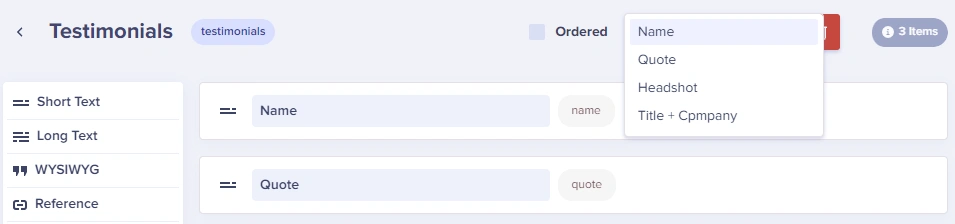
The Collection Label determines which field is displayed in the list view. Your developer can configure this when setting up the Collection. Common choices include:- Name: For categories, authors, and team members
- Title: For FAQ questions and testimonials
- Date: For events and time-sensitive content