
The revision history interface
With revision history, you can track all changes made to the content. You can easily review past versions, identify who made specific changes, and revert to previous iterations if needed.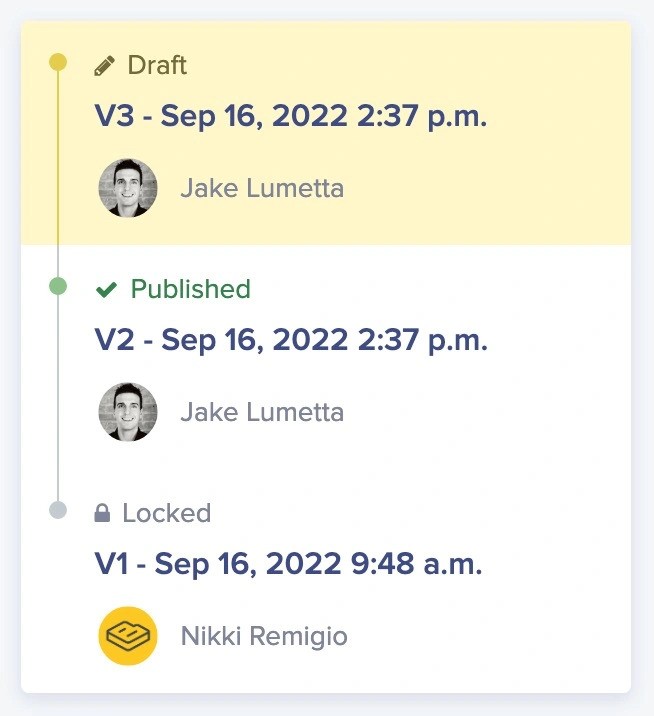 The revision history timeline provides a chronological view of all content changes, displayed in an easy-to-navigate interface that shows:
- Version timeline: A visual representation of all saved versions
- Author information: Who made each change
- Timestamps: When each version was created
- Status indicators: Draft, Published, Scheduled, or Locked states
Key features of revision history
Automatic tracking
Every save creates a new version entry automatically—no manual action required
Author attribution
See exactly who made each change and when
Safe rollback
Revert to any previous version with confidence
Preview before restore
View any historical version before deciding to restore it
How revision history works
ButterCMS enables seamless collaboration with “team presence” and “revision history” features that track changes and prevent conflicts. This combination ensures your team can work efficiently while maintaining a complete record of content evolution.Component versioning limitations
Changes to a Global Component can affect all versions of a Page in its history—not just the current one. Understand the implications before restoring or modifying versioned Component content.
What gets tracked
- Field values: All changes to text, numbers, dates, and other field content
- Media references: Which images and files are attached
- Component configuration: Changes to Component instances and their settings
- Reference relationships: Updates to linked Pages and Collection items
- Metadata: SEO fields, slugs, and other page properties
What isn’t tracked
- Schema changes: Adding or removing fields from content types (see Retention policies for details)
- Real-time edits: Only saved versions are tracked, not keystroke-by-keystroke changes
Content types supporting version history
Blog Posts follow a simplified publication workflow. Once published, edits are applied directly to the published version rather than creating a new draft.