How AI enhances SEO
AI can be a powerful ally in your SEO strategy when used wisely:- Trend analysis - AI tools can analyze trends and user behavior to suggest topics that resonate with your target audience
- Keyword research - AI can identify high-performing keywords, analyze competitors, and find content gaps
- Content improvement - AI-powered tools like Grammarly or Surfer SEO can improve readability, structure, and keyword usage
- Personalization - AI can help create tailored recommendations or dynamic content based on user preferences and behaviors
Using the AI assistant for SEO
The AI shortcuts in the WYSIWYG editor cover the on-page part of SEO. An admin turns them on under Settings > Integrations (see Customizing the shortcuts). The predefined list includes an Optimize content for SEO shortcut, and you can add your own prompts for specific tasks: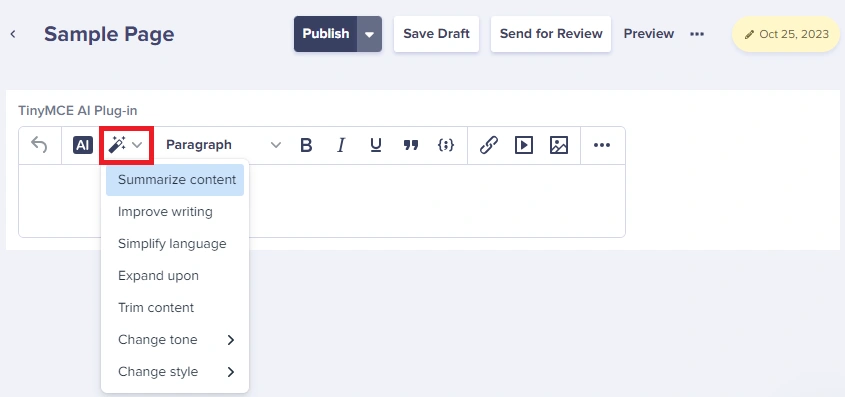
The assistant exists only in WYSIWYG fields and its output lands in that field. The SEO title and meta description fields themselves have no AI. Generate a title or description from the body text, then copy it into the SEO fields of the blog post or page.
SEO-focused AI prompts
Add these as shortcuts under Settings > Integrations > AI Assistant:ButterCMS SEO fields
ButterCMS has several built-in tools to optimize SEO, including:- SEO metadata management - Dedicated SEO title and meta description fields on blog posts, and whatever SEO fields you add to your page types
- Automatic image compression - Optimized images for faster page loads
- Localization support - Multi-language SEO through integrated translation tools like DeepL
Recommended SEO Component schema
Create an SEO Component in ButterCMS with these fields: This component can be added to any Page Type to ensure consistent SEO across your site.AI-assisted content optimization workflow
Step 1: Keyword research
Use AI tools to identify high-intent keywords and long-tail phrases:- High-intent keywords - Keywords indicating strong purchase intent or desire for detailed information (e.g., “buy,” “best,” “how to”)
- Long-tail keywords - Capture niche audiences by targeting specific, low-competition phrases
Step 2: Content creation with user intent
Your content should always address the intent behind a user’s search query:- Informational queries - Create how-to guides, FAQs, or explainer articles
- Transactional queries - Offer product comparisons, reviews, or landing pages
Step 3: AI-powered content enhancement
Select a section in the WYSIWYG editor and use a shortcut or the AI Assistant dialog to:- Review it - Ask what weakens the section and what is missing
- Generate optimized versions - Rewrite it around your target keyword
- Check readability - Run Simplify language or ask for a reading-level rewrite
- Add semantic variations - Ask for related terms and synonyms to work in
Step 4: Technical SEO elements
Ensure AI-optimized content includes:- Descriptive URLs - Use slug fields with keywords
- Proper heading hierarchy - H1 > H2 > H3 structure
- Internal linking - Connect related content
- Alt text for images - Describe images with relevant keywords
Step 5: Monitor and iterate
Track performance using analytics tools and refine your AI prompts based on results:- Monitor rankings for target keywords
- Analyze click-through rates from search results
- Track engagement metrics (time on page, bounce rate)
- A/B test different AI-generated meta descriptions
Balancing quality and optimization
A successful SEO strategy strikes the right balance between content quality and optimization:Tips for high-quality SEO content
Offer unique insights
Provide perspectives, data, or analysis that set your content apart from competitors
Address pain points
Understand your audience’s challenges and address them directly in your content
Use storytelling
Make content more memorable with narrative techniques and real examples
Improve readability
Break up text with headings, bullet points, and short paragraphs
SEO best practices
- Incorporate primary and secondary keywords naturally and avoid keyword stuffing
- Write compelling title tags and meta descriptions that encourage clicks
- Add descriptive alt text to images
- Use internal linking to connect related content
- Monitor performance using Google Search Console
AI tools for SEO
Recommended AI-powered SEO tools
These are external tools that complement ButterCMS. They work alongside your content workflow rather than integrating directly.
Multilingual SEO with AI translation
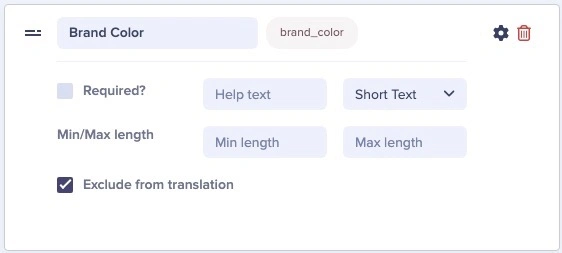
For international SEO, ButterCMS integrates with DeepL for AI-powered translation while allowing you to exclude specific fields from auto-translation: Benefits of Controlled AI Translation for SEO:- Precision and control - Keep brand names, technical terms, and SEO-critical content in their original form
- Customized localization - Hand-pick fields that should be translated
- Compliance - Meet industry-specific regulations during translation
- Enhanced user experience - Ensure international visitors receive properly localized experiences