
When to use custom forms

Choose custom forms if you want to:
  • Control the validations
  • Apply custom frontend styling
  • Choose where form submission data is sent
  • Perform A/B testing on the positioning of form fields
  • Avoid vendor contracts and subscriptions

Custom forms vs form builders

Advantages of custom forms

BenefitDescription
Full ControlControl the design, functionality, and validation logic. Custom forms are tailored to fit your brand and specific needs.
Advanced ValidationCustom forms allow for complex validation rules and error handling, giving you more flexibility than third-party tools.
Data OwnershipYou decide where the data is stored, ensuring compliance with your internal policies and privacy regulations like GDPR.
No Vendor Lock-InYou aren’t tied to third-party vendors or contracts, and you have full control over the form’s availability and performance.
ScalabilityYou can easily scale and modify your forms as your business grows, without being limited by external platforms.
Custom IntegrationsYou can connect forms directly to your systems, CRMs, or APIs without paying for extra integrations.

Considerations

ConsiderationDescription
Development TimeCustom forms require developer resources, which can slow down the process of building and updating forms.
MaintenanceYou’re responsible for maintaining, updating, and securing the forms.
AnalyticsYou need to implement your own tracking for submissions and user behavior.
SecurityYou’ll need to handle security features like CAPTCHA and ensure compliance with regulations.

Building custom forms with Collections

You can use ButterCMS Collections to build custom forms. Using the Reference field in a Component, a user can position the form to render on a webpage with the rest of the Components and content they’re using.

Step 1: Create a form Collection

Create a Collection to define the overall form structure: Form collection schema Recommended fields for the Form Collection:
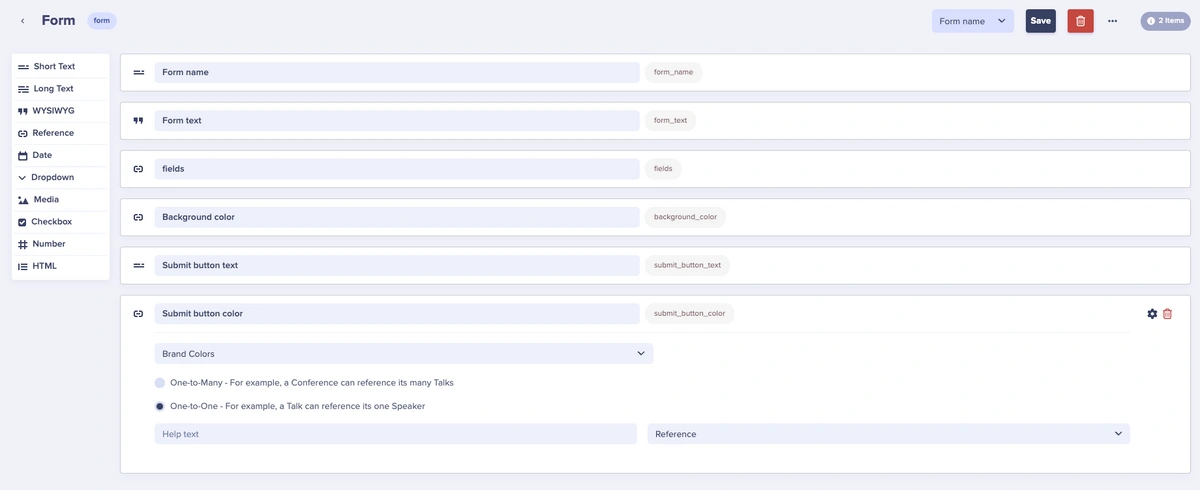
Field NameField TypePurpose
form_nameShort TextInternal identifier
form_titleShort TextDisplay title
submit_button_textShort TextButton label (e.g., “Submit”, “Send”)
success_messageLong TextMessage shown after successful submission
submission_endpointShort TextAPI endpoint for form submissions
fieldsReferenceLinks to Form Field Collection

Step 2: Create a form field Collection

Create a Form Field Collection to define individual form fields: Form Field collection schema
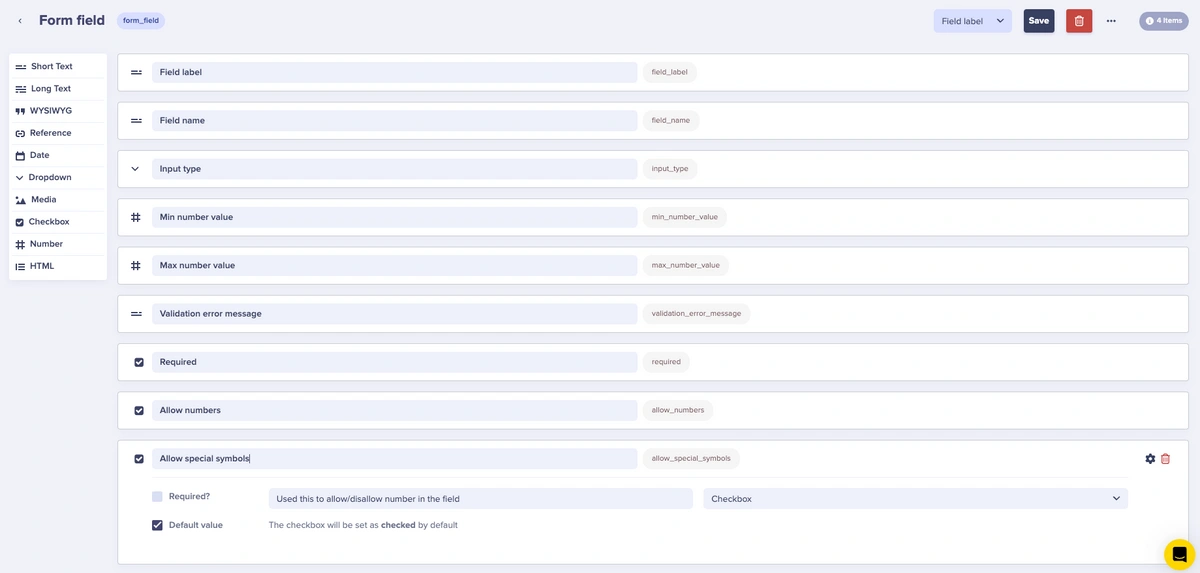
Schema Field NameSchema Field TypeWhat it is used for
field_labelShort TextThe label for the input field
field_nameShort TextUsed in code accessibility and handling input data
input_typeDropdownChanges the input type (email, password, text, etc.)
requiredCheckboxMakes the field required for form submission
validation_error_messageShort TextCustomizes the error message
allow_numbersCheckboxAllows or disallows numbers
allow_special_symbolsCheckboxAllows or disallows special characters
placeholderShort TextPlaceholder text for the input
optionsRepeaterFor dropdowns/select fields, list of options