
SEO in Collections
Collections in ButterCMS are powerful tools for managing structured data like categories, tags, FAQs, team members, and product catalogs. While Collections themselves are typically used as reference data, they can significantly impact your site’s SEO when used strategically.Understanding Collections and SEO
Content management systems use taxonomy to structure content within hierarchies. Some examples include categories, tags, authors, and collections. You need to consider a few factors concerning the taxonomy of posts, pages, and other content you publish using a CMS. Failing to structure your taxonomy can result in duplicate content and/or thin content, both of which are discouraged by search engines.Collections as filterable properties
In order to create article pages, you must first categorize your pages using the collection feature. This allows you to use collections as filterable properties for your pages. For example, you can create a product catalog where each product has an associated set of tags used to group products and allows for filtering products by a tag.
First, create the
For example, you can create a product catalog where each product has an associated set of tags used to group products and allows for filtering products by a tag.
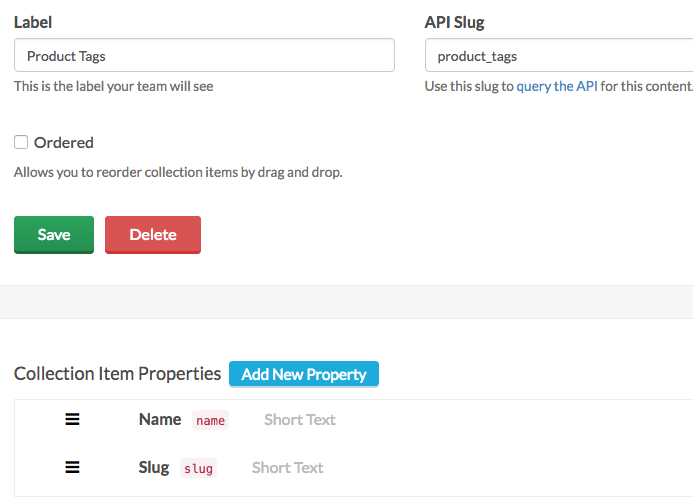
First, create the Product Tags collection:
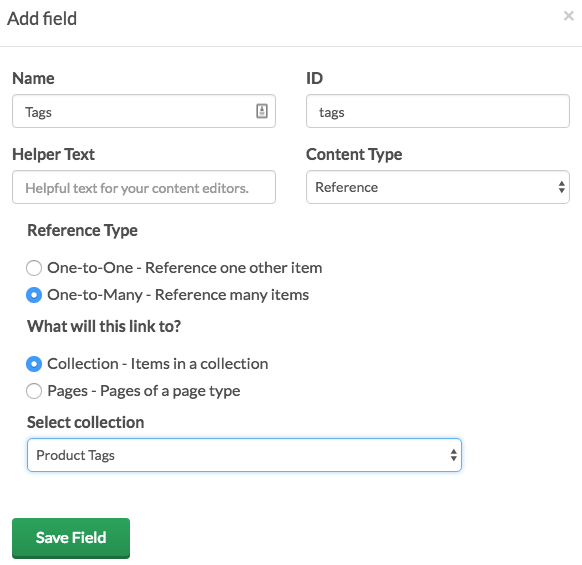
 Then create the
 Product page type with a reference field to the above Product Tags collection:
SEO considerations for Collection index pages
An index page is created any time you use a taxonomy like category, tag, or author.
By default, this index page can be presented to users via a search engine, a site search, or directly via the index page’s URL.
If your intention is to keep the index page accessible, you should consider the experience of users who use it. Ensure the index page presentation is consistent with the existing user flow for your site or app.
Avoiding duplicate content
Collections that map to URL patterns (categories, tags) can create duplicate content. For a full explanation with examples, see Avoiding Duplicate Content.Avoiding thin content
Index pages often include a minimum set of related fields, such as title, description, and a featured image. When index pages are not planned, they can be published with no content or very little in the related fields. The resulting thin content has little substance or value and is frowned upon by search engines and end users alike. If your intention is to keep the index page accessible, you should consider the user experience and search ranking factors of the page. Create engaging, substantive content for each index page that will be displayed on your site or app.Adding SEO fields to Collections
When creating Collections that will have their own landing pages (like categories), include SEO fields:Example: FAQ Collection with SEO
Filtering Pages by Collection references
When using Collections as references, you can filter content by collection items. For example, with an Author Collection:- Create an Author Collection with fields like Name, Slug, Image, Bio
- Add a Reference to your “Blog Post” Page Type to that Author Collection
- Filter for Blog Post pages with a given author by passing in
fields.author.slug
Building Category and Tag Pages
When building category or tag archive pages, ensure they have proper SEO:Category Page Template
Collection SEO checklist
URL structure
URL structure
- Use consistent, SEO-friendly URL patterns
- Include the category/tag slug in URLs
- Avoid deep nesting (
/category/subcategory/sub-subcategory/) - Use hyphens, not underscores
Content quality
Content quality
- Write unique descriptions for each category/tag
- Include relevant keywords naturally
- Add introductory content to archive pages
- Avoid thin pages with only a list of links
Technical SEO
Technical SEO
- Set canonical URLs for all category pages
- Add category pages to your sitemap
- Use proper heading hierarchy (H1 for category name)
- Implement pagination with rel=“next” and rel=“prev”
Schema markup
Schema markup
- Use CollectionPage schema for archive pages
- Add BreadcrumbList schema for navigation
- Include ItemList schema for paginated content
- Use FAQPage schema for FAQ collections
Including Collections in sitemaps
Add category and tag pages to your sitemap using the same pattern as other pages. See Sitemap Generation for a full implementation — include collection URLs atpriority: 0.5–0.6 with changefreq: weekly.