Traditional CMS platforms no longer cut it in 2025. Their rigid, monolithic setup makes it hard to scale or customize beyond what’s built in. You’re often stuck with predefined themes and limited integration options unless you install heavy plugins or write custom code from scratch. Many organizations still feel this pain today because modernizing legacy monolithic codebases can be an uphill climb.
That’s why more businesses are switching to API-first CMSs. “API-first” means APIs are prioritized at the very start of the software development process (not bolted on later) so the entire system is structured around clean, consistent integration patterns.
They fix many of the problems that come with traditional CMSs, offering the flexibility, interoperability, and long-term adaptability that modern teams crave. In this piece, we’ll look at what an API-first CMS is and how it changes the way you build and manage content.
An API-first content management system is built around standardized APIs that let it connect with any number of external systems. For example, it can connect with decoupled frontends across different digital touchpoints such as websites, mobile apps, kiosks, or smart TVs. It can also connect with payment gateways, analytics tools, CRM platforms, and marketing automation systems. This freedom lets organizations assemble a best-of-breed tech stack instead of being pushed into an all-in-one suite that may not age well.
A good example of this approach is ButterCMS. It’s an API-first, frontend-agnostic CMS that provides a REST Content API, webhooks, SDKs, and starter kits to streamline integrations and delivery. This setup allows developers to deliver structured content anywhere without being locked into a specific tech stack.
Here are a couple of ways teams use ButterCMS as an API-first CMS:
• Omnichannel retail: Brands manage a single product catalog in Butter and push updates instantly to all their channels without duplicating content.
• SaaS marketing: Teams use Butter to power both marketing pages and in-app guides while keeping all content consistent and easy to update from one dashboard.
An API-first content management system stores all data in a centralized backend content repository and exposes it through API endpoints. Any frontend application can call these endpoints to create or fetch content.
For example, you can use:
POST /api/posts to create a new blog post
GET /api/posts/{id} to fetch a specific post to display on any frontend
These APIs return structured data (e.g., JSON), which makes it simple for developers to render content in any framework or platform.
The same APIs can also connect the CMS with third-party services. For example, when a frontend app calls an endpoint such as POST /api/customers, the request could not only update the CMS database but also trigger a webhook to add the same customer record in a connected CRM. This kind of setup helps teams sync data and automate processes across multiple platforms without having to write complex backend integrations.
Structured content modeling: Define complex relationships (e.g., product categories, blogs, landing pages, or campaigns) with reusable, scalable content types.
Integration-ready APIs: Connect effortlessly to third-party tools through well-structured endpoints. This is the foundation of a truly composable tech stack.
Personalization and localization: Deliver customized experiences by dynamically assembling content based on context or user profile.
To succeed with an API-first approach, organizations should plan content models carefully and ensure strong developer collaboration. The payoff: streamlined content delivery and long-term scalability.
These terms overlap but have distinct meanings:
|
Term |
Definition |
Key implication |
|
API-first |
A product and design philosophy where APIs are the foundation; everything else (UI, SDKs, and tools) is built on top. |
Predictable integrations with third-party services. |
|
API-driven |
A broader term describing any CMS that exposes APIs to deliver or manage content programmatically. |
APIs are central, but quality and coverage vary. |
|
Headless |
An architecture where the CMS manages content but leaves presentation entirely to external frontends. |
Ideal for omnichannel and composable systems. |
Learn more: Explore the pros and cons of implementing a headless CMS and how it compares to traditional platforms.
Not every headless CMS is truly API-first. Some older systems bolt APIs onto existing monolithic structures, which can lead to inconsistent performance, limited flexibility, and integration challenges. An API-first CMS, by contrast, is built for APIs from day one to ensure clean integrations and predictable scalability.
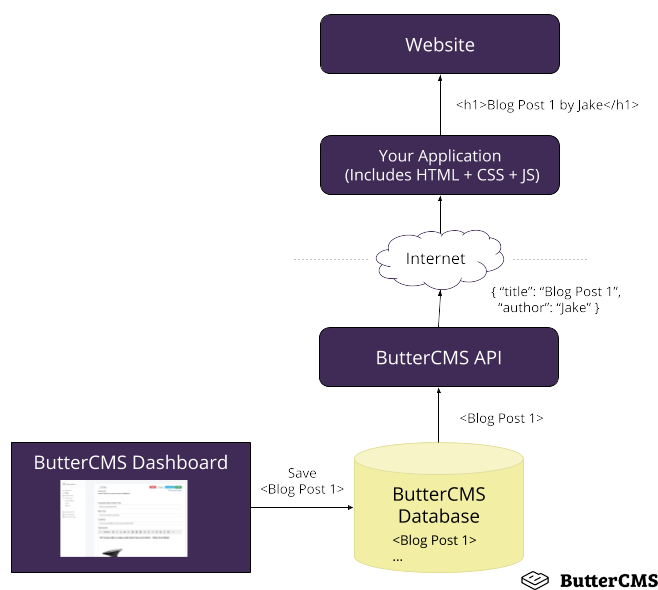
Sample architecture of an API-first CMS
Traditional content management systems tightly couple the backend (content storage and management) with the frontend (presentation and rendering). This works for simple websites, but it becomes restrictive when you have to deliver content across multiple digital channels.
An API-first content management system removes this tight coupling. Developers fetch content through APIs and render it however they want (e.g., web, mobile, voice interfaces, IoT, kiosks, and more). Because the frontend is completely separate, teams can adopt faster frameworks, experiment with new technologies, and ship updates without touching the CMS.
|
Capability |
Traditional CMS |
API-first / headless CMS |
|
Omnichannel content reuse |
Limited |
Excellent |
|
Frontend flexibility |
Low |
High |
|
Integration options |
Plugin-based |
API-native |
|
Scalability |
Constrained |
Horizontally scalable via APIs |
For a deeper analysis, see our guide comparing headless CMS vs. decoupled CMS and headless CMS vs traditional CMS.
In addition to the obvious flexibility and scalability, an API-first CMS offers several other benefits for both developers and businesses:
Future-proof ecosystem: Since it’s API-native, you can adopt new tools and channels without needing major changes to the backend or replatforming.
Faster development cycles: Because the frontend is separate, frontend and backend teams can work in parallel: backend developers model and manage content while frontend developers build interfaces independently, which allows for faster rollouts.
Consistent content delivery: All digital channels pull from the same API. This ensures that content stays uniform across all touchpoints.
Lower maintenance overhead: With no dependency between content and frontend presentation layers, updates or migrations are far less disruptive.
Higher developer productivity: Teams can pick the right tools for the job, not the ones the CMS forces on them.
Better performance options: A decoupled frontend enables static generation, CDN distribution, and edge rendering.
Improved security: APIs reduce direct exposure of the content repository and minimize the attack surface. The public-facing frontend never directly interacts with the content database; it only communicates through authenticated API endpoints.
Composable stack support: Perfect for organizations building a flexible, best-of-breed ecosystem rather than a monolithic stack.
Choose API-first when you:
Need to distribute content across multiple channels (web, mobile, voice, apps).
Are you adopting a composable (MACH) architecture: Microservices, API-first, Cloud-native, Headless.
Want to decouple content publishing from code deployments.
Prefer modern frontend frameworks and languages.
Need clean integrations with third-party tools.
Stick with traditional CMSs when you:
Need a quick, theme-based website with minimal developer input.
Don’t require multichannel or app integrations.
Let’s unpack some common myths around API-first CMSs:
API-first = no editor UI. False. Most API-first CMSs, including ButterCMS, offer visual editing, drag-and-drop components, and intuitive dashboards built on their own APIs.
API-first CMSs are only for developers. Not anymore. While early API-first tools catered mostly to developers, modern platforms make content creation accessible to non-technical users.
API-first means a steep learning curve for non-technical users. This used to be true. Some older or developer-centric CMSs weren’t designed for marketers or other non-technical users. But modern platforms offer visual editing, content previews, workflows, and no-code tools that eliminate previous friction.
Headless and API-first are identical. Headless is the architecture; API-first is the design philosophy behind it.
API-driven = API-first. Not necessarily; always verify the API’s depth and coverage.
API-first brings significant advantages, but implementation requires planning. Make sure to take these key considerations under advisement:
Integrating APIs may require updates to internal systems, communication patterns, or team workflows.
Teams with deeply entrenched monolithic architectures may need time to modernize legacy codebases.
Successful adoption relies heavily on clear, reliable documentation.
Costs extend beyond licensing: you should factor implementation, maintenance, and scaling API usage into your budget.
These considerations are part of adopting a modern architecture with thoughtfulness and intention.
If you’re scaling across channels and/or integrating with modern tools, an API-first CMS offers unmatched flexibility and performance.
If your goal is a simple website that needs quick setup and built-in templates, a traditional or hybrid CMS may be enough.
ButterCMS gives you both: an API-first foundation that empowers developers and an intuitive interface that helps marketers create and publish with ease.
Interested in testing an API-first CMS? Tinker all you want with Butter's 14-day free trial. When you're done with the free trial, move to the free forever plan to host your MVP.
A CMS built so that all functionality is accessible through APIs, enabling consistent integrations and omnichannel delivery. These APIs are planned at the very beginning of the system’s design.
Headless refers to architecture; API-first describes the development philosophy behind the platform.
It means APIs are central to content management, though “API-first” implies a stronger commitment to design and documentation.
It supports faster, modern frameworks, static site generation, edge rendering, and CDN-backed performance, which help improve Core Web Vitals metrics.
Editors can preview drafts securely via preview tokens or staging environments before publishing.
Look for SSO, role-based permissions, content states, and versioning (all of which ButterCMS provides natively). These ensure security while reducing the attack surface.