Creating accessible content is increasingly important, but it doesn’t have to slow teams down or complicate publishing workflows.
That’s why ButterCMS now includes an Accessibility Checker directly inside the content editor, helping teams identify and address common accessibility issues as they work, not after content goes live.
The Accessibility Checker is available in ButterCMS through our TinyMCE editor integration.
It helps content creators:
Run in-editor checks for common accessibility issues
See clear explanations of what needs attention
Get guidance to improve accessibility while editing and publishing
All of this happens directly inside the ButterCMS editing experience, with no additional setup required.
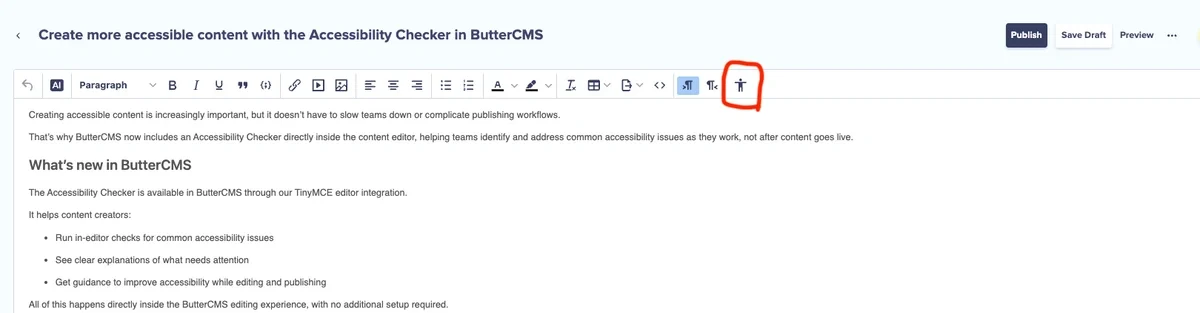
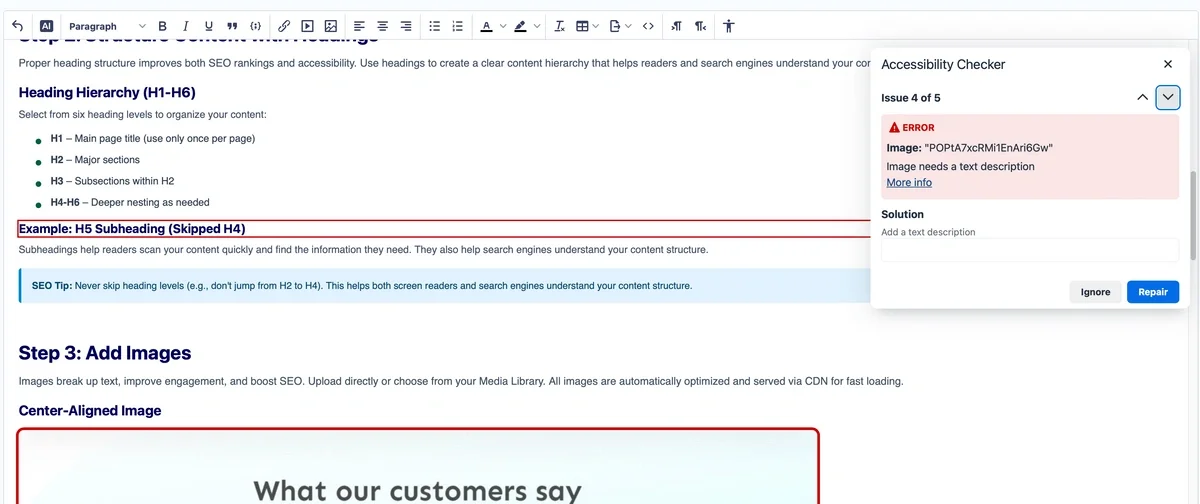
The following screenshots show where you can find the Accessibility Checker feature inside ButterCMS's Blog Engine as well as what the error state and success state looks like.

Accessibility reviews often happen late in the process, leading to rework and delays. The Accessibility Checker helps teams shift accessibility earlier in the workflow.
With it, teams can:
Catch issues early instead of after publishing
Build accessibility awareness without specialized training
Reduce back-and-forth between content and development teams
The result is smoother collaboration and fewer post-publishing surprises.
The Accessibility Checker supports more accessible content creation as part of your regular workflow. It helps teams spot and address common issues early, while broader accessibility outcomes still depend on design, development, and how content is ultimately implemented on your site.
Built directly into ButterCMS, it fits naturally into how teams already create and manage content.
Accessibility starts with better content habits. With the Accessibility Checker in ButterCMS, teams can take a meaningful step toward more inclusive digital experiences, right where content is created.
Want to try it out? Log in to test it on your own.