ButterCMS now includes editor templates, a way to save reusable blocks of formatted content and insert them into any WYSIWYG field in one click. An editor template is a saved snippet of rich-text content, like a callout box or an author bio, that anyone on your team can drop in fully formatted, exactly as it was saved.
Until now, reusing a layout meant rebuilding it by hand in every post, or copy-pasting from an old entry and cleaning up whatever formatting came along for the ride. Some teams kept a "reference" post around just to copy from. It works, but it's slow, and the formatting drifts a little more each time.
What's new in ButterCMS
- Save the current WYSIWYG content as a named template.
- Insert any saved template into any WYSIWYG field, formatted and ready to edit.
- Rename and delete templates to keep the library tidy.
- Turn the template buttons on per field through the schema builder's custom toolbar picker.
Templates are managed per organization, so your whole team works from the same library.
See it in action
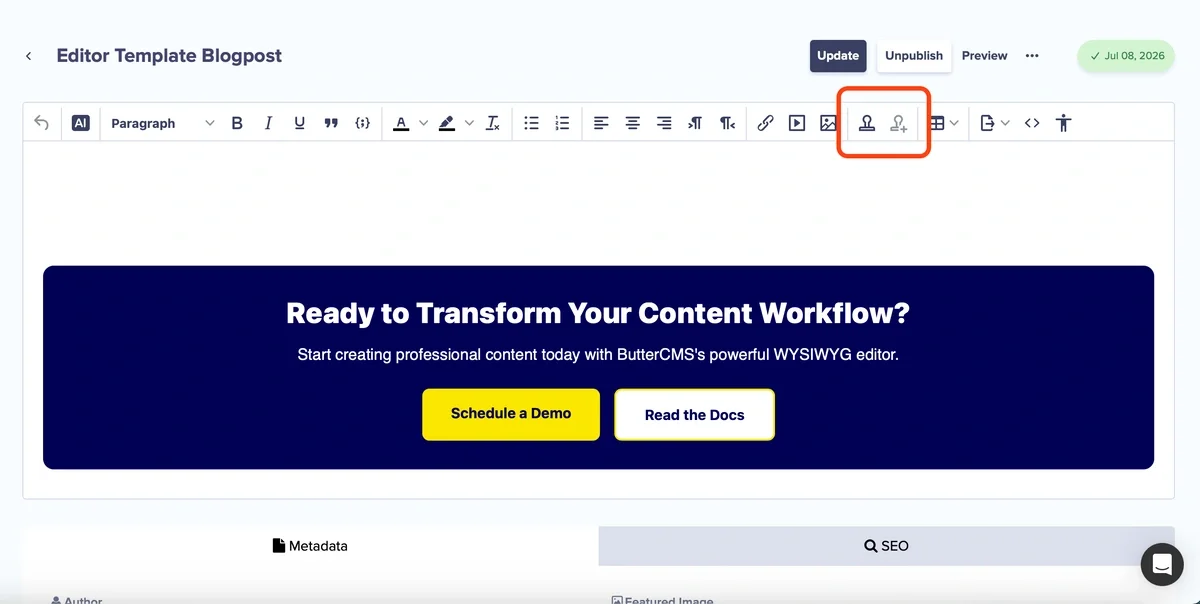
The WYSIWYG toolbar gets two new buttons: Insert Template and Save as Template.
- Build a block of formatted content in any WYSIWYG field, like the CTA you end every post with.
- Click Save as Template and give it a name. This button is visible to organization admins only.
- In any other WYSIWYG field, click Insert Template and pick it from the list. The content lands at your cursor with its formatting intact.
There is nothing to configure and nothing to migrate. Existing content is untouched, and the buttons are available in the editor as soon as the release ships. For a step-by-step walkthrough with screenshots, see the editor templates knowledge base article.
How editor templates help your team work faster
- Standard blocks take one click instead of five minutes of rebuilding.
- Formatting stays consistent because everyone inserts from the same source.
- New team members don't need to know how a callout "should" look. They insert it.
- Admins curate the library, so it stays a set of approved blocks rather than a dumping ground.
Who benefits
Content managers and marketers
If you publish the same structures across dozens of posts, a standard CTA block, a legal disclaimer, a product spec table, this removes the most tedious part of your day. Insert, tweak the copy, publish.
Teams that care about brand consistency
Because only organization admins can add, rename, or delete templates, the library works as a set of approved building blocks. A large team can move fast without every writer inventing their own version of the callout box.
What developers should know
Nothing changes in the Read API. Inserted template content is stored and delivered as standard HTML, the same as any other WYSIWYG content. If your site renders WYSIWYG fields today, it already renders content built with templates. There is no new endpoint and no migration to run.
What editor templates are not
A few boundaries worth knowing before you build your library:
- Inserting a template drops in a copy. Editing the template later does not update entries that already used it. If you need content that stays linked everywhere it appears, that's a job for Components, not templates.
- Templates don't define a content model. Page Types and Components describe structure; editor templates are an authoring shortcut inside a single rich-text field.
- Templates are scoped to your organization, not per environment or per user.
Availability and limits
Editor templates are available on every plan and turned on automatically. The number of templates your organization can store depends on your plan:
| Plan | Template limit |
|---|---|
| Free | 2 |
| Basic | 5 |
| Advanced | 10 |
| Pro | 25 |
| Enterprise | 50, custom limits available |
Legacy plans map to the nearest equivalent tier.
Anyone who can edit content can insert templates. Adding, renaming, and deleting them is limited to organization admins.
What's next
Editor templates are phase one of a larger WYSIWYG editor upgrade. Coming next: advanced tables and table of contents support.
If you're on ButterCMS today, open any WYSIWYG field and the Insert Template button is already waiting. Save the block you rebuild most often and see how much time it gives back. Not a customer yet? Sign up for a free trial and try it on your first post.