
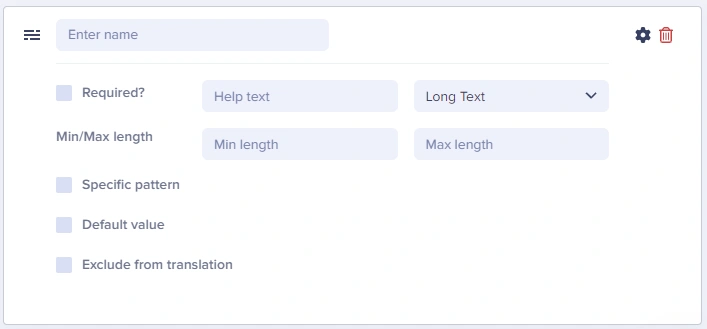
The Long Text field can be used to enter multi-line alphanumeric content, such as a meta-description, article summary, or Markdown snippet.
If your content includes multiple paragraphs, they’ll appear as \n characters in the API Response.
Long Text field configuration

Long Text at a glance

Input and output

Input type

Multi-line text area

API output

string (preserves line breaks with \n)

API response example

"article_summary": "A comprehensive guide.\nWe'll cover all aspects of content modeling in ButterCMS.\nWe'll explore Pages, Collections, and Components.",

Field configuration options

Set reasonable limits via min/max length. For example, meta descriptions should use a max length of ~160 characters.
Option NameTypeFunction
Required?booleanMake field required to save page
Help textstringAdd help text to describe usage to your team
Min lengthnumberSet a minimum length in characters
Max lengthnumberSet a maximum length in characters
Default valuestringSet a default value for the field
Exclude from translationbooleanExclude the field from translation function
Specific patternDropdownValidates field data against your choice of:
  • Email
  • URL
  • US Phone Number
  • US Zip Code
  • Custom (Regex)

Common use cases

  • Meta descriptions for SEO
  • Article summaries and excerpts
  • Product descriptions
  • Author bios
  • Plain text instructions
  • Markdown content (when you’ll parse it on the frontend)
  • JSON data (advanced use)

Using Long Text as a Markdown editor

Many developers use the Long Text field to store Markdown content, which is then parsed and rendered on the frontend. This approach is popular for:
  • Technical documentation
  • Developer blogs
  • Content where authors are comfortable with Markdown syntax

Example workflow

  1. Create a Long Text field named content_markdown
  2. Authors write content using Markdown syntax
  3. Frontend application parses the Markdown using a library (e.g., marked, remark, or markdown-it)
// Example: Parsing Markdown in JavaScript
import { marked } from 'marked';

const markdownContent = page.fields.content_markdown;
const htmlContent = marked.parse(markdownContent);

API response with Markdown

{
  "content_markdown": "## Getting Started\n\nFollow these steps:\n\n1. Install the SDK\n2. Configure your API key\n3. Fetch your first page\n\n```javascript\nconst butter = require('buttercms')('your-key');\n```"
}

Best practices

  1. Consider WYSIWYG instead - If editors need formatting, use the WYSIWYG field
  2. Document Markdown expectations - If using for Markdown, provide help text explaining the format
  3. Set reasonable limits - For meta descriptions, use max length of ~160 characters
  4. Use for SEO fields - Meta descriptions work great with Long Text

Field validation examples

Example: meta description (Long Text)

Field Name: meta_description
Max Length: 160
Help Text: "Enter a brief description for search results (max 160 characters)"
Required: No

Example: article excerpt (Long Text)

Field Name: excerpt
Min Length: 50
Max Length: 300
Help Text: "Summarize the article in 1-2 sentences"
Required: Yes