
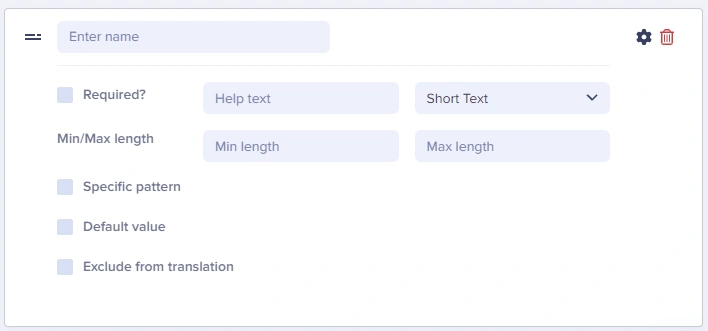
The Short Text field is best used for short, single-line, alpha-numeric content, like a page title or button label.
The Short Text field does not support line breaks, which makes it a poor fit for content like Markdown. Use the Long Text field, WYSIWYG field (with code editor), or the HTML field for that kind of content.
Short Text field configuration

Field at a glance

Input and output

Input type

Single line text

API output

string

API response example

"headline": "Welcome to Our Site"

Field configuration options

Use max length validation to ensure headlines don’t exceed what your design can accommodate. A typical recommendation is 60-70 characters for page titles to optimize for SEO.
Option NameTypeFunction
Required?booleanMake field required to save page
Help textstringAdd help text to describe usage to your team
Min lengthnumberSet a minimum length in characters
Max lengthnumberSet a maximum length in characters
Default valuestringSet a default value for the field
Exclude from translationbooleanExclude the field from translation function
Specific patternDropdownValidates field data against your choice of:
  • Email
  • URL
  • US Phone Number
  • US Zip Code
  • Custom (Regex)

Common use cases

Some of the common use cases for the Short Text field include:
  • Page titles and headlines
  • Button labels and CTA text
  • Meta titles for SEO
  • URL slugs
  • Author names
  • Product names
  • Navigation menu items
  • Headlines, titles, button text, URLs

Best practices

  1. Set appropriate max lengths: Match your design constraints
  2. Use help text: Guide editors on expected content (e.g., “Enter a headline under 60 characters”)
  3. Make required when needed: Titles and slugs should typically be required
  4. Use for structured short data: Phone numbers, social media handles, short URLs