
References are a powerful field type added to Pages and Collections that allow you to create links (or references) among your content. References provide the ability to link to Items from a Collection or Pages from a Page Type from a Collection or Page. You will configure your reference fields to be either “one-to-one” or “one-to-many” references:
  • one-to-one: reference one page or item
  • one-to-many: reference more than one page or item
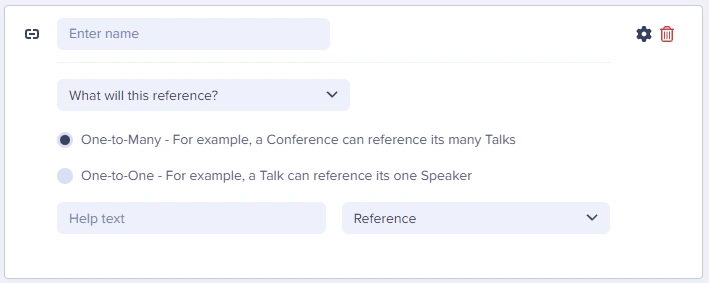
Reference field configuration

Field at a glance

Input and output

Input type

One-to-one or one-to-many links to Pages or Collections

API output

array (one-to-many) or object (one-to-one)

API response

Varies by type, see responses below.

Field configuration options

Option NameTypeFunction
Help textstringAdd help text to describe usage to your team
What will this reference?dropdownSelect content to reference (Pages or Collections)
One-to-one/one-to-manyboolean (radio)Choose reference types

One-to-one vs. one-to-many references

One-to-one reference

Links to a single item or page. Use when content has exactly one related item. Examples:
  • Article → Author (each article has one author)
  • Product → Brand (each product has one brand)
  • Page → Primary Category
{
  "author": {
    "name": "Jane Smith",
    "bio": "Technical writer with 10 years experience",
    "photo": "https://cdn.buttercms.com/jane.jpg"
  }
}

One-to-many reference

Links to multiple items or pages. Use when content can have multiple related items. Examples:
  • Article → Tags (article can have multiple tags)
  • Product → Categories (product can be in multiple categories)
  • Page → Related Articles
{
  "tags": [
    { "name": "Tutorial", "slug": "tutorial" },
    { "name": "Beginner", "slug": "beginner" },
    { "name": "React", "slug": "react" }
  ]
}

References vs. Repeaters

ScenarioUse ReferenceUse Repeater
Content reused across pagesYesNo
Content unique to one pageNoYes
Need to filter/query by this dataYesNo
Data managed separatelyYesNo
Simple list of itemsMaybeYes
Ask yourself: “Will this content be managed independently and potentially used on multiple pages?” If yes, use a Reference to a Collection. If it’s page-specific content, use a Repeater.

Working with references in your application

const butter = require('buttercms')('your-api-key');

// Fetch page with references
const response = await butter.page.retrieve('*', 'article-page');
const article = response.data.data.fields;

// One-to-one reference
const authorName = article.author.name;
const authorPhoto = article.author.photo;

// One-to-many reference
const categories = article.categories;
categories.forEach(category => {
  console.log(category.name, category.slug);
});

// React component with references
    function ArticlePage({ article }) {
      return (
        <article>
          <h1>{article.title}</h1>

          {/* Author (one-to-one) */}
          <div className="author">
            <img src={article.author.photo} alt={article.author.name} />
            <span>By {article.author.name}</span>
          </div>

          {/* Categories (one-to-many) */}
          <div className="categories">
            {article.categories.map(cat => (
              <a key={cat.slug} href={`/category/${cat.slug}`}>
                {cat.name}
              </a>
            ))}
          </div>

          <div dangerouslySetInnerHTML={{ __html: article.body }} />

          {/* Related articles (one-to-many) */}
          <section className="related">
            <h2>Related Articles</h2>
            {article.related_articles.map(related => (
              <a key={related.slug} href={`/articles/${related.slug}`}>
                <img src={related.featured_image} alt={related.title} />
                <h3>{related.title}</h3>
              </a>
            ))}
          </section>
        </article>
      );
    }

Filtering by reference

// Get all articles in a specific category
const articles = await butter.page.list('article', {
  'fields.category.slug': 'tutorials'
});

// Get articles by a specific author
const authorArticles = await butter.page.list('article', {
  'fields.author.slug': 'jane-smith'
});

Best practices

Naming references

  1. Use descriptive names: author not ref1
  2. Indicate plurality: category (one-to-one) vs categories (one-to-many)
  3. Match the Collection name: If Collection is “Authors”, Reference could be author

Collection design for references

  1. Include a slug: Essential for filtering and URLs
  2. Add display fields: Name, title, image for rendering
  3. Keep Collections focused: One purpose per Collection
  4. Consider the API response: What data do you need when referencing?

Performance

  1. Limit referenced data: Don’t create huge Collection items
  2. Use filtering: Query only what you need
  3. Consider pagination: For large sets of referenced items

Use cases

How to use Reference fields in the ButterCMS dashboard

For common use-cases and how to implement them in the ButterCMS dashboard, see the article below:

Working with references

How to implement common use cases, including categories (grouping/filtering), testimonials (reusable content), and related articles (linking related content).