Happy National Butter Day! Here's everything new in ButterCMS
November 19 is National Butter Day, and we can't think of a better excuse to look back at everything we've been churning out for you. Since summer, our product and engineering team has shipped a steady stream of improvements to the editor, the dashboard, and the API, all aimed at making your day-to-day content work smoother.
Here's a roundup of what's new, with links where you can dig deeper.
Publish your blog in every language: Blog Posts Localization
You can now create, manage, and publish translated versions of your blog posts right inside the ButterCMS Blog Engine, without a developer or a separate content system.
-
A version for every language: each post can have its own title, URL, body, summary, SEO title, meta description, and featured image for every language on your account. Translating or publishing one language doesn't affect the others.
-
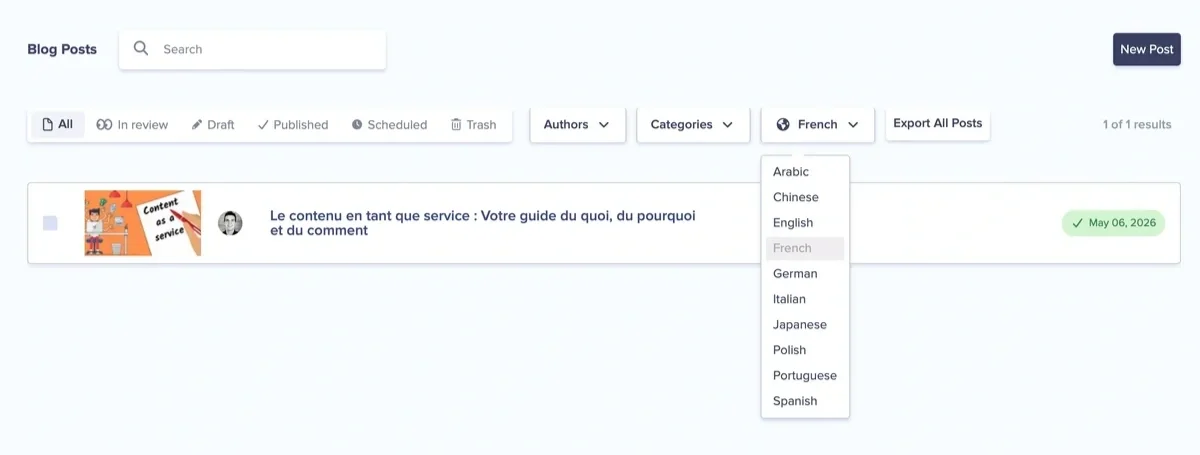
Simple to use: open a post, pick a language from the locale dropdown, edit the translated fields, then save a draft or publish.
-
See what's translated at a glance: the language switcher on the Blog Engine homepage shows which posts are translated, in draft, or not started yet.
-
Your existing posts carry over: when you turn localization on, your current posts become the default-language version automatically.
-
Translation integrations: DeepL and Lokalise can send your content out for translation and bring it back into Butter (availability depends on your account).
Authors, tags, and categories aren't translated automatically, so you'll update those yourself. Localization needs to be enabled for your account. If you don't see the language selector, reach out to your account admin or our team.
Read more: Blog Posts Localization
Never lose an edit again: Autosave
Closed a tab before saving, or had your session expire mid-edit? Autosave now keeps your unsaved changes to Pages, Collection Items, and Blog Posts in your browser. When you come back, ButterCMS shows you what it found and lets you restore or discard each change. Nothing is saved to ButterCMS until you click Save or Publish.
Autosave is on by default for everyone who can edit content.
Read more: Closed the tab before saving? Autosave brings your edits back
A more powerful WYSIWYG editor
If you write long-form content in ButterCMS, the WYSIWYG editor has picked up some useful upgrades:
-
Advanced tables: better table editing tools, plus automatic row numbering that stays correct as you add or remove rows.
-
Table of contents: generate a table of contents from your H1–H3 headings, and update it with one click when your headings change.
-
Editor templates: save formatted content as a named template and insert it into any WYSIWYG field, formatting intact.
-
Accordions: add collapsible accordion sections to your content.
-
Spellchecker toggle: turn the spellchecker on or off.
New toolbar buttons can be enabled per field in the schema builder's custom toolbar picker.
Read more:
-
Advanced tables and table of contents: build better long-form content in ButterCMS
-
Editor templates: save and reuse formatted content in ButterCMS
-
Knowledge Base: Blog Templates
Keep your Media Library in check: media file size limits
One oversized video or uncompressed hero image is easy to upload and easy to forget, until it's served thousands of times. Large files take up storage, eat into your bandwidth allowance, and slow down the pages that load them.
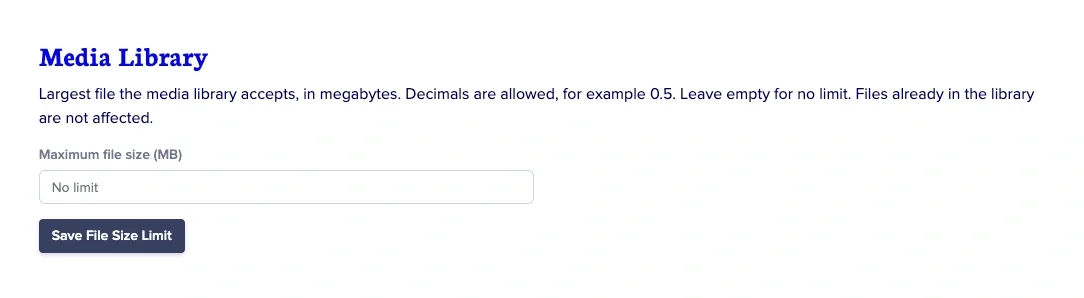
You can now set a maximum file size for media uploads in your account settings. Files over the limit are kept out of your Media Library, so every asset your team adds stays within the size you've chosen. We built this in response to customer feedback, and we think plenty of teams will find it useful.
Navigate to your Account's Settings to set the file size limit:
Why it's worth turning on:
-
Fewer surprises on your usage: keeping heavy files out of the Media Library helps you stay within your bandwidth and storage limits and avoid overages.
-
Faster pages for your visitors: smaller assets mean quicker load times, which helps both user experience and SEO.
-
Guardrails for the whole team: set the limit once, and nobody has to remember the image guidelines before they hit upload.
A refreshed editing experience across ButterCMS
We've rebuilt the edit views for collections, components, and page types. The functionality is the same, but the interface is more consistent and works better on smaller screens.
-
Update history view: a new view of the changes made to your content.
-
Sticky action bar and back-to-top shortcut: on long content, your Save and Publish actions stay in view, and one click takes you back to the top.
For developers
-
Alt text in the Write API: you can now set image alt text through the Write API, which makes it easier to keep accessibility metadata in sync from your own tools. See the API documentation.
-
Test webhook button: send a test request to your webhook endpoint straight from ButterCMS to check that it's set up correctly.
-
API Explorer in the blog post view: see the API request and response for a blog post without leaving the editor.
-
Component cloning: duplicate a component within an environment instead of rebuilding it from scratch.
-
Copy drafted collections: draft collection content now carries over when you copy.
Thanks for spreading the love
Every one of these updates was shaped by feedback from you, our customers. So this National Butter Day, thank you for building with ButterCMS. We have more on the way, and we can't wait to show you what's next.
Have a question about any of these features, or want help turning one on? Our Customer Success team is a chat away. And if you're new here, you can start your free trial and try it all for yourself.