- Traditional vs. Headless architecture: What are the key differences?
- What are the benefits of headless architecture?
- What are the risks of choosing a headless architecture approach?
- When might headless architecture be right for you?
- When may you not need a headless architecture?
- Headless architecture in the wild
- Closing thoughts
The term headless architecture is often mentioned when discussing the future of web development, but what does it actually mean?
What is headless architecture?
Headless architecture is a software development approach that separates the front-end (user interface) and back-end (operational logic) of an application. This separation provides both new and established businesses with the flexibility and agility to adapt quickly, whether for a simple website or a more complex application.
With a headless architecture, developers can scale different components independently. While there are some drawbacks to the headless approach, such as increased complexity and potential for errors, the benefits of going headless, especially with an API-first CMS, often outweigh the costs.
In this article, we'll take a deep dive into the pros and cons of using a headless architecture and discuss when going headless is a good idea for your project.
Table of contents
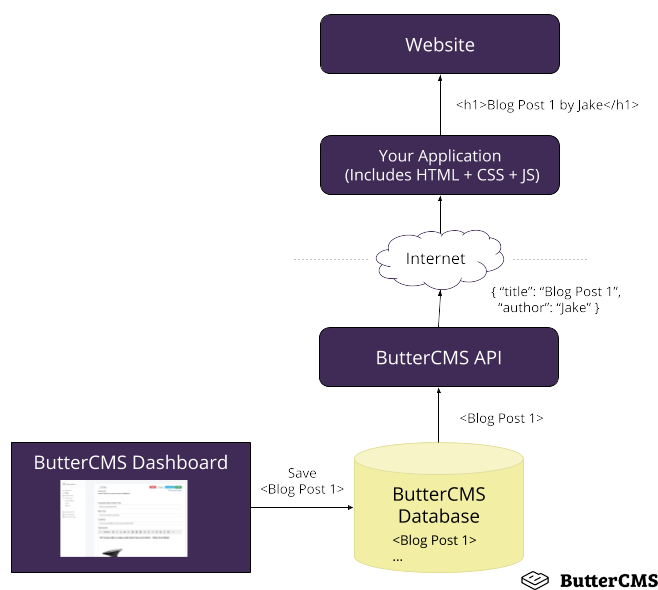
A more specific way to think about headless architecture is that it is a subset of the decoupled CMS architecture. In a headless model, data and presentation are handled separately as packaged business capabilities (PBC) that connect via APIs to work independently but in sync to create complex digital experiences.
A typical headless installation is composed of the following elements: a headless content management system serving as the backend, an API layer that connects the front and backend, and a static site generator or JavaScript framework that presents the content to different devices.
In a monolithic platform –or traditional CMS– like WordPress, the front and the backend are fused together, and users can only enhance the CMSs functionalities using plugins. While independent from each other, plugins themselves aren’t independent of WordPress, and thus front-end developers are forced to use only specific languages and tools when developing your site.
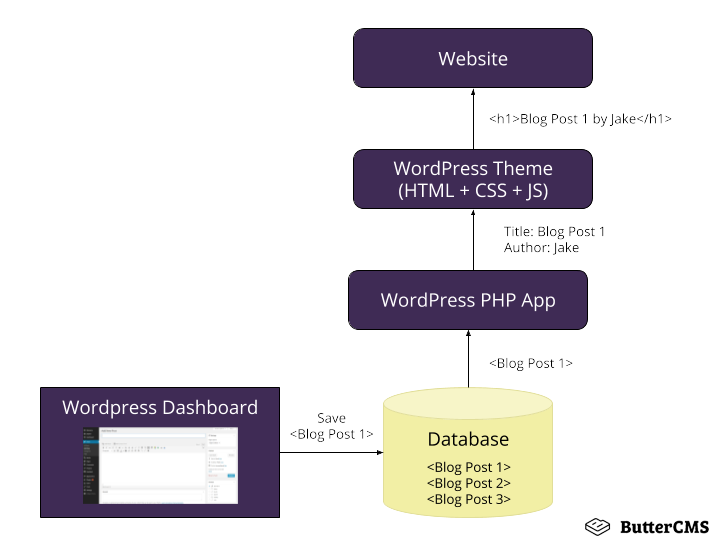
The major benefit of headless architecture is that unlike a traditional CMS like Drupal or WordPress –even headless WordPress– a headless CMS platform enables developers and technical leaders to implement a best-of-breed tech stack. A best-of-breed approach means that you can select your favorite backend and your preferred payment gateway, search engine, media management tools, etc.
To be fair, WordPress developers have tried to decouple the platform, creating headless WordPress. They use WordPress as a backend and APIs to present content using static site generators like Gatsby, which has a plugin that WordPress developers can leverage to go headless. Still, we don’t recommend it because WordPress wasn’t born headless, and it might introduce more complexities to your development process.
Take the Next Step With Headless Architecture: Read Our Guide To Headless CMS Now!
Read the GuideBut this wasn’t always the case. Before the decoupled architecture was an option, connecting a monolithic application to data or functionality with another system required complex integrations. A developer had to build custom point-to-point integrations for every piece of software they wanted to integrate into the CMS or platform, which is costly and time-consuming.
With the advent of the API economy, developers can now leverage different microservices configured as PBCs and extend the functionalities of a headless CMS using REST API and GraphQL to provide independent functions without having to build complex integrations between two different platforms.
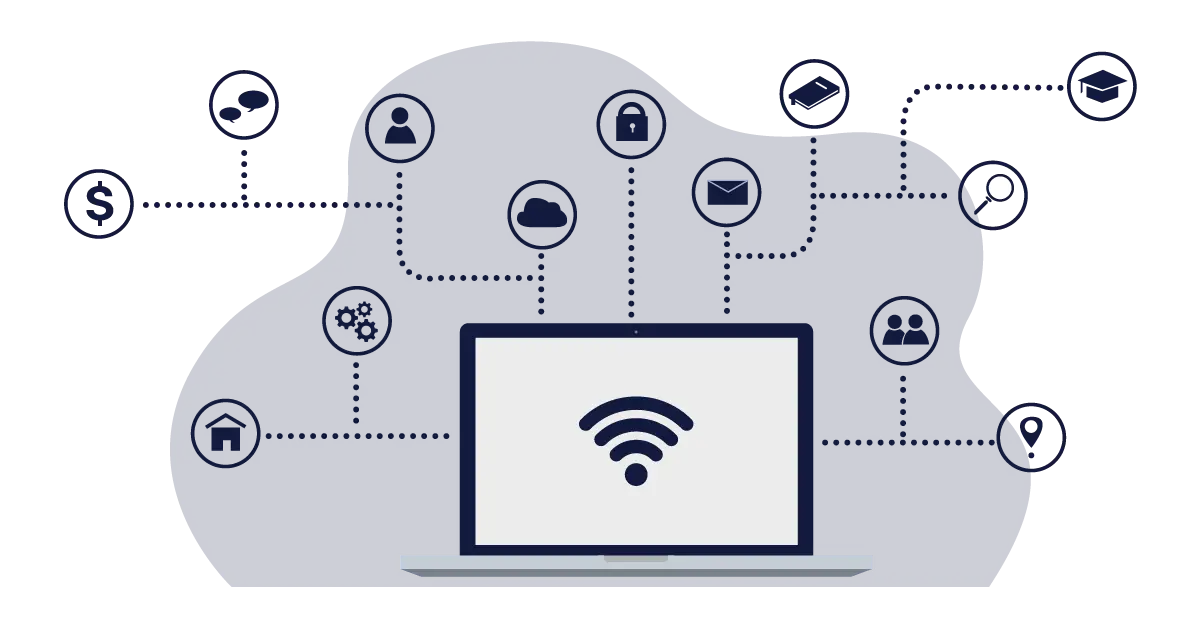
We’ve written an in-depth article about headless CMS and urge that you check it out if you'd like to learn about it in more detail.
Now that we’ve talked about headless architecture, let's compare it with the monolithic architecture of CMSs like WordPress or Drupal.
Traditional vs. Headless architecture: What are the key differences?
As we said before, in a traditional CMS, everything is packed together, so there’s no independence between front and backend. For instance, your typical WordPress installation comes with a generic theme composed of HTML, CSS, JavaScript, and a predefined MySQL database.
On the other hand, headless architecture connects different pieces using APIs to build a cohesive platform. A headless CMS platform works like the command center, orchestrating the various components and services of your digital experiences.
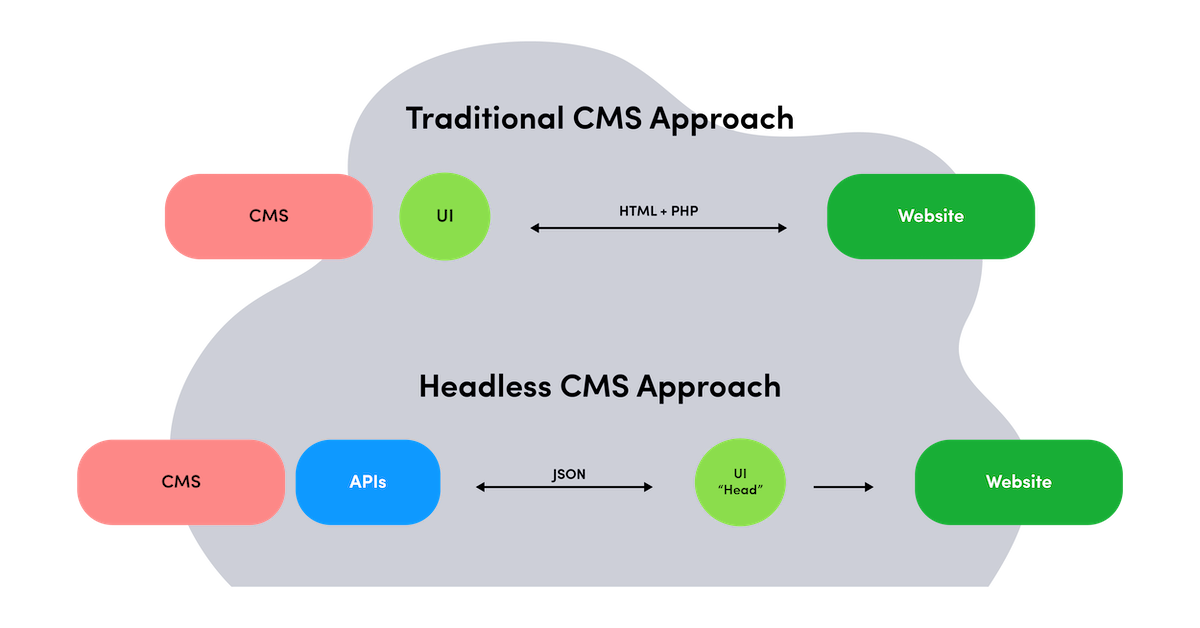
Take a look at this article to dive deeper into the debate between headless CMS vs traditional CMS.
What are the benefits of headless architecture?
Compared to traditional web development, headless architecture unlocks plenty of benefits and new ways of building digital experiences at scale. Here are the main advantages of implementing a headless architecture:
Headless commerce
A headless commerce architecture can power eCommerce stores and deliver the same benefits as a headless CMS but focused on digital commerce. Headless eCommerce platforms enable merchants to build online stores the way they want and use third-party REST APIs to enhance their functionalities by decoupling the frontend and backend.
Another major benefit of headless eCommerce is that it allows non-technical users to build better commerce experiences that are SEO optimized, fast, efficient under heavy traffic loads, high-converting, and eye-catching. In addition, this model of digital commerce makes it easy for merchants to mix and match tools to build customized commerce engines that allow omnichannel experiences.
Omnichannel content management
One of the main tenets of the headless approach is "create once and publish everywhere." Omnichannel marketing fulfills this promise by enabling users to create content on the backend and present it to different frontends configured for many devices using a REST API or GraphQL.
Following an omnichannel strategy gives merchants granular control over what kind of digital experiences they present, thereby delighting customers and opening the door for delivering shopping experiences to emerging channels such as IoT devices, digital signage, and mobile devices.
Frontend agnosticism
Another solid business benefit of going headless is the possibility of leveraging any frontend. Unfortunately, frontend developers don't like WordPress because it places too many constraints and prevents them from using modern technologies, methodologies (like jamstack), and tools to build better, faster digital experiences.
Monolithic platforms like WordPress use the theme-based WP engine. This precludes you from using modern tools and getting better results. Headless technology unlocks the door for faster, more performant ways of presenting content like JavaScript frameworks and static site generators.
Scalability
WordPress and Drupal can scale, but only if you add new plugins. However, if you add too many, they'll become slow, bloated behemoths that make it cumbersome to maintain and create new content. Also, becoming reliant on plugins created by random community members is risky since they could be discontinued or not updated regularly which will create problems whenever WordPress or Drupal release a new version. So not only can they leave your site bloated but your site might not even work right after a while.
Also, as you need to add plugins to give your website new features, you risk making it slower every time you want to update it.
Headless CMS platforms, on the other hand, allow you almost unlimited scalability in terms of features and hosting. The headless approach uses the cloud and CDNs to unlock almost infinite scalability without incurring hefty monthly costs. Also, if you need a new feature in your headless platform, you're just an API call away from it.
Take the Next Step With Headless Architecture: Read Our Guide To Headless CMS Now!
Read the GuideSecurity
Traditional platforms have many different attack surfaces and are vulnerable to malicious attacks like SQL injection and DDoS. Also, the fact that 78% of WordPress websites aren't updated to the latest version opens the door for hackers to exploit known vulnerabilities to gain entry into the system.
On the other hand, Headless architecture is almost impervious to these vulnerabilities. Headless platforms are cloud-based and update automatically, reducing potential exploits. In addition, by separating the frontend, the backend, and the different PBCs, headless-built digital experiences present fewer attack vectors than their traditional counterparts, making them harder to hack.
What are the risks of choosing a headless architecture approach?
Even though headless architecture brings plenty of benefits to both businesses and web developers, it has a few drawbacks that you need to consider when deciding whether it is the right choice for your company. So let's take a look:
Additional complexity
Choosing and implementing a headless solution can be a massive undertaking. The flexibility of most headless technologies comes with the added drawback of additional complexity. That can be daunting for frontend developers who are only used to working with WordPress and other traditional solutions.
But with that added complexity also comes increased freedom for frontend developers to code things their way and build breathtaking digital experiences and digital commerce stores. So, even though going headless is more complex initially, the payoff is more significant in the end.
Requires specialized developers
One of the main advantages of WordPress and other traditional platforms is that everyone can use them. Headless architecture, on the contrary, is still relatively new, and the average WordPress developer might not be yet ready to work with an interconnected, non-monolithic web of services.
That means you'll need more than your usual WordPress person to build digital experiences based on headless architecture. Nevertheless, despite the learning curve being steeper for new developers, the benefits of the headless approach will ensure faster loading speeds and a better user experience.
Not so good for content editors
While headless platforms offer a solid user experience, they often do it at the expense of the editor experience. In fact, most headless CMSs are developer-first and weren't built with content editors in mind, which makes them harder to use than WordPress or Drupal.
However, luckily for content editors and managers, there's a new breed of headless systems like ButterCMS created to give developers all the tools they need to play without neglecting the happiness of your content editor and marketing team.
When might headless architecture be right for you?

- You want to start omnichannel marketing campaigns: Developers can create digital experiences and web apps for emerging devices and channels by decoupling the front and the backend. A headless platform enables you to deliver content to different touchpoints from a single unified platform.
- You want to use your own tech stack: If your company has a set of tools they know and love, going headless is a sensible way of building things your way without becoming tied down to a specific/limited tech stack as you would with WordPress and its PHP-based approach.
- You want to revamp your existing systems: If you're still reliant on legacy approaches and want to build websites the modern way, staying on a traditional platform will not give you all the benefits headless would. Headless implementation ensures that your company remains future-proof and that the digital experiences you build remain snappy and performant.
When may you not need a headless architecture?

- You require a marketer-friendly platform: As we noted before, the headless approach tends to leave marketers out in the open unless you use the right headless CMS. Suppose you rely on marketers and content editors to create websites and digital experiences. You might not need to go headless unless you have the resources to educate your collaborators on this new approach.
- You're a small company with limited resources: Implementing a headless solution can be resource-intensive, and if you're still starting, switching to headless might incur extra costs. Before going all-in, we advise you to create a proof of concept to assess your company's viability of a headless solution.
- Your current CMS is enough: Implementing headless architecture is a great choice, but it's not something you have to do only for fear of missing out. If your current CMS is enough for what you need, you may not need to change, but if you feel like implementing headless can take you to the next level, do it but proceed with caution.
Headless architecture in the wild
By now, you should have a solid understanding of headless architecture, its pros and cons, and when going headless would move the needle. But, to help you see things even clearer, let’s see some examples of headless architecture so you can see what it means and can do in real life.
Freddie’s Flowers
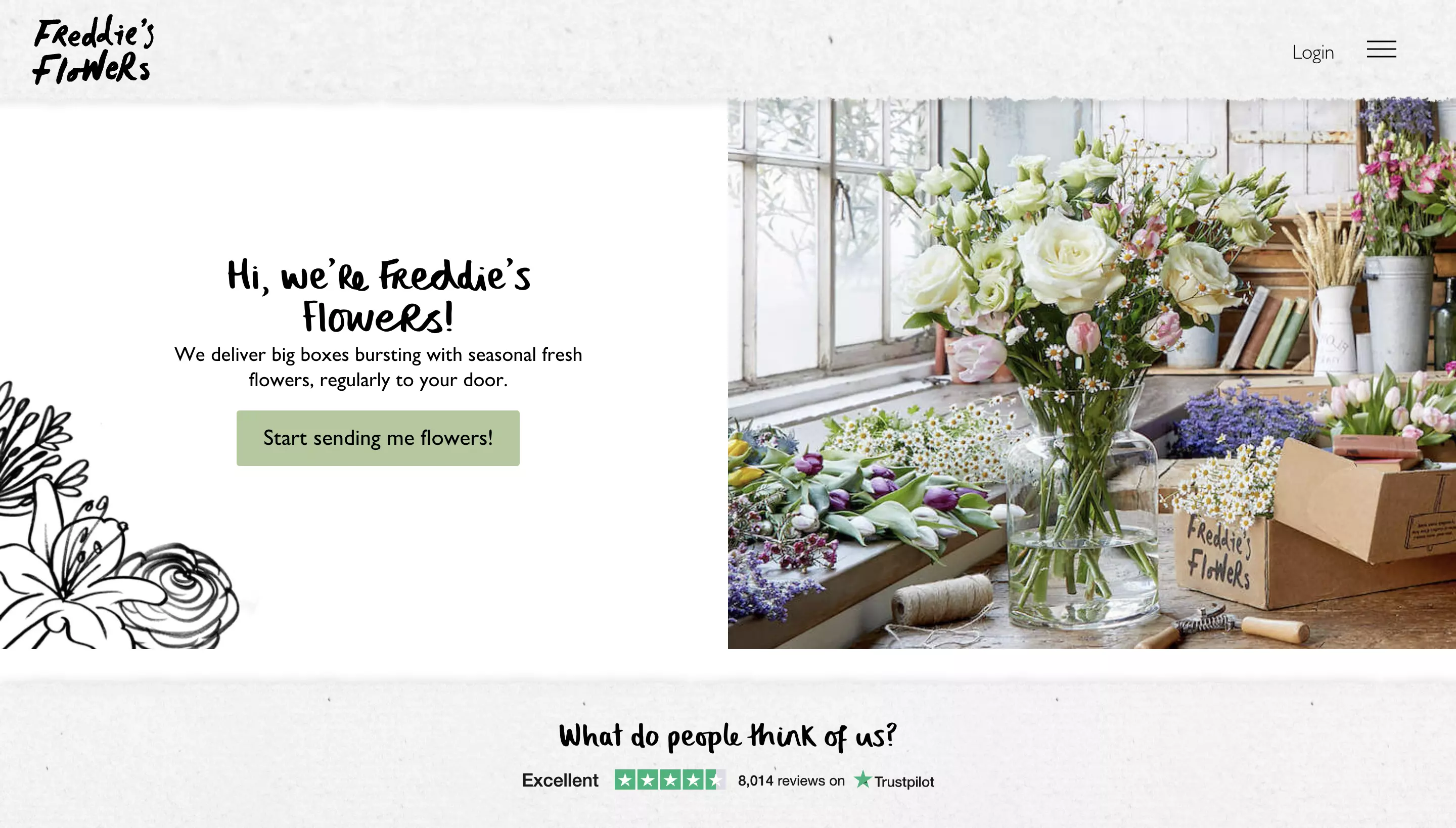
Freddie’s Flowers is a UK-based flower delivery business. Built on ButterCMS, Freddie’s Flowers is an excellent example of how headless architecture can power businesses of all shapes and sizes. It shows that you don’t need to be a multimillion-dollar company to reap the benefits of going headless; you only need to be digitally mature and have the human-power to make it happen.
Freddie’s Flowers headless website is faster and more efficient than their previous hard-coded implementation. It also supports different locales in several languages, ensuring that the business can operate freely in other countries outside the UK with content that resonates with local audiences, which would have been hard, if not impossible, with the site's previous version. You can read more about Freddie's Flowers journey with ButterCMS in this case study.
PickFu

PickFu is a US-based SaaS platform that gives designers and developers honest answers as to how their websites and designs look and feel. However, despite being a forward-thinking company, they still used a hard-coded database and a WordPress blog to publish content.
PickFu is a great example of headless architecture done right. With the help ButterCMS, they were able to build a performant website using the tools developers liked while at the same time giving marketers the space and the features to create and update content without involving the developer team. To dig deeper into how PickFu implemented ButterCMS check out this case study.
Closing thoughts
While a traditional architecture still has benefits for some users, the reality is that it’s a dated, clunky way of building websites and digital experiences. It serves its purpose if you simply need to be present the internet, but it won’t help your company scale beyond a small online presence.
By choosing to go headless rather than staying traditional, you gain flexibility and the power to do things your way. But with great power comes great responsibility. To go headless, you need to be mature—technologically speaking—to ensure you reap the performance and architecture benefits of this new approach to building websites and online stores.
Nevertheless, if you feel headless architecture is the right move, you won’t be disappointed. The benefits in scalability and security alone are worth the trouble. Besides, the right headless platform, such as an API-first CMS, will make it easy to adopt new technologies, better hosting options, and faster content delivery.
Do you want your product or marketing team to test Butter CMS? We can set up a live demo to walk your team through the fast, easy-to-use interface.