|
TL;DR A headless content management system is built without a front-end "head" entirely. It acts as a centralized repository where content is stored and then delivered via APIs. This gives developers a blank canvas to build fully customized presentation layers for any device or platform. A decoupled CMS also has a centralized backend for managing content, but it comes with an optional, pre-built presentation layer that you can use right out of the box. It’s worth noting that this doesn't lock you in; developers still have the freedom to forego the defaults and build custom front-ends if needed. All headless CMS solutionss are technically decoupled, but not all decoupled CMSs are headless. |
There's no denying that flexibility in today's digital landscape requires a shift away from monolithic, traditional content management systems. These older platforms slow down teams and struggle to scale at the pace modern businesses demand.
The two primary alternatives people turn to are decoupled and headless architectures. While they both break away from the 'all-in-one' model, the way they handle content delivery creates a fork in the road for your development workflow
In this piece, we will cover everything you need to know to make a confident decision between the two: what is decoupled CMS, what is headless CMS, whether one is simply better than the other, and which approach you should choose for your projects.
The problem with traditional CMS solutions
Traditional content management systems have been around since the late 1990s. These solutions typically provide a content delivery layer on the front-end—usually as web page templates—for content producers to develop, publish, and manage their content.
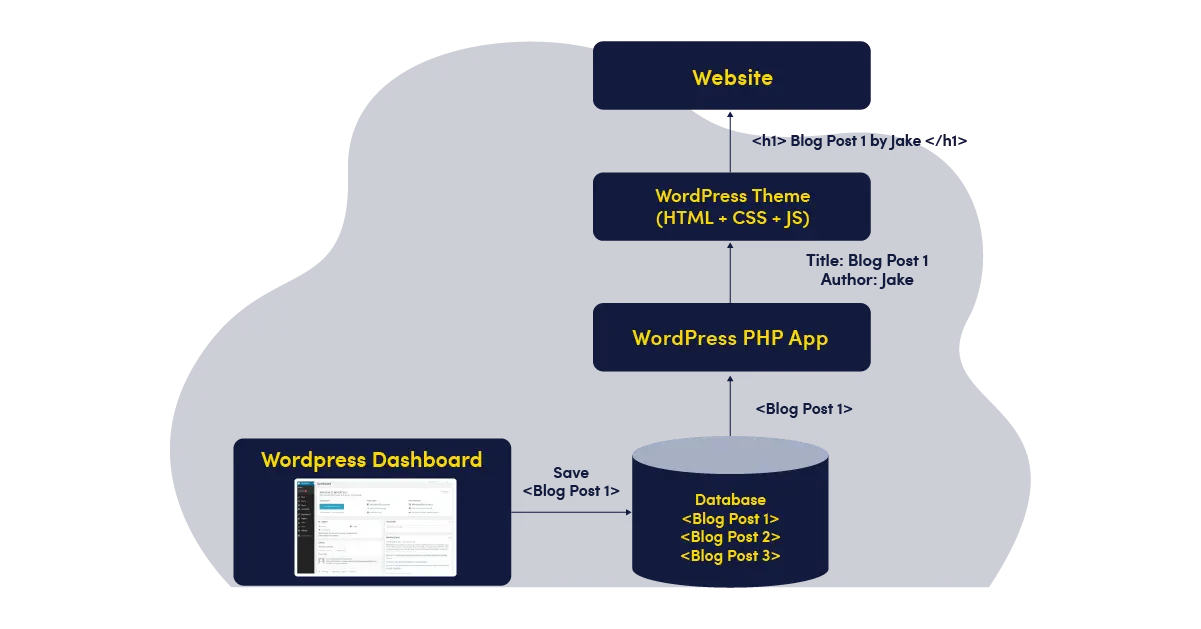
The architecture of a traditional CMS solution comprises two distinct components: the front-end and the backend. The front-end displays content on a web page or application, and the backend stores all the content.
There is a strong dependency between the front and back ends, i.e., these two components are tightly coupled to each other. And, that’s the problem!
When components are tightly coupled, it becomes difficult to change one without impacting the others. In a coupled content management system (like WordPress, Drupal, or Joomla), the back-end and front-end are closely integrated. While this architecture is simple and cost-effective, it comes with several significant downsides:
-
Releasing updates can pose a deployment risk
-
If you upgrade the backend architecture components, the front-end components have to be changed as well
-
You can’t change the backend or the front-end components independent of one another due to the dependencies
-
Extremely difficult to scale
What is a headless CMS solution?
A headless CMS has no built-in front-end and works as a content store that is accessed through APIs. It is not tied to any specific presentation layer, so you can use any front-end you prefer to display the content.
This allows the content to be used across multiple platforms without requiring reformats or repurposing. One example of a popular headless CMS solution is ButterCMS.
Another advantage of headless CMSs is that they tend to be more lightweight and easier to use than traditional, coupled CMSs. A headless CMS is light-weight and faster since the content database is decoupled from the presentation resulting in better flexibility, multi-channel distribution, and faster performance. This makes them ideal for developers who want to quickly create prototypes or MVPs without having to worry about setting up a complex backend infrastructure.
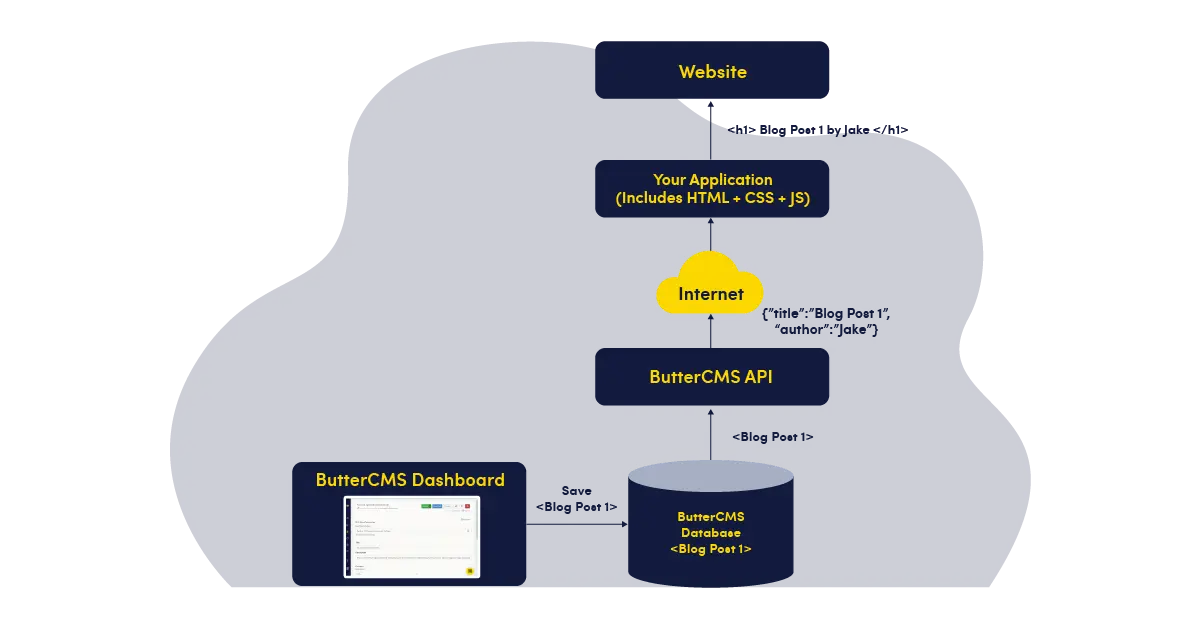
Advantages and disadvantages of a headless CMS solution
Advantages
Exceptional flexibility
If you build a website with a headless CMS, you don’t need to worry about your content being compatible with the design or layout of the website. The content would be created in a centralized location, and then it would be published and made available on the website or UI of your choice. You also have the flexibility to use the tools and frameworks of your choice and seamlessly integrate with new technologies.
Omnichannel support
In a headless CMS, since content and code are separated from each other, a single headless CMS instance is capable of serving multiple digital channels such as mobile apps, digital signage, kiosks, smartwatches, etc. without the need for content duplication.
Lower costs
With a headless CMS, you can build new websites faster and improve existing ones without being held back by rigid templates. Developers can connect it to different parts of your tech stack through APIs, making it easier to work with modern tools and frameworks.
You don’t have to wait for developers to set up templates before creating content, which helps teams move quicker. It also lowers upfront costs, since you can start with a small proof of concept instead of committing to a large, complex build right away.
Better security
The choice of headless architecture for your CMS solution is also a great idea from a security standpoint. Because the frontend is decoupled from the administrative tools, a vulnerability in your display layer won't automatically grant an intruder access to your core backend.

Disadvantages
No presentation layer
For teams that don’t want to build a fully custom front-end from scratch, the lack of a built-in presentation layer can be a drawback. A headless CMS also tends to require more developer involvement, especially during the initial setup and integration with your front-end.
Higher complexity
Working with a headless CMS can be complex in the absence of experienced frontend developers. Additionally, you'll typically have to work with several codebases - one for each front-end the API connects to.
Higher costs
As a result of the fragmented technological stack, implementation and maintenance are rather expensive in a headless CMS.
What is a decoupled CMS solution?
A decoupled CMS sits between a traditional CMS and a headless CMS. It has a centralized backend for creating and storing content, but it also includes an optional front-end for teams that want to get started quickly.
For example, a team can launch using the default front-end right away, and later, as they expand to new channels, they can use APIs to build custom front-ends that still connect to the same decoupled CMS backend.
Examples of decoupled CMS solutions are WordPress and Drupal. In practice, these platforms achieve decoupling by separating the backend content management from the front-end display. WordPress, for example, provides the traditional theme-based front-end by default but also exposes REST APIs so developers can build custom front-ends.
Advantages and disadvantages of a decoupled CMS solution
Advantages
Better flexibility
When using a decoupled CMS solution, you're not constrained by the templates that are provided by the CMS. You can work with any designer or development team you want, and they can create a custom user interface that meets your specific needs.
Performance
A decoupled CMS architecture can improve content delivery performance and make it easier to scale your website. Since the front-end and back-end run as separate systems, traffic can be distributed more efficiently, which reduces the load on each part of the platform.
You can also use caching and auto-scaling to keep things running smoothly, even during peak traffic periods.
Better security
Because of the decoupled CMS architecture, you can put up a firewall between the content creation and content delivery environments to safeguard your network. The decoupled architecture also reduces the chances of DDOS or SQL injection attacks.
In a typical CMS solution with a tightly coupled front-end and back-end, any security issues affecting the front-end can impact the entire system. This risk is mitigated with a decoupled CMS thanks to a separation of concerns.
Scalability
A decoupled CMS makes it easier to scale your website as your needs grow. Because the front-end and back-end are separate, you can expand each part independently without affecting the other.
This also gives you the freedom to build the front-end using any technology you prefer, whether it’s React, Angular, Vue.js. Since the two layers operate separately, updates or maintenance on the back-end won’t disrupt the front end.
Disadvantages
May neglect the developer experience
While a headless platform is built primarily with a developer-first mindset, a decoupled CMS aims for a middle ground between marketing and development needs. However, this attempt to balance both worlds can sometimes backfire; by prioritizing user-friendly features for marketers, decoupled CMSs sometimes end up imposing rigid constraints that limit a developer's creative freedom.
Performance overhead in some setups
If the built-in front-end is still in use, it can add extra processing compared to a fully custom front-end. This may affect performance if not properly optimized.
Less flexibility than fully headless setups
Even though decoupled CMSs offer flexibility, they may still carry some structure from their built-in front-end. This can limit how far you can go with customization compared to a fully headless approach.
The main differences between headless and decoupled CMS
Here are the main differences between headless vs decoupled CMS solutions:
-
Architecture: A headless CMS has no built-in front-end at all and focuses only on content storage and delivery via APIs. A decoupled CMS has a backend along with an optional presentation layer you can use if needed.
-
Front-end control: With a headless CMS, you have full control over the front-end since you build everything from scratch. In a decoupled CMS, you can either use the default front-end or build your own, which gives flexibility but not complete freedom (in every case).
-
Content delivery: Headless CMS delivers content strictly through APIs to any device or platform. A decoupled CMS also uses APIs, but it can deliver content through its built-in front-end as well.
-
Developer effort: Headless CMS requires more developer effort, especially at the start, because everything on the front-end needs to be built. A decoupled CMS can reduce that effort if you choose to use its default front-end.
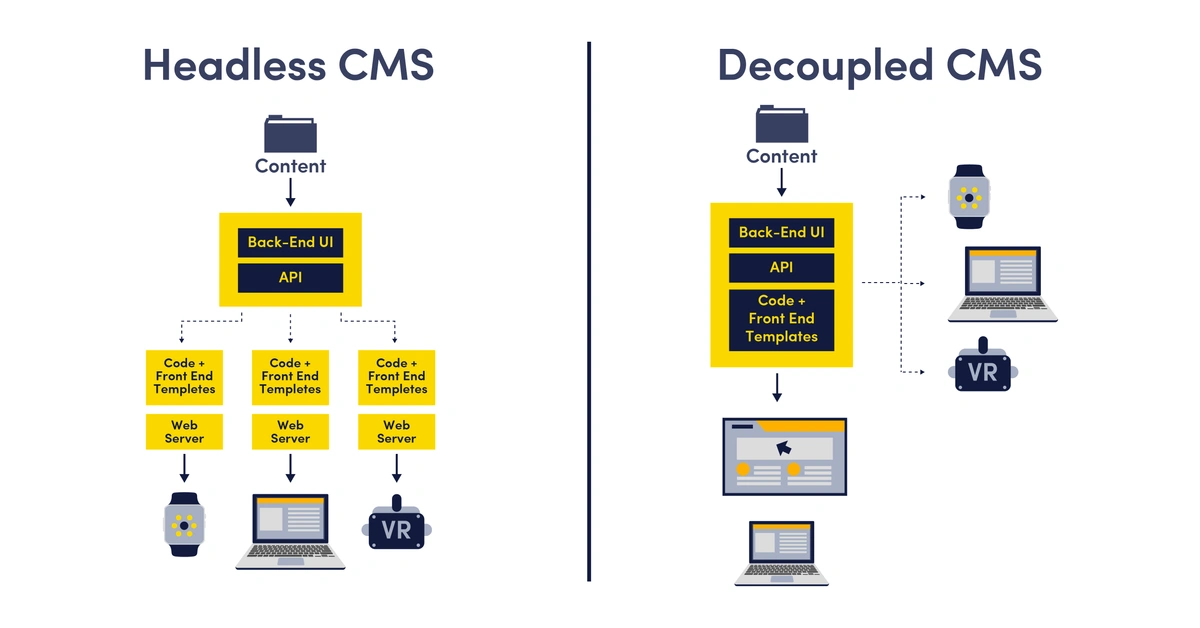
Here’s a quick comparison table to sum it up:
|
Feature |
Headless CMS |
Decoupled CMS |
Traditional CMS |
|
Front-end |
No built-in front-end |
Optional built-in front-end |
Tightly coupled built-in front-end |
|
Content delivery |
API-first only |
API + optional front-end |
Directly through built-in front-end |
|
Flexibility |
Very high |
High |
Limited |
|
Developer effort |
High (custom front-end required) |
Moderate (can use built-in or custom) |
Low to moderate |
|
Marketer-friendliness |
High |
Moderate to high |
Low, sometimes dependent on developers |
|
SEO support |
Most modern options include it |
Most modern options include it |
Available via plugins |
|
Cost |
Higher upfront, flexible long-term |
Moderate to high depending on setup |
Lower upfront, may increase over time |
|
Best for |
Custom apps, multi-channel platforms |
Flexible websites with optional customization |
Simple websites and blogs |
How to choose between headless vs decoupled cms
Now that you understand the differences between headless cms vs. decoupled cms, use this simple checklist to choose between the two:
Go with a headless CMS if:
-
You need to deliver content across multiple platforms like web, mobile apps, kiosks, and conversational interfaces
-
You want full control over how your front-end is built and designed
-
You have developers who can build and maintain a custom front-end
-
You want to build a fully-scalable, future-proof content stack
Go with a decoupled CMS if:
-
You want the flexibility of APIs but still value having a built-in front-end option
-
Your team prefers a faster setup without building everything from scratch
-
You don’t have frontend developers to build from scratch
Use cases of headless CMSs
Fintech companies
Most banks and fintech companies deliver content through websites and mobile apps. They often choose a headless CMS to push content like banners and promotions to multiple channels at once.
A headless CMS also lets them adopt new technologies and updates without having to rebuild their site, keeping their platforms user-friendly and secure.
Media and publication houses
A headless CMS is an excellent choice if you want to publish breaking news stories at an accelerated speed for media and publication sites. Your content team can deliver the latest information as breaking news stories to viewers quickly without having to bother about where the content will eventually be represented.
Headless commerce
Commerce is an excellent example of how a headless CMS can help. An online store is not enough to do a functional commerce practice. Commerce now includes IoT apps, native apps, customer support chat apps, connectivity to Alexa, Google Home, etc. Your content and commerce inventory must be consistently available across every application and touchpoint your customer frequents.
Use cases of decoupled CMSs
Digital signage
You can leverage decoupled CMSs for digital signage. These days, it has become increasingly common for stores to display digital signage. This can include menus at restaurants and coffee shops to train information at subway stations. Digital signage often requires real-time or near-real-time information updates, such as with train timetables or the latest restaurant or coffee shop discounts. An organization can take advantage of a decoupled CMS to connect the digital dots and provide a seamless user experience.
Corporate websites
Decoupled CMSs are also ideal for corporate websites that need both flexibility and control. Companies can use the built-in front-end for faster setup while still connecting APIs to other systems, like CRM or analytics tools.
Real-life examples of headless and decoupled CMSs
Headless CMS examples:
Freddie's Flowers
After taking their initial steps towards international expansion outside of UK markets, Freddie's Flowers quickly began to outgrow their legacy website and sought out a headless CMS that would allow them to create pages and easily iterate them for different languages and locales. With ButterCMS they were able to scale quickly, build and support landing pages in a variety of different languages, and give marketers the freedom to make changes without needing developer assistance—something that would only help expedite their expansion.
Qatalog
Prior to integrating ButterCMS with their marketing site, the marketing team at Qatalog's effectiveness was heavily reliant upon busy developers. In order to become as efficient as possible, they needed to implement a headless CMS that was not only compatible with their current tech stack but also had a UI that could be easily navigated and used by non-technical teams. After successfully merging their blog onto the ButterCMS blog engine they took their usage site-wide giving the marketing team the ability to effectively control, create, and edit/publish marketing site pages and content with the use of components and schemas that have helped them expand their organic and paid reach.
Decoupled CMS examples:
The Economist
An example of a media brand pushing the boundaries of content delivery is The Economist. The Economist's core systems have been re-engineered to support microservices and APIs. This allows it to provide real-time content to a variety of channels while using the same core content.
Vodafone
A seamless digital experience is challenging for Vodafone due to its scale. This made them take advantage of a decoupled CMS system for content delivery. Vodafone's CMS delivers the latest content and product information to its POS systems as part of its omnichannel strategy. Vodafone leverages a single decoupled system to manage content.
Final thoughts
In conclusion, both headless CMS and decoupled CMS solutions handle content management and storage, but they differ in how content is presented. A headless CMS has no built-in front-end, while a decoupled CMS includes an optional presentation layer. Choosing the right CMS depends on your business goals and project needs.
This article covered what a CMS is, the differences in headless and decoupled CMS architecture, pros and cons of both, along with typical use cases. We hope you found it useful.
If you want to see how ButterCMS works in practice, you can start a free trial to explore on your own, or we can set up a personalized demo to show your team its fast, easy-to-use interface.