Locale-specific content

Not all content needs to exist in every locale. ButterCMS supports creating content that is unique to specific markets, regions, or languages without requiring equivalent content in other locales.

Understanding locale-specific content

Locale-specific content differs from translated content in important ways:
AspectTranslated ContentLocale-Specific Content
PurposeSame message, different languageDifferent message per region
StructureSame fields, different valuesMay have unique content items
WorkflowTranslate from sourceCreate independently
ExamplesProduct descriptions, blog postsRegional promotions, local events

Creating locale-specific Pages

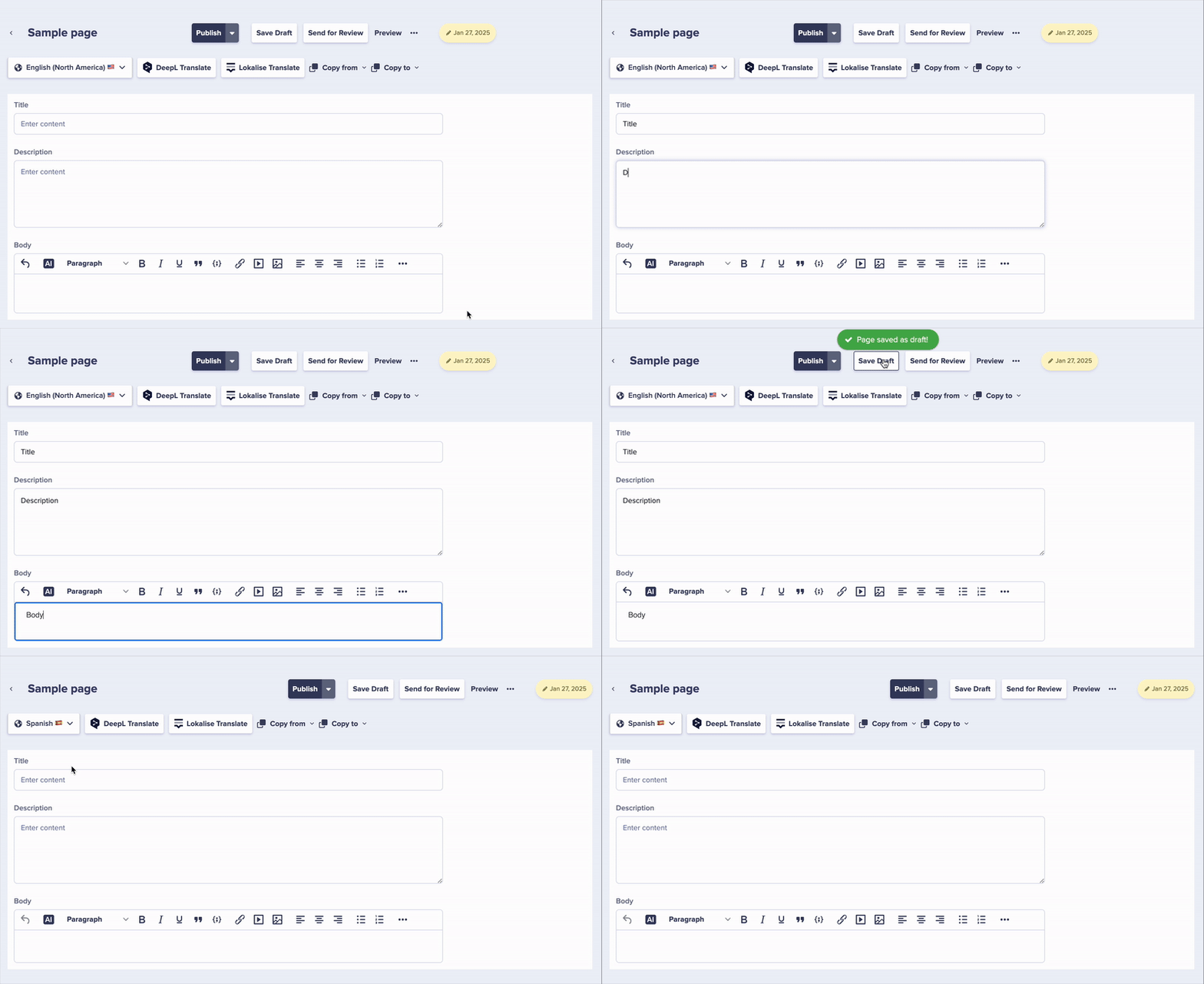
When localization is enabled, each page can have independent content for each locale. The pages created in other languages will remain empty until you enter content specifically for that locale. Locale selector for pages

Creating content for one locale only

To create content that exists only in a specific locale:
  1. Navigate to your Page Type or create a new page
  2. Select the target locale from the locale dropdown
  3. Add your content for that locale only
  4. Publish the page
The page will only be available when the API is called with that specific locale parameter.

Example: regional promotion

// This page only exists in the German locale
const germanPromo = await butter.page.retrieve(
  'promotional_pages',
  'oktoberfest-sale',
  { locale: 'de' }
);

// Calling with English locale would return no content
const englishPromo = await butter.page.retrieve(
  'promotional_pages',
  'oktoberfest-sale',
  { locale: 'en' }
); // Returns empty or error

Locale-specific Collection items

Collections also support locale-specific content. All the fields in your Default Locale will be defined and the same fields are created for other Locales automatically. However, the content you create for your default locale in a Collection will not automatically appear in your other localized Collections.

Use cases for locale-specific Collection items

Regional Team Members
// Team members collection with region-specific entries
// Some team members only appear for certain markets
const usTeam = await butter.content.retrieve(['team_members'], {
  locale: 'en-us'
});

const ukTeam = await butter.content.retrieve(['team_members'], {
  locale: 'en-gb'
});
// UK team may include different members
Local Store Locations
// Store locations that only exist in certain regions
const germanStores = await butter.content.retrieve(['store_locations'], {
  locale: 'de'
});
Region-Specific FAQs
// FAQs that address local regulations or customs
const euFaqs = await butter.content.retrieve(['faqs'], {
  locale: 'de',
  'fields.category': 'gdpr'
});

Managing different Reference field data per locale

Reference fields work seamlessly with localization, allowing different reference relationships for different language versions. This enables:
  • Locale-specific content recommendations
  • Region-appropriate product references
  • Language-specific related content

Example: locale-specific references

Imagine a product page that references related products. In different markets, you might want to show different related items: US Market (en-us)
  • Related product: “Summer Collection”
  • Shipping info: US shipping details
German Market (de)
  • Related product: “Herbstkollektion” (Autumn Collection)
  • Shipping info: EU shipping details
// The same page, different references per locale
const usProductPage = await butter.page.retrieve('product', 'main-product', {
  locale: 'en-us',
  levels: 2  // Include referenced content
});

const deProductPage = await butter.page.retrieve('product', 'main-product', {
  locale: 'de',
  levels: 2
});
// References are resolved based on the locale

Content strategy patterns

All locales have the same pages, but with translated or adapted content.
/about-us     → en, de, fr, es (all locales)
/products     → en, de, fr, es (all locales)
/contact      → en, de, fr, es (all locales)
Best for: Corporate sites, e-commerce, documentation

Pattern 2: adaptive structure

Some pages exist only in certain locales based on market needs.
/about-us     → en, de, fr, es (all locales)
/oktoberfest  → de only
/4th-of-july  → en-us only
/bastille-day → fr only
Best for: Marketing sites, regional promotions, local events

Pattern 3: hybrid structure

Core content mirrored, with locale-specific additions.
/core-product → en, de, fr, es (all locales)
/us-only-service → en-us only
/eu-gdpr-info → de, fr (EU locales only)
Best for: SaaS products, services with regional variations

Handling missing locale content

For strategies and code examples for handling missing locale content, see Fetching Localized Content.

Best practices

Planning locale-specific content

  1. Document your content strategy: Define which content types will be mirrored vs. locale-specific
  2. Use consistent naming: Even locale-specific content should follow naming conventions
  3. Consider SEO implications: Locale-specific pages need proper hreflang tags

Content organization

  • Use tags or categories to identify locale-specific content
  • Create a content matrix showing which pages exist in which locales
  • Establish review workflows for locale-specific content approval

Technical implementation

  • Use the preview parameter to check locale content before publishing
  • Implement locale detection to route users appropriately
Remember that content created in only one locale won’t appear when the API is called with a different locale parameter. Ensure your frontend handles this scenario.