You can import your content from another CMS programmatically via the Write API.
Before importing, configure your Page Types and Collections to match your content structure. (You can create Pages of existing Page Types or
items for existing Collections with the Write API, but you will need to set up the schema first in the dashboard.)
Note that if you’re setting up a blog, we have a pre-built Blog Engine that may serve your needs.
Write API import
For programmatic imports, use the ButterCMS Write API. This allows you to automate content creation without manual data entry.
Getting your Write API token
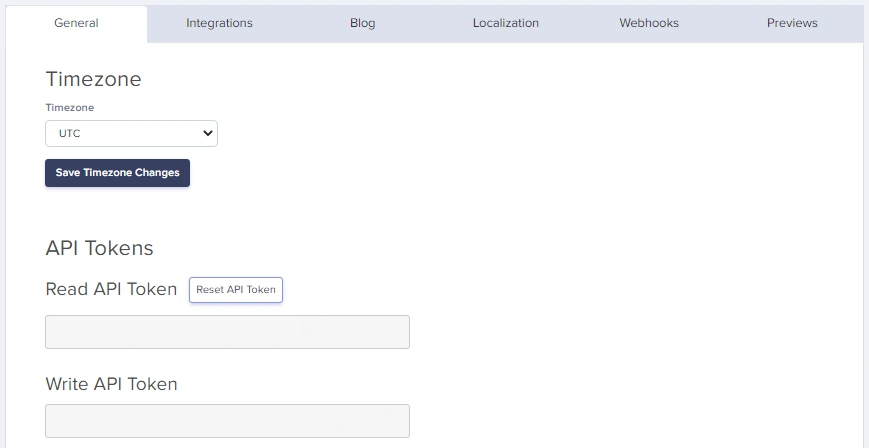
Navigate to Settings in your ButterCMS dashboard
Go to the API Tokens tab
Copy your Write API Token
Keep your Write API Token secure. It allows creating and modifying content in your account.
Creating content via Write API
For full parameter details and code examples, see:
Collections API Reference
Blog Engine API Reference
Supported SDKs
Click on any SDK to see examples of how to write Pages, Collection Items, and Blog Posts.
Language Package Doc JavaScript buttercmsJavaScript SDK Python buttercms-pythonPython SDK Ruby buttercms-rubyRuby SDK PHP buttercms/buttercms-phpPHP SDK Java buttercms-javaJava SDK .NET ButterCMS.NET SDK Go buttercms-goGo SDK Dart buttercms_dartDart SDK Swift buttercms-swiftSwift SDK Kotlin buttercms-kotlinKotlin SDK Gatsby gatsby-source-buttercmsGatsby SDK
Write API tips
Working with references
To reference Collection items or other Pages, use their slugs or meta IDs:
// First, create collection items and note their slugs
const categorySlug = 'technology' ;
const authorSlug = 'john-doe' ;
// Then reference them in your page
const pageWithReferences = {
"page-type" : "blog_page" ,
status: "published" ,
title: "Tech Article" ,
slug: "tech-article" ,
fields: {
title: "Understanding APIs" ,
body: "<p>Article content...</p>" ,
categories: [ categorySlug ], // Array of slugs for One-to-Many
author: authorSlug // Single slug for One-to-One
}
};
ButterCMS can handle media in several ways:
Option 1: External URLs
fields : {
hero_image : "https://example.com/image.jpg"
}
Option 2: ButterCMS CDN URLs
fields : {
hero_image : "https://cdn.buttercms.com/abc123xyz"
}
ButterCMS will automatically download images from external URLs and serve them from the ButterCMS CDN.
Handling localized content
For multilingual content, include locale-specific fields:
const localizedPage = {
"page-type" : "product_page" ,
status: "published" ,
title: "Product Name" ,
slug: "product-name" ,
fields: {
en: {
title: "Amazing Product" ,
description: "English description of the product." ,
price: "$99.99"
},
de: {
title: "Erstaunliches Produkt" ,
description: "German description of the product." ,
price: "EUR 89.99"
}
}
};
await createPage ( localizedPage );
Working with Component Pickers
For pages with Component Pickers, pass an array of component objects:
const pageWithComponents = {
"page-type" : "landing_page" ,
status: "published" ,
title: "Dynamic Landing Page" ,
slug: "dynamic-landing" ,
fields: {
title: "Welcome" ,
body: [
{
hero_block: {
headline: "Build Amazing Websites" ,
subheadline: "With ButterCMS" ,
background_image: "https://cdn.buttercms.com/hero.jpg"
}
},
{
content_block: {
text: "<p>Your content here...</p>"
}
},
{
cta_block: {
caption: "Get Started Today" ,
link: "/signup"
}
}
]
}
};
Each object in the array represents a component instance. The key is the component’s API name (lowercase, underscores).
Import from CSV/spreadsheet
For content in spreadsheets, parse and import programmatically:
const csv = require ( 'csv-parse/sync' );
const fs = require ( 'fs' );
// Read CSV file
const fileContent = fs . readFileSync ( 'content.csv' );
const records = csv . parse ( fileContent , {
columns: true ,
skip_empty_lines: true
});
// Import each row as a page
for ( const record of records ) {
const page = {
"page-type" : "team_member" ,
status: "published" ,
title: record . name ,
slug: record . name . toLowerCase (). replace ( / / g , '-' ),
fields: {
name: record . name ,
title: record . job_title ,
bio: record . bio ,
email: record . email ,
photo: record . photo_url
}
};
await createPage ( page );
console . log ( `Imported: ${ record . name } ` );
}
CSV format example:
name, job_title, bio, email, photo_url
John Doe, CEO, "Founder and CEO of the company.", john@example.com, https://example.com/john.jpg
Jane Smith, CTO, "Technical leader with 15 years experience.", jane@example.com, https://example.com/jane.jpg
Bulk upload
Bulk upload is ideal for:
Migrating hundreds or thousands of pages
Importing product catalogs from e-commerce systems
Loading content from databases or external APIs
Populating Collections with reference data
Automated content pipelines
Prerequisites
Before bulk uploading:
Write API access enabled - Contact support@buttercms.com
Content types created - Page Types and Collections must exist
Data source prepared - JSON, CSV, database, or API ready
Field mapping documented - Know how source fields map to ButterCMS
Architecture
Complete bulk upload script
Here’s a complete Python script for bulk content migration:
# bulk_migration.py
import json
import os
import time
from requests import request, exceptions
from dotenv import dotenv_values
# Configuration
config = dotenv_values( ".env" )
BUTTERCMS_BASE_URL = "https://api.buttercms.com/v2"
BUTTERCMS_WRITE_API_KEY = config.get( 'BUTTERCMS_WRITE_API_KEY' )
# Rate limiting settings
REQUESTS_PER_SECOND = 5
DELAY_BETWEEN_REQUESTS = 1 / REQUESTS_PER_SECOND
class BulkMigrator :
def __init__ ( self , data_file_path , verbose = True ):
self .verbose = verbose
self .success_count = 0
self .error_count = 0
self .errors = []
# Load data from file
with open (data_file_path, 'r' ) as f:
self .data = json.load(f)
if self .verbose:
print ( f "Loaded { len ( self .data.get( 'pages' , [])) } pages" )
print ( f "Loaded { len ( self .data.get( 'collections' , [])) } collections" )
def api_request ( self , route , data , method = "POST" ):
"""Make an API request with error handling."""
try :
response = request(
url = f " { BUTTERCMS_BASE_URL } / { route } " ,
json = data,
method = method,
headers = {
"Authorization" : f "Token { BUTTERCMS_WRITE_API_KEY } " ,
"Content-Type" : "application/json"
}
)
if response.status_code in [ 200 , 201 , 202 ]:
self .success_count += 1
return response.json()
else :
self .error_count += 1
error_msg = f "Status { response.status_code } : { response.text } "
self .errors.append({
'route' : route,
'data' : data,
'error' : error_msg
})
if self .verbose:
print ( f "Error: { error_msg } " )
return None
except exceptions.RequestException as e:
self .error_count += 1
self .errors.append({
'route' : route,
'data' : data,
'error' : str (e)
})
return None
def create_pages ( self , status = "draft" ):
"""Bulk create pages."""
pages = self .data.get( 'pages' , [])
for i, page in enumerate (pages):
page[ 'status' ] = status
if self .verbose:
print ( f "Creating page { i + 1 } / { len (pages) } : { page.get( 'title' , 'Untitled' ) } " )
result = self .api_request( 'pages/' , page)
if result and self .verbose:
print ( f " ✓ Created: { page.get( 'slug' ) } " )
# Rate limiting
time.sleep( DELAY_BETWEEN_REQUESTS )
return self .success_count
def create_collection_items ( self , collection_key , items , status = "published" ):
"""Bulk create collection items."""
for i, item in enumerate (items):
# Note: 'fields' takes an array even for single items
payload = {
'key' : collection_key,
'status' : status,
'fields' : [item]
}
if self .verbose:
print ( f "Creating collection item { i + 1 } / { len (items) } " )
result = self .api_request( 'content/' , payload)
if result and self .verbose:
print ( f " ✓ Created collection item" )
time.sleep( DELAY_BETWEEN_REQUESTS )
return self .success_count
def get_summary ( self ):
"""Return migration summary."""
return {
'success' : self .success_count,
'errors' : self .error_count,
'error_details' : self .errors
}
# Usage
if __name__ == "__main__" :
migrator = BulkMigrator( 'content_data.json' , verbose = True )
# Create all pages as drafts first
migrator.create_pages( status = "draft" )
# Get summary
summary = migrator.get_summary()
print ( f " \n === Migration Complete ===" )
print ( f "Success: { summary[ 'success' ] } " )
print ( f "Errors: { summary[ 'errors' ] } " )
# Save errors for review
if summary[ 'errors' ] > 0 :
with open ( 'migration_errors.json' , 'w' ) as f:
json.dump(summary[ 'error_details' ], f, indent = 2 )
print ( "Error details saved to migration_errors.json" )
JavaScript/Node.js implementation
// bulk-migration.js
const fs = require ( 'fs' );
require ( 'dotenv' ). config ();
const BUTTERCMS_API_URL = 'https://api.buttercms.com/v2' ;
const BUTTERCMS_WRITE_TOKEN = process . env . BUTTERCMS_WRITE_TOKEN ;
class BulkMigrator {
constructor ( options = {}) {
this . verbose = options . verbose ?? true ;
this . delayMs = options . delayMs ?? 200 ; // 5 requests per second
this . successCount = 0 ;
this . errorCount = 0 ;
this . errors = [];
}
async delay ( ms ) {
return new Promise ( resolve => setTimeout ( resolve , ms ));
}
log ( message ) {
if ( this . verbose ) console . log ( message );
}
async apiRequest ( endpoint , data , method = 'POST' ) {
try {
const response = await fetch ( ` ${ BUTTERCMS_API_URL } / ${ endpoint } ` , {
method ,
headers: {
'Content-Type' : 'application/json' ,
'Authorization' : `Token ${ BUTTERCMS_WRITE_TOKEN } `
},
body: JSON . stringify ( data )
});
if ( response . ok ) {
this . successCount ++ ;
return await response . json ();
} else {
const errorText = await response . text ();
this . errorCount ++ ;
this . errors . push ({
endpoint ,
data ,
status: response . status ,
error: errorText
});
this . log ( `Error: ${ response . status } - ${ errorText } ` );
return null ;
}
} catch ( error ) {
this . errorCount ++ ;
this . errors . push ({
endpoint ,
data ,
error: error . message
});
return null ;
}
}
async createPages ( pages , status = 'draft' ) {
this . log ( `Starting bulk page creation: ${ pages . length } pages` );
for ( let i = 0 ; i < pages . length ; i ++ ) {
const page = { ... pages [ i ], status };
this . log ( `[ ${ i + 1 } / ${ pages . length } ] Creating: ${ page . title } ` );
const result = await this . apiRequest ( 'pages/' , page );
if ( result ) {
this . log ( ` ✓ Created: ${ page . slug } ` );
}
await this . delay ( this . delayMs );
}
return this . successCount ;
}
async createCollectionItems ( collectionKey , items , status = 'published' ) {
this . log ( `Creating ${ items . length } items in collection: ${ collectionKey } ` );
for ( let i = 0 ; i < items . length ; i ++ ) {
const payload = {
key: collectionKey ,
status ,
fields: [ items [ i ]]
};
this . log ( `[ ${ i + 1 } / ${ items . length } ] Creating collection item` );
await this . apiRequest ( 'content/' , payload );
await this . delay ( this . delayMs );
}
return this . successCount ;
}
getSummary () {
return {
success: this . successCount ,
errors: this . errorCount ,
errorDetails: this . errors
};
}
}
// Usage
async function main () {
// Load data
const data = JSON . parse ( fs . readFileSync ( 'content_data.json' , 'utf8' ));
const migrator = new BulkMigrator ({ verbose: true });
// Create pages
await migrator . createPages ( data . pages , 'draft' );
// Create collection items
if ( data . collections ) {
for ( const [ key , items ] of Object . entries ( data . collections )) {
await migrator . createCollectionItems ( key , items );
}
}
// Summary
const summary = migrator . getSummary ();
console . log ( ' \n === Migration Complete ===' );
console . log ( `Success: ${ summary . success } ` );
console . log ( `Errors: ${ summary . errors } ` );
if ( summary . errors > 0 ) {
fs . writeFileSync ( 'errors.json' , JSON . stringify ( summary . errorDetails , null , 2 ));
console . log ( 'Error details saved to errors.json' );
}
}
main (). catch ( console . error );
Structure your data file for bulk upload:
{
"pages" : [
{
"page-type" : "blog_post" ,
"title" : "First Article" ,
"slug" : "first-article" ,
"fields" : {
"title" : "First Article" ,
"body" : "<p>Content here...</p>" ,
"summary" : "Article summary" ,
"publish_date" : "2024-01-15T10:00:00Z" ,
"author" : "john-doe" ,
"categories" : [ "technology" , "tutorials" ]
}
}
],
"collections" : {
"blog_authors" : [
{
"en" : {
"name" : "John Doe" ,
"slug" : "john-doe" ,
"bio" : "Technical writer"
}
}
]
}
}
Handling large datasets
Batch processing
For very large datasets, process in batches:
async function processBatches ( items , batchSize = 50 ) {
const batches = [];
for ( let i = 0 ; i < items . length ; i += batchSize ) {
batches . push ( items . slice ( i , i + batchSize ));
}
console . log ( `Processing ${ batches . length } batches of ${ batchSize } items` );
for ( let i = 0 ; i < batches . length ; i ++ ) {
console . log ( ` \n Batch ${ i + 1 } / ${ batches . length } ` );
await migrator . createPages ( batches [ i ], 'draft' );
// Longer pause between batches
if ( i < batches . length - 1 ) {
console . log ( 'Pausing between batches...' );
await delay ( 2000 );
}
}
}
Progress tracking
class ProgressTracker {
constructor ( total ) {
this . total = total ;
this . current = 0 ;
this . startTime = Date . now ();
}
increment () {
this . current ++ ;
}
getProgress () {
const percent = Math . round (( this . current / this . total ) * 100 );
const elapsed = ( Date . now () - this . startTime ) / 1000 ;
const rate = this . current / elapsed ;
const remaining = ( this . total - this . current ) / rate ;
return {
current: this . current ,
total: this . total ,
percent ,
elapsed: Math . round ( elapsed ),
remaining: Math . round ( remaining ),
rate: rate . toFixed ( 2 )
};
}
log () {
const p = this . getProgress ();
console . log (
`Progress: ${ p . current } / ${ p . total } ( ${ p . percent } %) ` +
`| Rate: ${ p . rate } /s | ETA: ${ p . remaining } s`
);
}
}
// Usage
const tracker = new ProgressTracker ( pages . length );
for ( const page of pages ) {
await createPage ( page );
tracker . increment ();
tracker . log ();
}
Checkpoint/resume support
For very long migrations, implement checkpoint support:
const fs = require ( 'fs' );
class CheckpointMigrator {
constructor ( checkpointFile = 'migration_checkpoint.json' ) {
this . checkpointFile = checkpointFile ;
this . checkpoint = this . loadCheckpoint ();
}
loadCheckpoint () {
try {
if ( fs . existsSync ( this . checkpointFile )) {
return JSON . parse ( fs . readFileSync ( this . checkpointFile , 'utf8' ));
}
} catch ( e ) {
console . log ( 'No checkpoint found, starting fresh' );
}
return { lastIndex: - 1 , completed: [] };
}
saveCheckpoint () {
fs . writeFileSync (
this . checkpointFile ,
JSON . stringify ( this . checkpoint , null , 2 )
);
}
async migrateWithCheckpoint ( pages ) {
const startIndex = this . checkpoint . lastIndex + 1 ;
console . log ( `Resuming from index ${ startIndex } ` );
for ( let i = startIndex ; i < pages . length ; i ++ ) {
const page = pages [ i ];
try {
await createPage ( page );
this . checkpoint . lastIndex = i ;
this . checkpoint . completed . push ( page . slug );
// Save checkpoint every 10 items
if ( i % 10 === 0 ) {
this . saveCheckpoint ();
}
} catch ( error ) {
console . error ( `Failed at index ${ i } :` , error );
this . saveCheckpoint ();
throw error ;
}
}
// Clear checkpoint on completion
fs . unlinkSync ( this . checkpointFile );
console . log ( 'Migration complete, checkpoint cleared' );
}
}
Request pacing
Request Volume Recommended Delay Requests/Second < 100 items 200ms 5/s 100-500 items 250ms 4/s 500-1000 items 300ms 3/s 1000+ items 500ms 2/s
These delays help keep bulk migrations stable and reduce the chance of hitting monthly API call limits. Free and Trial plans have a 50,000 API calls per month limit.
Handling 429 responses
async function requestWithRetry ( fn , maxRetries = 3 ) {
for ( let attempt = 1 ; attempt <= maxRetries ; attempt ++ ) {
try {
const response = await fn ();
if ( response . status === 429 ) {
// Monthly API call limit reached (Free/Trial). Respect Retry-After and pause.
const retryAfter = Number ( response . headers . get ( 'Retry-After' ) || 0 );
console . log ( `API limit reached. Retry after ${ retryAfter } s...` );
await delay ( retryAfter * 1000 );
continue ;
}
return response ;
} catch ( error ) {
if ( attempt === maxRetries ) throw error ;
await delay ( 1000 * attempt );
}
}
}
Validation before upload
Always validate data before uploading:
function validatePage ( page , schema ) {
const errors = [];
// Check required fields
if ( ! page [ 'page-type' ]) {
errors . push ( 'Missing page-type' );
}
if ( ! page . title ) {
errors . push ( 'Missing title' );
}
if ( ! page . slug ) {
errors . push ( 'Missing slug' );
}
// Recommended slug format (lowercase alphanumeric with hyphens)
// API allows up to 200 characters
if ( page . slug && ! / ^ [ a-z0-9- ] + $ / . test ( page . slug )) {
errors . push ( 'Slug contains characters outside recommended format (a-z, 0-9, hyphens)' );
}
if ( page . slug && page . slug . length > 200 ) {
errors . push ( 'Slug exceeds maximum length of 200 characters' );
}
// Check fields against schema
if ( schema && page . fields ) {
for ( const [ key , config ] of Object . entries ( schema )) {
if ( config . required && ! page . fields [ key ]) {
errors . push ( `Missing required field: ${ key } ` );
}
}
}
return errors ;
}
// Validate all before uploading
const validationErrors = [];
for ( const page of pages ) {
const errors = validatePage ( page , schema );
if ( errors . length > 0 ) {
validationErrors . push ({ page: page . title , errors });
}
}
if ( validationErrors . length > 0 ) {
console . error ( 'Validation failed:' , validationErrors );
process . exit ( 1 );
}
Error handling
Handle common errors gracefully:
async function safeCreatePage ( pageData ) {
try {
const response = await fetch ( ` ${ BUTTERCMS_API_URL } /pages/` , {
method: 'POST' ,
headers: {
'Content-Type' : 'application/json' ,
'Authorization' : `Token ${ BUTTERCMS_WRITE_TOKEN } `
},
body: JSON . stringify ( pageData )
});
if ( response . status === 409 ) {
// Page with this slug already exists
console . log ( `Page ${ pageData . slug } exists, updating...` );
return updatePage ( pageData [ 'page-type' ], pageData . slug , pageData );
}
if ( ! response . ok ) {
const error = await response . json ();
throw new Error ( `API Error: ${ JSON . stringify ( error ) } ` );
}
return response . json ();
} catch ( error ) {
console . error ( `Failed to create ${ pageData . title } :` , error . message );
return null ;
}
}
Common error codes
Status Code Meaning Solution 400 Bad Request Check field names and data types 401 Unauthorized Verify your Write API token 403 Forbidden Write API is not enabled—contact support@buttercms.com to enable 409 Conflict Page/item with slug already exists 422 Validation Error Check required fields and formats 429 API Limit Reached (Free/Trial) Reduce calls and wait for the monthly reset
This list covers common errors. For complete API error documentation, see API Reference .
Best practices
Test with draft status first - Create as drafts, review, then publish
Batch your imports - Import in small batches to identify issues early
Log everything - Keep detailed logs of what was imported
Validate before import - Check data quality before sending to API
Monitor monthly limits - Use pacing and caching to stay within limits
Use idempotent operations - Check if content exists before creating