

ESPN website comparison: 2000 vs 2020 showing increased content complexity

What is caching?

Caching means to store resources or data once retrieved as cache. Once stored, the browser or API client can get the data from the cache. This means the server will not have to process or retrieve the data repeatedly, resulting in reduced load on the server. Caching is a simple concept - store the data and retrieve it from the cache when needed again. However, it requires careful implementation. Caching strategies should be understood and applied carefully.

Types of caching strategies

1. Browser level / local caching

Browser level caching means storing resources and API responses at the user level. This enables the web application to load considerably faster compared to a fresh load. Browser level caching utilizes the browser’s local data store and disk space to save resources. Local caching diagram Benefits:
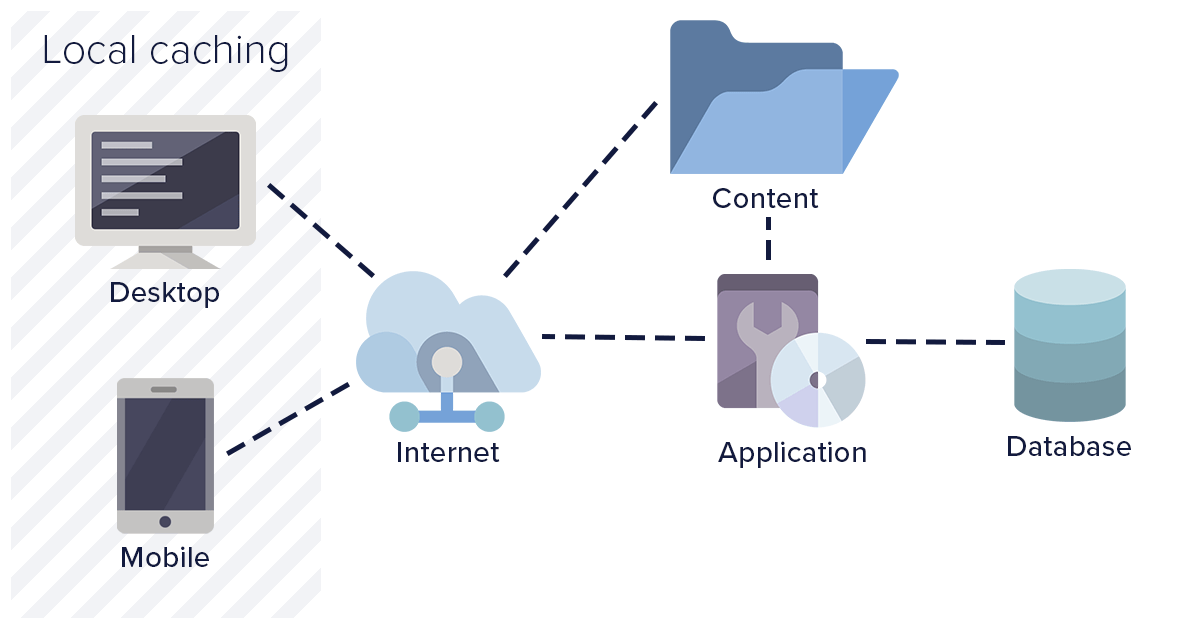
  • Browser level cache consumes space only on a user’s system
  • Helps in avoiding a full round trip to the server
  • Results in quick loading of the web page
  • Reduced API calls consequently reduce server traffic
Drawbacks:
  • If expiry time is configured too long, it could load stale files
  • Heavy resources may consume significant client disk space
  • Limited control over the cache

2. Object level caching

Object level caching involves caching pre-processed pages at the server level along with the data. This helps in preventing frequent database calls as well as page processing calls. Object level caching is beneficial when the web application expects many new users on a regular basis. Object caching strategy diagram Benefits:
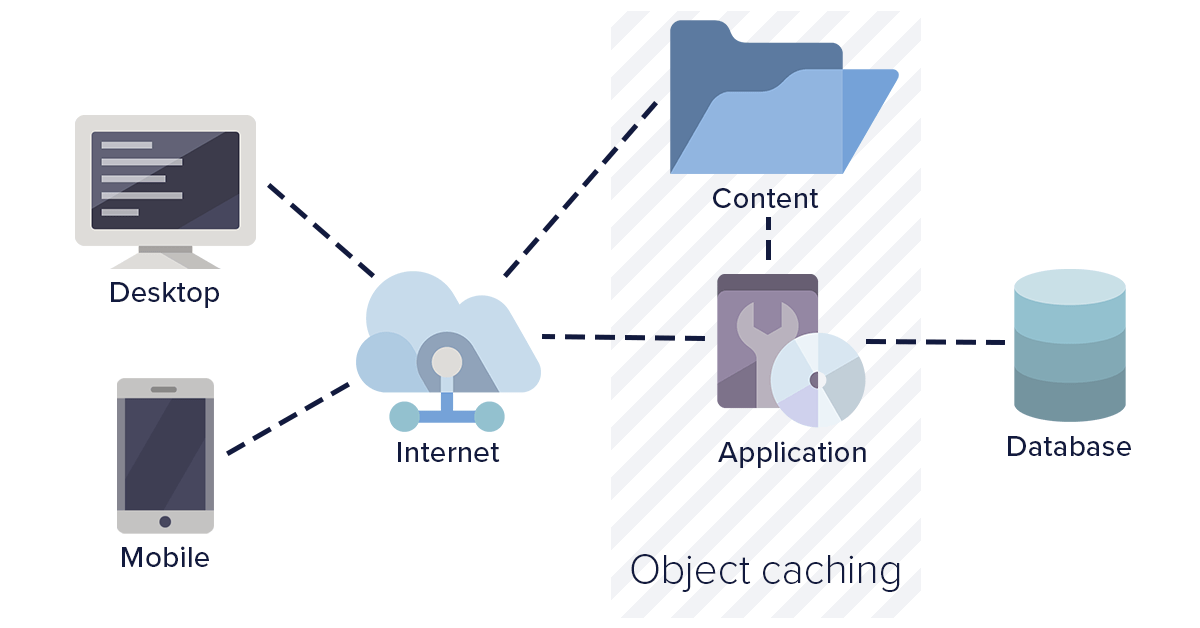
  • Common cache for all users ensures consistent content delivery
  • Cache expiry is controlled by the server
  • Optimizes database calls
Drawbacks:
  • Occupies server disk space
  • Requires shared disk or cache duplication for load-balanced servers

3. Network level caching

Network level caching is where your intermediate HTTP web server and routers are configured to cache API calls and resources. This type of caching works strictly based on URL. The network layer can be configured to use or ignore query parameters as needed. Network layer caching improves overall performance by completely avoiding calls for a response. In regional setups, users hit a network layer closer to their location, improving response time considerably. Network caching diagram Benefits:
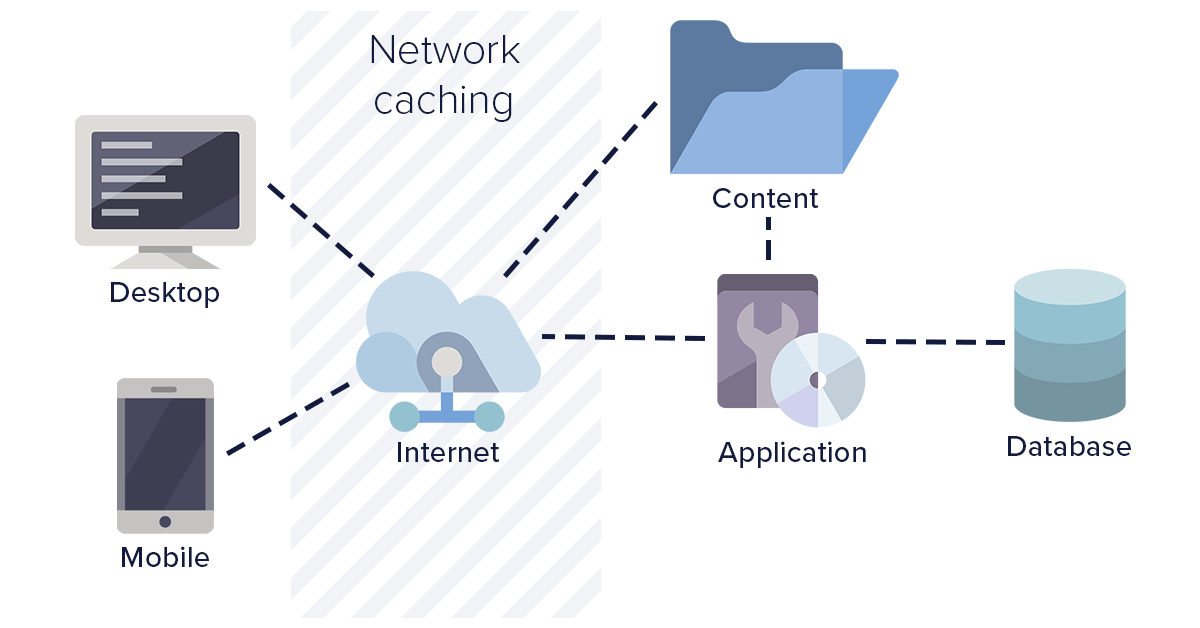
  • Common cache irrespective of servers
  • Reduced hits on application servers
  • Faster response times in regional setups
Drawbacks:
  • Requires durable network layer with sufficient disk space
  • Increased traffic and bandwidth at network layers

4. Third-party caching (CDN)

This is the best caching method in use today. Third-party caching involves routing resource-intensive calls through third-party cache providers. These providers handle, manage, and clean the cache as needed. With third-party caching, you can ensure that the same cache is served around the world irrespective of country or region. They also improve website performance by cascading data to locations closer to the user. Benefits:
  • Complete cache responsibility handled by the third party
  • Full control over cache with global replication
  • Reduces hits on web application servers
  • Faster performance due to high-speed caching servers
ButterCMS uses this approach - content is delivered through a global CDN with 150+ edge locations, providing sub-100ms response times for cached content worldwide.

Caching for ButterCMS content

ButterCMS handles CDN-level caching automatically — see CDN & Global Delivery for how edge caching and cache invalidation work. The strategies below focus on application-level caching you implement in your own stack.

Implementing application-level caching

While ButterCMS handles CDN caching automatically, implementing application-level caching provides additional benefits:

Node.js with node-cache

import NodeCache from 'node-cache';
import Butter from 'buttercms';

const cache = new NodeCache({
  stdTTL: 300,      // 5 minutes default TTL
  checkperiod: 60    // Check for expired keys every 60 seconds
});

const butter = Butter(process.env.BUTTER_API_TOKEN);

async function getPage(slug) {
  const cacheKey = `page-${slug}`;

  // Check cache first
  let page = cache.get(cacheKey);

  if (page === undefined) {
    // Cache miss - fetch from API
    const response = await butter.page.retrieve('*', slug, { levels: 2 });
    page = response.data.data;

    // Store in cache
    cache.set(cacheKey, page);
  }

  return page;
}

// Invalidate cache when content updates (webhook handler)
function invalidatePageCache(slug) {
  cache.del(`page-${slug}`);
}

Next.js with ISR (incremental static regeneration)

// pages/blog/[slug].js
export async function getStaticProps({ params }) {
  const butter = Butter(process.env.BUTTER_API_TOKEN);

  try {
    const response = await butter.post.retrieve(params.slug);
    return {
      props: { post: response.data.data },
      // Revalidate every 60 seconds
      revalidate: 60
    };
  } catch (error) {
    return { notFound: true };
  }
}

export async function getStaticPaths() {
  const butter = Butter(process.env.BUTTER_API_TOKEN);
  const response = await butter.post.list({ page_size: 100 });

  const paths = response.data.data.map(post => ({
    params: { slug: post.slug }
  }));

  return {
    paths,
    fallback: 'blocking' // Generate new pages on-demand
  };
}

Redis caching (production scale)

import Redis from 'ioredis';
import Butter from 'buttercms';

const redis = new Redis(process.env.REDIS_URL);
const butter = Butter(process.env.BUTTER_API_TOKEN);

async function getCachedPage(slug) {
  const cacheKey = `buttercms:page:${slug}`;

  // Try cache first
  const cached = await redis.get(cacheKey);
  if (cached) {
    return JSON.parse(cached);
  }

  // Fetch from ButterCMS
  const response = await butter.page.retrieve('*', slug, { levels: 2 });
  const page = response.data.data;

  // Cache for 5 minutes
  await redis.setex(cacheKey, 300, JSON.stringify(page));

  return page;
}

// Webhook handler for cache invalidation
async function handleWebhook(payload) {
  const { slug, page_type } = payload;

  // Invalidate specific page
  await redis.del(`buttercms:page:${slug}`);

  // Optionally invalidate related list caches
  await redis.del(`buttercms:list:${page_type}`);
}

SWR (React) for client-side caching

import useSWR from 'swr';

const fetcher = (url) => fetch(url).then(res => res.json());

function BlogPost({ slug }) {
  const { data, error, isLoading } = useSWR(
    `/api/posts/${slug}`,
    fetcher,
    {
      revalidateOnFocus: false,
      revalidateOnReconnect: false,
      dedupingInterval: 60000,  // Dedupe requests within 60s
      refreshInterval: 0        // Don't auto-refresh
    }
  );

  if (isLoading) return <div>Loading...</div>;
  if (error) return <div>Error loading post</div>;

  return (
    <article>
      <h1>{data.title}</h1>
      <div dangerouslySetInnerHTML={{ __html: data.body }} />
    </article>
  );
}

Cache expiry best practices

Cache expiry is the time before which the cache is considered valid. When analyzing different caching strategies, ensure there is an option for configuring custom cache expiry.
Content TypeRecommended TTLReason
Static pages (About, Contact)24 hoursRarely changes
Blog post listings5-15 minutesBalances freshness with performance
Individual blog posts1-24 hoursContent stable once published
Navigation/menus1-6 hoursStructure changes infrequently
Homepage5-30 minutesOften includes dynamic elements
Product pages15-60 minutesMay have inventory/pricing updates

Cache invalidation strategies

Use ButterCMS webhooks to invalidate cache when content changes:
// Webhook endpoint handler
app.post('/api/webhooks/buttercms', async (req, res) => {
  const { webhook_type, data } = req.body;

  switch (webhook_type) {
    case 'page.published':
    case 'page.updated':
      await invalidatePageCache(data.slug);
      break;
    case 'post.published':
    case 'post.updated':
      await invalidatePostCache(data.slug);
      await invalidateListCache('posts');
      break;
  }

  res.status(200).json({ received: true });
});
Set appropriate TTL values based on content volatility:
const TTL_CONFIG = {
  page: 3600,        // 1 hour
  post: 1800,        // 30 minutes
  collection: 3600,  // 1 hour
  list: 300          // 5 minutes
};
Serve stale content while fetching fresh data in background:
// SWR configuration
const { data } = useSWR(key, fetcher, {
  revalidateOnFocus: true,
  refreshInterval: 60000,  // Refresh every minute in background
  fallbackData: staleData
});

Avoiding common caching mistakes

Extreme Caching Pitfalls: Caching every file with high expiration times can result in improper web application performance. Stale JavaScript, CSS, or API data could cause unexpected behavior. Carefully cache resources and refresh the cache when updates are made.

What to cache vs. not cache

Should CacheShould Not Cache
Published page contentPreview/draft content
Static assets (images, CSS)User-specific data
Navigation menusShopping cart data
Blog post listingsAuthentication tokens
Collection reference dataReal-time notifications