
Monitoring webhook health

Key metrics to track

Monitor these metrics to ensure your webhook integration is healthy:
MetricDescriptionAlert Threshold
Success RatePercentage of webhooks returning 2xx< 95%
LatencyTime from receipt to response> 5 seconds
Error RatePercentage of 4xx/5xx responses> 5%
Timeout RatePercentage timing out (>30s)> 1%
Queue DepthPending webhooks in processing queueGrowing consistently

Setting up monitoring

Application-level monitoring

const promClient = require('prom-client');

// Create metrics
const webhookCounter = new promClient.Counter({
  name: 'webhook_requests_total',
  help: 'Total number of webhook requests',
  labelNames: ['event', 'status']
});

const webhookLatency = new promClient.Histogram({
  name: 'webhook_processing_seconds',
  help: 'Webhook processing time',
  labelNames: ['event'],
  buckets: [0.1, 0.5, 1, 2, 5, 10, 30]
});

// Middleware to track webhooks
app.post('/webhooks/buttercms', async (req, res) => {
  const startTime = Date.now();
  const { webhook } = req.body;

  try {
    await processWebhook(req.body);

    // Record success
    webhookCounter.inc({ event: webhook.event, status: 'success' });

    res.status(200).json({ received: true });
  } catch (error) {
    // Record failure
    webhookCounter.inc({ event: webhook.event, status: 'error' });

    res.status(500).json({ error: error.message });
  } finally {
    // Record latency
    const duration = (Date.now() - startTime) / 1000;
    webhookLatency.observe({ event: webhook.event }, duration);
  }
});

// Expose metrics endpoint for Prometheus
app.get('/metrics', async (req, res) => {
  res.set('Content-Type', promClient.register.contentType);
  res.end(await promClient.register.metrics());
});

Logging best practices

Structured logging

Use structured logging to make webhook events searchable and analyzable:
const winston = require('winston');

const logger = winston.createLogger({
  level: 'info',
  format: winston.format.combine(
    winston.format.timestamp(),
    winston.format.json()
  ),
  transports: [
    new winston.transports.File({ filename: 'webhooks.log' }),
    new winston.transports.Console()
  ]
});

app.post('/webhooks/buttercms', async (req, res) => {
  const { data, webhook } = req.body;
  const requestId = req.headers['x-request-id'] || crypto.randomUUID();

  // Log incoming webhook
  logger.info('Webhook received', {
    requestId,
    event: webhook.event,
    contentId: data.id,
    contentType: data.page_type || 'post',
    locale: data.locale,
    editor: data.editor,
    timestamp: data.timestamp
  });

  try {
    const result = await processWebhook(req.body);

    logger.info('Webhook processed', {
      requestId,
      event: webhook.event,
      contentId: data.id,
      result,
      processingTime: Date.now() - startTime
    });

    res.status(200).json({ received: true });
  } catch (error) {
    logger.error('Webhook processing failed', {
      requestId,
      event: webhook.event,
      contentId: data.id,
      error: error.message,
      stack: error.stack
    });

    res.status(500).json({ error: 'Processing failed' });
  }
});

Log aggregation

Send logs to a centralized logging service for analysis:
// Datadog example
const { createLogger, format, transports } = require('winston');
const DatadogWinston = require('datadog-winston');

const logger = createLogger({
  transports: [
    new DatadogWinston({
      apiKey: process.env.DATADOG_API_KEY,
      hostname: 'webhook-server',
      service: 'buttercms-webhooks',
      ddsource: 'nodejs',
      ddtags: `env:${process.env.NODE_ENV}`
    })
  ]
});

Debugging webhook issues

Common issues and solutions

Symptoms: No requests arriving at your endpointDebugging steps:
  1. Verify the webhook is enabled in ButterCMS settings
  2. Check the endpoint URL is correct and publicly accessible
  3. Test the endpoint with curl: curl -X POST https://your-endpoint.com/webhooks/buttercms
  4. Check firewall rules and security groups
  5. For local development, ensure ngrok/tunnel is running
Solution: Usually a configuration or network issue. Verify URL accessibility from outside your network.
Symptoms: ButterCMS indicates delivery failureDebugging steps:
  1. Check server logs for incoming requests
  2. Verify your endpoint returns 2xx status codes
  3. Ensure response time is under 30 seconds
  4. Check for SSL certificate issues
Solution: Review server logs to identify the specific error. Common causes: slow processing, exceptions, SSL issues.
Symptoms: Request received but actions not happeningDebugging steps:
  1. Log the full webhook payload
  2. Verify payload structure matches expectations
  3. Check event type handling in your switch/if statements
  4. Verify downstream services (cache, database) are accessible
Solution: Add detailed logging at each processing step to identify where the failure occurs.
Symptoms: Same webhook processed multiple timesDebugging steps:
  1. Check if your endpoint is responding too slowly (causing retries)
  2. Look for timeout errors in logs
  3. Verify idempotency implementation
Solution: Implement idempotency using event IDs or timestamps. Speed up response time.
Symptoms: Webhook processes but content remains staleDebugging steps:
  1. Verify cache invalidation is actually running
  2. Check CDN cache headers and TTLs
  3. Confirm the correct cache keys are being cleared
  4. Test by manually clearing cache
Solution: Add logging to cache invalidation. Verify CDN is receiving purge requests.

Debug mode

Enable debug mode during development to see full payload details:
const DEBUG = process.env.DEBUG_WEBHOOKS === 'true';

app.post('/webhooks/buttercms', async (req, res) => {
  if (DEBUG) {
    console.log('=== Webhook Debug ===');
    console.log('Headers:', JSON.stringify(req.headers, null, 2));
    console.log('Body:', JSON.stringify(req.body, null, 2));
    console.log('====================');
  }

  // ... rest of handler
});

Testing webhooks locally

Using ngrok

Expose your local server to receive webhooks during development:
# Install ngrok
npm install -g ngrok

# Start your local server
node server.js  # Running on port 3000

# In another terminal, create tunnel
ngrok http 3000
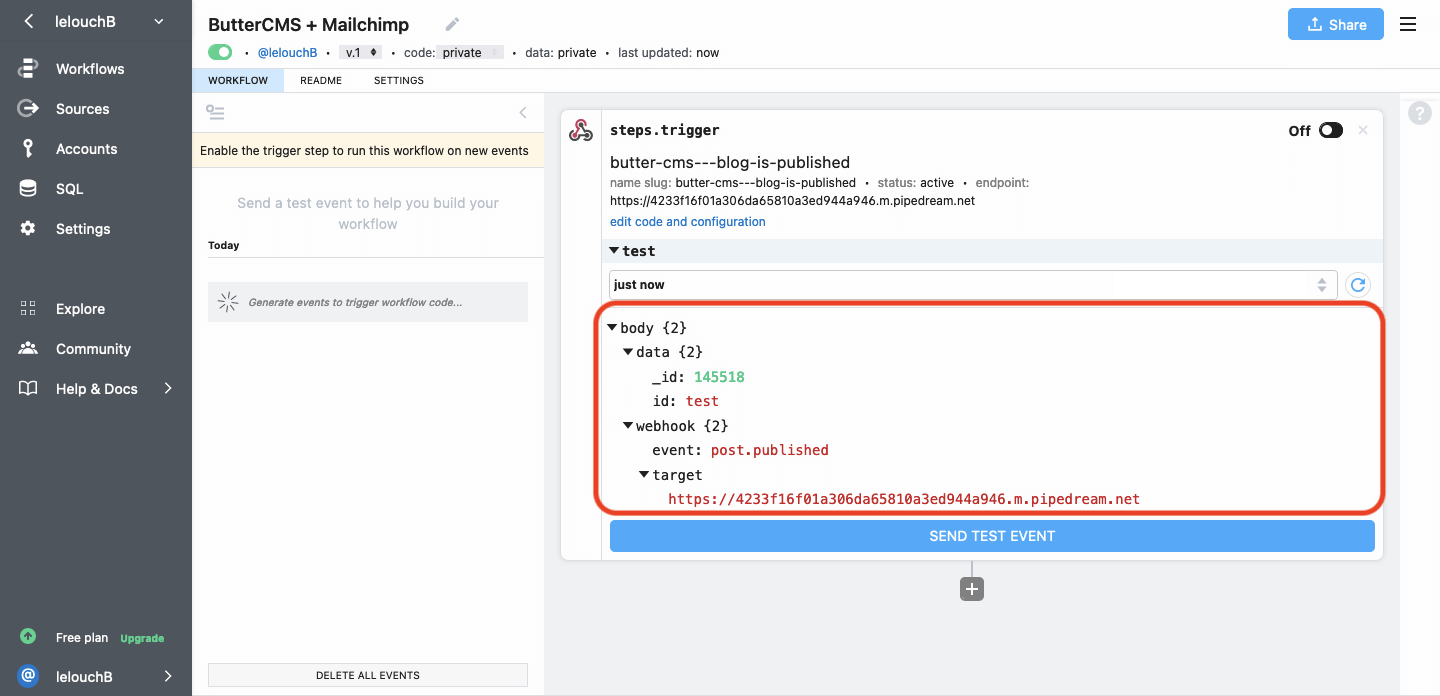
ngrok provides a public URL like https://abc123.ngrok.io that forwards to your local server. Pipedream dashboard showing webhook request
Using webhook testing services

For quick testing without setting up your own endpoint: Webhook.site
# Get a free test URL from https://webhook.site
# Configure this URL in ButterCMS webhook settings
# View incoming requests in real-time on the dashboard
RequestBin
# Create a bin at https://requestbin.com
# Use the provided URL as your webhook endpoint
# Inspect incoming requests

Simulating webhooks

Test your handler with simulated webhook payloads:
// test/webhook.test.js
const request = require('supertest');
const app = require('../app');

describe('Webhook Handler', () => {
  it('should process page.published event', async () => {
    const payload = {
      data: {
        id: 'test-page',
        buttercms_id: 1234,
        page_type: 'landing',
        editor: 'Test User',
        name: 'Test Page',
        timestamp: new Date().toISOString(),
        locale: null,
        status: 'published',
        updated: new Date().toISOString(),
        published: new Date().toISOString(),
        scheduled: null
      },
      webhook: {
        event: 'page.published',
        target: 'https://example.com/webhooks'
      }
    };

    const response = await request(app)
      .post('/webhooks/buttercms')
      .set('X-Webhook-Secret', process.env.WEBHOOK_SECRET)
      .send(payload);

    expect(response.status).toBe(200);
    expect(response.body.received).toBe(true);
  });

  it('should reject unauthorized requests', async () => {
    const response = await request(app)
      .post('/webhooks/buttercms')
      .set('X-Webhook-Secret', 'wrong-secret')
      .send({});

    expect(response.status).toBe(401);
  });
});

Alerting

Setting up alerts

Configure alerts to notify you of webhook issues:

PagerDuty Integration

const axios = require('axios');

async function sendPagerDutyAlert(summary, details) {
  await axios.post('https://events.pagerduty.com/v2/enqueue', {
    routing_key: process.env.PAGERDUTY_ROUTING_KEY,
    event_action: 'trigger',
    payload: {
      summary,
      severity: 'error',
      source: 'webhook-server',
      custom_details: details
    }
  });
}

// Alert on high error rate
if (errorRate > 0.05) {
  await sendPagerDutyAlert(
    'High webhook error rate detected',
    { errorRate, timeWindow: '5 minutes' }
  );
}

Slack Notifications

async function sendSlackAlert(message, details) {
  await axios.post(process.env.SLACK_WEBHOOK_URL, {
    text: message,
    attachments: [{
      color: 'danger',
      fields: Object.entries(details).map(([key, value]) => ({
        title: key,
        value: String(value),
        short: true
      }))
    }]
  });
}

Alert conditions

Set up alerts for these conditions:
ConditionSeverityAction
Error rate > 5%WarningInvestigate within 1 hour
Error rate > 20%CriticalImmediate investigation
Endpoint down > 5 minCriticalImmediate response
Processing time > 20sWarningOptimize handler
Queue depth increasingWarningScale processing

Dashboard examples

Grafana dashboard

Create a dashboard to visualize webhook health:
{
  "panels": [
    {
      "title": "Webhook Success Rate",
      "type": "gauge",
      "targets": [{
        "expr": "sum(rate(webhook_requests_total{status='success'}[5m])) / sum(rate(webhook_requests_total[5m])) * 100"
      }]
    },
    {
      "title": "Webhook Latency",
      "type": "graph",
      "targets": [{
        "expr": "histogram_quantile(0.95, rate(webhook_processing_seconds_bucket[5m]))"
      }]
    },
    {
      "title": "Events by Type",
      "type": "piechart",
      "targets": [{
        "expr": "sum by (event) (increase(webhook_requests_total[24h]))"
      }]
    }
  ]
}

Key dashboard panels

  1. Real-time success rate - Shows current webhook health
  2. Latency percentiles - P50, P95, P99 processing times
  3. Events by type - Distribution of webhook events
  4. Error breakdown - Categorized errors for debugging
  5. Processing queue depth - For async processing systems

Troubleshooting checklist

Use this checklist when debugging webhook issues:

Pre-flight checks

  • Webhook enabled in ButterCMS settings
  • Correct endpoint URL configured
  • Correct event types selected
  • Endpoint is publicly accessible
  • SSL certificate is valid (for HTTPS)

Endpoint checks

  • Server is running and healthy
  • Endpoint accepts POST requests
  • Endpoint returns 2xx status codes
  • Response time is under 30 seconds
  • Authentication is correctly configured

Processing checks

  • Payload is being parsed correctly
  • Event type is being handled
  • Downstream services are accessible
  • No exceptions being thrown
  • Idempotency is implemented

Infrastructure checks

  • Firewall allows inbound traffic
  • Load balancer is routing correctly
  • DNS is resolving correctly
  • No rate limiting blocking requests
  • Sufficient server resources