
SEO & Social Components

SEO is must-have for any content, so creating a reusable SEO component is one of the first things you should do when setting up your ButterCMS project. This component can be reused across all your Page Types for consistent search optimization.

Why create SEO Components?

Consistency

Same SEO fields across all Page Types

Completeness

Ensure no SEO field is forgotten

Efficiency

Update SEO schema once, apply everywhere

Best Practices

Built-in validation for SEO guidelines

Building an SEO Component

An SEO component can be quite simple: SEO component schema Our fields will be:
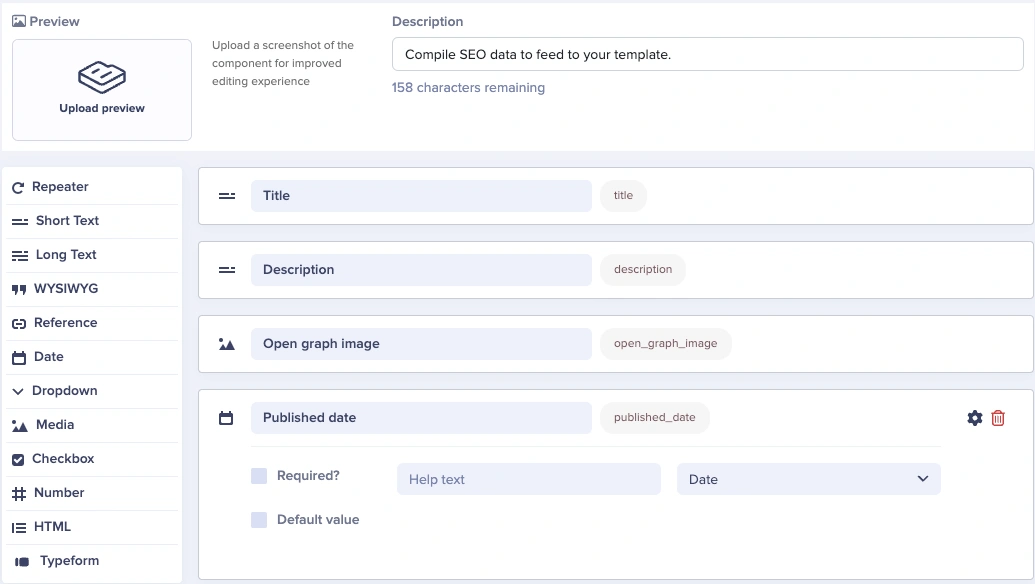
  • A Short Text field for our meta title
  • A Short Text field for our meta description
    • You can set a max of 150-160 characters for SEO best practices by clicking on the Gear (⚙️) icon
  • A Media field for our open graph image when sharing the blog post via social media and messaging platforms
  • A Date field to set our original published date for SEO and JSON-LD

Essential SEO fields

Core meta tags

Field NameField TypeValidationPurpose
Meta TitleShort TextMax 60 charsBrowser tab and search results
Meta DescriptionShort TextMax 160 charsSearch result snippet
Canonical URLShort TextURL patternPrevent duplicate content
RobotsDropdownindex/noindex, follow/nofollowSearch engine directives

Open Graph tags (social sharing)

Field NameField TypeValidationPurpose
OG TitleShort TextMax 60 charsSocial share headline
OG DescriptionShort TextMax 200 charsSocial share summary
OG ImageMedia1200x630px recommendedSocial share image
OG TypeDropdownwebsite, article, productContent type

Twitter card tags

Field NameField TypeOptionsPurpose
Twitter Card TypeDropdownsummary, summary_large_imageCard display format
Twitter TitleShort TextMax 70 charsTweet headline
Twitter DescriptionShort TextMax 200 charsTweet summary
Twitter ImageMedia1200x600px for largeTweet image

Complete SEO Component schema

Here’s a comprehensive SEO component that covers all essential metadata:
SEO & Social Component
├── Core SEO
│   ├── meta_title (Short Text, max 60, required)
│   ├── meta_description (Short Text, max 160, required)
│   ├── canonical_url (Short Text, optional)
│   ├── robots (Dropdown: index/follow, index/nofollow, noindex/follow, noindex/nofollow)
│   └── published_date (Date)

├── Open Graph
│   ├── og_title (Short Text, max 60, defaults to meta_title)
│   ├── og_description (Short Text, max 200, defaults to meta_description)
│   ├── og_image (Media, required)
│   └── og_type (Dropdown: website, article, product, profile)

├── Twitter
│   ├── twitter_card (Dropdown: summary, summary_large_image)
│   ├── twitter_title (Short Text, defaults to og_title)
│   ├── twitter_description (Short Text, defaults to og_description)
│   └── twitter_image (Media, defaults to og_image)

└── Advanced (Optional)
    ├── keywords (Short Text, comma-separated)
    ├── author (Reference → Authors Collection)
    └── schema_type (Dropdown: Article, BlogPosting, Product, WebPage)

Rendering SEO tags

Using React Helmet to generate the head HTML tags:
<Helmet
    htmlAttributes={{
      lang
    }}
    title={title}
    titleTemplate={`%s | ${site.siteMetadata.title}`}
    meta={[
      {
        name: `description`,
        content: metaDescription
      },
      {
        property: `og:title`,
        content: title
      },
      {
        property: `og:description`,
        content: metaDescription
      },
      {
        property: `og:type`,
        content: `website`
      },
      {
        name: `twitter:card`,
        content: `summary`
      },
      {
        name: `twitter:creator`,
        content: site.siteMetadata.author
      },
      {
        name: `twitter:title`,
        content: title
      },
      {
        name: `twitter:description`,
        content: metaDescription
      }
    ].concat(meta)}
  />

Next.js example

// components/seo.js
import Head from 'next/head'

function SEO({ seo }) {
  return (
    <Head>
      <title>{seo.meta_title}</title>
      <meta name='description' content={seo.meta_description} />

      {/* Open Graph */}
      <meta property='og:type' content={seo.og_type || 'website'} />
      <meta property='og:title' content={seo.og_title || seo.meta_title} />
      <meta property='og:description' content={seo.og_description || seo.meta_description} />
      <meta property='og:image' content={seo.og_image} />

      {/* Twitter */}
      <meta name='twitter:card' content={seo.twitter_card || 'summary_large_image'} />
      <meta name='twitter:title' content={seo.twitter_title || seo.meta_title} />
      <meta name='twitter:description' content={seo.twitter_description || seo.meta_description} />
      <meta name='twitter:image' content={seo.twitter_image || seo.og_image} />

      {/* Canonical */}
      {seo.canonical_url && <link rel='canonical' href={seo.canonical_url} />}
    </Head>
  )
}

export default SEO

Social sharing preview Component

For pages where social sharing is critical, create a dedicated social preview Component:
Social Preview Component
├── facebook_title (Short Text, max 60)
├── facebook_description (Short Text, max 200)
├── facebook_image (Media, 1200x630px)
├── twitter_title (Short Text, max 70)
├── twitter_description (Short Text, max 200)
├── twitter_image (Media, 1200x600px)
├── twitter_handle (Short Text, e.g., @yourbrand)
├── linkedin_title (Short Text)
├── linkedin_description (Short Text, max 256)
└── pinterest_description (Short Text, max 500)
This allows content editors to customize messaging per platform while maintaining SEO as a separate concern.

Image requirements

Open Graph (Facebook, LinkedIn)

SpecificationRecommendation
Dimensions1200 x 630 pixels
Aspect Ratio1.91:1
File SizeUnder 8MB
FormatPNG, JPEG
TextKeep important content centered

Twitter cards

Card TypeImage Dimensions
Summary144 x 144 pixels (min), 4096 x 4096 (max)
Summary Large Image300 x 157 pixels (min), 4096 x 4096 (max)
Recommended1200 x 600 pixels for best display

Pinterest

SpecificationRecommendation
Dimensions1000 x 1500 pixels
Aspect Ratio2:3
FormatPNG, JPEG

Structured data Component

For enhanced search results, create a structured data Component:
Structured Data Component
├── schema_type (Dropdown: Article, BlogPosting, Product, FAQPage, etc.)
├── headline (Short Text)
├── author_name (Short Text)
├── author_url (Short Text)
├── date_published (Date)
├── date_modified (Date)
├── publisher_name (Short Text)
├── publisher_logo (Media)
└── main_image (Media)

Rendering JSON-LD

function StructuredData({ data }) {
  const jsonLd = {
    "@context": "https://schema.org",
    "@type": data.schema_type,
    "headline": data.headline,
    "author": {
      "@type": "Person",
      "name": data.author_name,
      "url": data.author_url
    },
    "datePublished": data.date_published,
    "dateModified": data.date_modified,
    "publisher": {
      "@type": "Organization",
      "name": data.publisher_name,
      "logo": {
        "@type": "ImageObject",
        "url": data.publisher_logo
      }
    },
    "image": data.main_image
  };

  return (
    <script
      type="application/ld+json"
      dangerouslySetInnerHTML={{ __html: JSON.stringify(jsonLd) }}
    />
  );
}

Best practices

Set meta title, meta description, and OG image as required fields to ensure content is never published without essential SEO metadata.
Configure max character limits based on platform guidelines: 60 for titles, 160 for descriptions.
Set default robots to “index, follow” and default OG type to “website” so editors don’t need to set them for standard pages.
Include guidance in field help text, like “Keep under 60 characters for best display in search results.”
In your frontend, let Twitter fields fall back to OG fields, and OG fields fall back to meta fields when empty.
Use help text to remind editors of recommended image dimensions for each platform.

SEO Component variations

Consider creating specialized SEO Components for different content types:

Article SEO Component

Enhanced for blog posts and articles:
  • Article-specific schema type
  • Author reference
  • Reading time
  • Article section/category
  • Publication and modification dates

Product SEO Component

Enhanced for e-commerce:
  • Product schema type
  • Price
  • Availability
  • Brand
  • SKU
  • Reviews/ratings

Event SEO Component

Enhanced for events:
  • Event schema type
  • Start/end dates
  • Location
  • Performer/organizer
  • Ticket availability

Testing your SEO setup

After implementing your SEO Components, validate them with these tools:
ToolPurposeURL
Facebook Sharing DebuggerTest Open Graph tagsdevelopers.facebook.com/tools/debug
Twitter Card ValidatorTest Twitter cardscards-dev.twitter.com/validator
LinkedIn Post InspectorTest LinkedIn previewslinkedin.com/post-inspector
Google Rich Results TestTest structured datasearch.google.com/test/rich-results
Schema.org ValidatorValidate JSON-LDvalidator.schema.org